 PE Collective
Windsurf Pricing: Free Plan, Pro, Teams, Enterprise
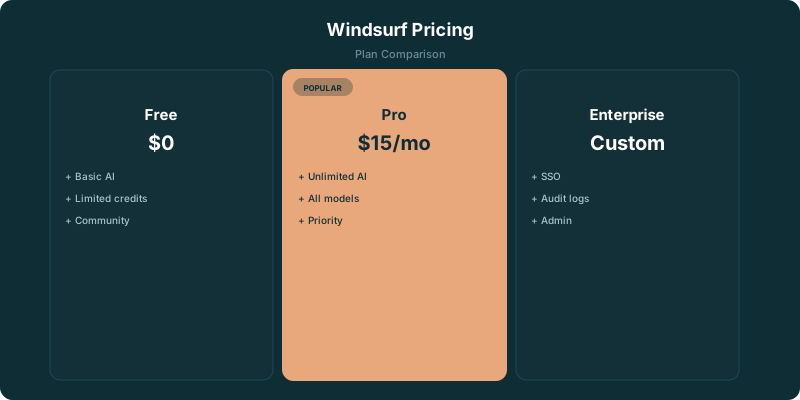
Windsurf pricing starts with a free plan. The catch is credits: the free tier is enough to test the product on real work, but regular use can turn every Chat, Cascade, and Command into a choice about what to spend next. The free plan includes 25 credits per month. Pro at $15/mo adds unlimited completions and includes 500 credits per month. That makes the decision fairly clean. Use Free if you want to learn whether Windsurf fits your workflow. Pay for Pro when credit limits start changing how you use the tool.
TLDR
Windsurf has a free plan with 25 credits per month. Pro costs $15/mo, adds unlimited completions, and includes 500 credits per month. Free is useful for trying the workflow; Pro makes more sense when you want to use Chat, Cascade, and Commands without rationing requests.
Is Windsurf Free
Yes. Windsurf has a free plan.
The free plan includes 25 credits per month, plus 1 App Deploy per day. You can use it without deciding up front that Windsurf will become part of your daily development setup.
That matters because coding tools are easy to like in a demo and harder to live with during a messy week of actual work. A free account lets you see how Windsurf handles your codebase, whether its editing workflow feels natural, and whether you trust it enough to hand it a meaningful task.
The limit shows up once you begin relying on the AI features rather than treating them as a novelty. Chat, Cascade, and Commands consume credits. A quick targeted request may feel cheap. A longer conversation, a wider edit, or a task that needs more context can use more of the monthly allocation.
Tab completions are free on all plans. That gives the free tier more staying power than a simple credit count suggests. You can keep using autocomplete while saving credits for the moments when you want help thinking through a bug, changing several files, or turning a rough instruction into an edit.
Unused credits do not roll over. Your allocation resets each billing cycle, so there is little reason to hoard them for a future month. Try the work that would make you consider paying. If the free plan runs out before you reach a useful conclusion, that tells you something too.
For a broader look at the product beyond billing, read our Windsurf review.
Free
- ✓ 25 credits per month
- ✓ Unlimited Fast Tab completions
- ✓ Access to AI Chat and Commands
- ✓ 1 App Deploy per day
- ✓ Good for trying Windsurf
Pro
- ✓ 500 credits per month
- ✓ Unlimited Tab, Command, and App Previews
- ✓ Access to Claude Sonnet 4.6, GPT-4.1, Gemini
- ✓ Cascade multi-file editing
- ✓ $5/mo cheaper than Cursor Pro
Teams
- ✓ 500 credits per user per month
- ✓ All Pro features for each user
- ✓ Centralized admin and billing
- ✓ Team management controls
- ✓ SSO and user provisioning
Enterprise
- ✓ Custom credit allocation
- ✓ Zero Data Retention (ZDR) by default
- ✓ Advanced security and compliance
- ✓ Dedicated support
- ✓ Custom deployment options
Windsurf Plans Compared
Windsurf’s plans separate individual experimentation from regular individual use, then move into shared team access and stricter company controls.
The Free plan is for evaluation and occasional AI help. It has enough room to establish whether Windsurf’s interface and editing style work for you. It is a poor fit if you expect the tool to sit beside you through most of the day.
Pro is the default paid option for an individual developer. It combines a larger monthly credit pool with unlimited completions, which removes one source of friction even when you are conserving credits for larger requests.
Teams costs $30/user with 500 credits per user per month. The important part is that the allocation is per user. A team should decide whether each developer has enough room for the way they work, rather than assuming a shared plan will smooth out uneven use.
Enterprise costs $60/user with custom credit allocation and Zero Data Retention by default. That plan is about procurement and data handling as much as usage volume. A company that needs controls around where code and prompts go will evaluate it differently from an individual developer comparing autocomplete tools.
Price alone is not the whole comparison. The more useful question is how often you ask the model to do work that requires credits.
How Windsurf Credits Work
Windsurf uses a credit-based pricing model. Every AI interaction costs credits, while Tab completions are free on all plans.
Credits are consumed by Chat, Cascade, and Commands. The exact cost depends on the model handling the request and how much context or work the request needs. That means there is no honest universal answer to how long a monthly allocation lasts. One developer may spend credits on small questions and focused edits. Another may use Cascade for wider changes across a repository.
The credit system makes behavior visible. You are not paying for a vague promise of AI coding help. You get a stated allocation, use it for the features that need it, and decide whether the result is worth paying for.
This can feel restrictive if you are accustomed to a flat subscription. It can also be useful. Developers who mostly want inline completions have a lower reason to pay for a large credit pool because completions are free. Developers who use an agent for planning, debugging, and multi-file work will care much more about the credits attached to the plan.
The allocation resets each billing cycle. Unused credits do not roll over. Treat the free plan as an evaluation budget, not a savings account.
Windsurf's built-in SWE-1 model costs a fixed number of credits per interaction. Third-party models like Claude Sonnet 4.6 or GPT-4.1 cost credits proportional to the tokens they process.
How Far 25 Free Credits Go
The free plan includes 25 credits per month. That is enough to test Windsurf with work you already have, which is the only test that counts.
Start with a task where the answer has a clear standard. Ask Windsurf to explain a confusing part of a codebase. Use it to make a contained edit. Give Cascade a problem with a result you can inspect in a diff. The point is to learn whether it gives you useful output, not to see whether it can produce an impressive-looking response.
Avoid spending the free allocation on toy prompts. They make every coding assistant look competent. A real bug, a refactor you have been delaying, or an unfamiliar section of a repository will show where the product helps and where it creates cleanup work.
The free plan also includes 1 App Deploy per day. That is useful for someone testing the path from an AI-assisted change to a deployed result. It will not replace a production workflow, but it gives you a chance to see whether Windsurf’s product surface fits how you ship.
What runs out first depends on your habits. If you mainly use Tab, credits may not be the constraint at all because Tab completions are free. If you rely on Chat, Cascade, and Commands to carry a larger share of the work, the allocation will become the constraint quickly.
That is why Free works best as a fit test. You are testing the workflow, not trying to extract maximum value from a limited pool.
When Pro Pays for Itself
Pro at $15/mo adds unlimited completions and includes 500 credits per month. It pays for itself when the free plan makes you postpone useful requests, shorten prompts to save credits, or avoid using Cascade on work where it could save time.
There is also a simpler buying signal: you know what you would use more of. If the free plan gives you useful answers but leaves you rationing Chat, Commands, or broader edits, Pro removes the test-drive ceiling.
Add-on credit packs cost $10 for 250 credits when you run out. That option makes sense when demand is irregular. Maybe you have a concentrated project, a migration, or a short period where you need more help than usual. It is less attractive when running out becomes a recurring part of the month.
A subscription should match your actual pattern of use. Buy credit packs for spikes. Choose Pro when the spikes have become your normal workweek.
Unlimited completions are part of the Pro package. For developers who value fast inline suggestions, that alone can make the paid plan feel less constrained even before they get deep into Chat or Cascade usage.
The wrong way to evaluate Pro is to ask whether you can force the free plan to last. You probably can, if you use Windsurf cautiously enough. The useful question is whether caution is making the product less valuable.
Windsurf vs Cursor: The Credit Difference
Windsurf and Cursor both use credit-based systems, but their billing language is different.
Windsurf uses fixed credit counts. The Free plan has a stated credit allocation. Pro has a larger stated allocation. When you use the AI features that consume credits, you are spending against that pool.
Cursor uses a dollar-denominated pool. Cursor’s comparable pool is $20 on Pro, $60 on Pro+, $200 on Ultra.
Neither approach automatically wins. A dollar pool can feel more familiar because it resembles a usage budget. Fixed credits can be easier to discuss inside a plan comparison because the allowance is stated directly. The practical issue is still the same: how much agentic work do you expect the tool to do for you?
If you are choosing between them, compare the work you want from the assistant rather than treating a plan name as a feature list. Do you want mostly free completions? Do you want frequent conversations about code? Do you expect wide edits across files? Do you need the tool to be predictable for a team?
Our Cursor vs Windsurf comparison goes deeper on the product differences. If you are comparing subscription costs across tools, see Cursor pricing.
Windsurf vs Cursor vs Copilot: Price and Feature Comparison
All three editors offer AI-powered coding with different pricing models and strengths.
Hidden Costs & Gotchas
- ⚠ Credits deplete at different rates depending on the AI model. Windsurf's SWE-1 model costs a fixed amount per interaction. Premium third-party models like Claude Sonnet 4.6 charge based on token volume, long conversations drain credits faster.
- ⚠ Add-on credits cost $10 for 250 credits if you exhaust your monthly allocation. That's $0.04 per credit, the same effective rate as the $15/500 Pro plan.
- ⚠ Tab completions are unlimited on all plans, but Cascade (multi-file editing) and Chat consume credits. Heavy Cascade use burns through 500 credits faster than you expect.
- ⚠ Enterprise at $60/user is 2x Teams and includes ZDR (Zero Data Retention) by default. If your organization doesn't need ZDR or advanced compliance, Teams at $30/user is sufficient.
- ⚠ 25 free credits per month is roughly 3-5 meaningful AI sessions. It's a trial, not a workflow.
Which Windsurf Plan Fits Your Work
Choose Free when you are evaluating Windsurf, use AI help occasionally, or care more about free completions than frequent agentic requests. The plan gives you a real chance to test the product without turning the decision into a billing commitment.
Choose Pro when Windsurf has become part of your normal development routine. The combination of unlimited completions and the larger credit allocation suits developers who use the tool for more than autocomplete.
Choose Teams when several developers need access under a common company plan. Teams costs $30/user with 500 credits per user per month, so the team should judge it against actual usage per developer rather than an imagined average.
Choose Enterprise when data retention and a custom credit allocation are part of the buying decision. Enterprise costs $60/user with custom credit allocation and Zero Data Retention by default.
For people deciding between several tools, the most useful move is to test one real task on the Free plan. You will learn more from a hard edit in your own codebase than from another feature grid.
Key Takeaways
- Windsurf’s free plan includes 25 credits per month and free Tab completions.
- Pro costs $15/mo and includes 500 credits per month, along with unlimited completions.
- Add-on credit packs cost $10 for 250 credits when usage spikes.
- Teams costs $30/user with 500 credits per user per month.
- Enterprise costs $60/user with custom credit allocation and Zero Data Retention by default.
The Bottom Line
Windsurf Pro at $15/month is the value play in AI code editors, $5 less than Cursor Pro and $5 more than Copilot Pro, with a solid feature set including Cascade for multi-file editing. The 500-credit monthly allocation covers typical daily coding. If you're evaluating AI code editors, Windsurf is worth testing alongside Cursor and Copilot. The free tier's 25 credits is just enough to form an opinion.
Related Resources
Frequently Asked Questions
Is Windsurf free?
Yes. Windsurf has a free plan with 25 credits per month, free Tab completions on all plans, and 1 App Deploy per day. It is enough to evaluate the tool on real work, but regular use of Chat, Cascade, and Commands will run through the allocation quickly.
How does Windsurf pricing compare to Cursor?
Windsurf Pro ($15/mo) is $5 cheaper than Cursor Pro ($20/mo). The billing models differ: Windsurf uses fixed credit counts (500 credits per month on Pro), while Cursor uses a dollar-denominated pool ($20 on Pro, $60 on Pro+, $200 on Ultra). Compare the agentic work you expect from the tool rather than the plan names.
What is Cascade in Windsurf?
Cascade is Windsurf's multi-file editing feature, similar to Cursor's Composer. It can read your codebase, understand context across files, and make coordinated edits. Cascade consumes credits on every plan: the free plan includes 25 credits per month and Pro includes 500 credits per month.
Does Windsurf support custom API keys?
Windsurf doesn't currently support bring-your-own API keys the way Cursor does. You use their allocated model access, which is included in the subscription price. This is simpler but less flexible if you have specific model preferences.
Is Windsurf Pro worth upgrading from the free tier?
If you're using Windsurf daily, yes. The free plan's 25 credits per month run out fast during active development. Pro at $15/mo adds unlimited completions and includes 500 credits per month, and add-on credit packs cost $10 for 250 credits when you run out.
Windsurf official pricing for 2026?
Current pricing: the free plan includes 25 credits per month and 1 App Deploy per day, with free Tab completions. Pro at $15/mo adds unlimited completions and includes 500 credits per month. Teams costs $30/user with 500 credits per user per month. Enterprise costs $60/user with custom credit allocation and Zero Data Retention by default. Add-on credit packs cost $10 for 250 credits when you run out.
Windsurf AI pricing for 2026: how does it compare?
Windsurf Pro at $15/mo is among the most aggressive in the AI coding editor category. Comparison: GitHub Copilot Pro at $10/mo, Cursor Pro at $20/mo, Cody Pro at $9/mo. The differentiator is Cascade (Windsurf's agent mode), more polished than Cursor Composer or Copilot Agent for multi-file editing. For pure code completion: GitHub Copilot is cheaper. For agent-heavy workflows: Windsurf Pro is the price-quality leader. For Claude-focused workflows: Cursor Pro at $20 includes higher Claude usage limits.
Has Windsurf pricing changed in 2026?
The current structure is Free with 25 credits per month, Pro at $15/mo with 500 credits and unlimited completions, Teams at $30/user with 500 credits per user per month, and Enterprise at $60/user with custom credit allocation and Zero Data Retention by default. Unused credits do not roll over, and add-on packs cost $10 for 250 credits when you run out.
Windsurf Pricing Update Tracker (2026)
Windsurf adjusts model access and adds features throughout the year. We track every update so this page stays the most current source. Last reviewed: September 2026.
- September 2026: Plan lineup confirmed as Free (25 credits per month), Pro at $15/mo with 500 credits, Teams at $30/user, and Enterprise at $60/user with Zero Data Retention by default.
- Q1 2026: Cascade workflow improvements landed across paid tiers.
- Q4 2025: Tier restructuring introduced the credit-based plan structure that has held into 2026.
- Q3 2025: Cascade agent mode launched as the differentiator vs Cursor Composer and GitHub Copilot Agent.