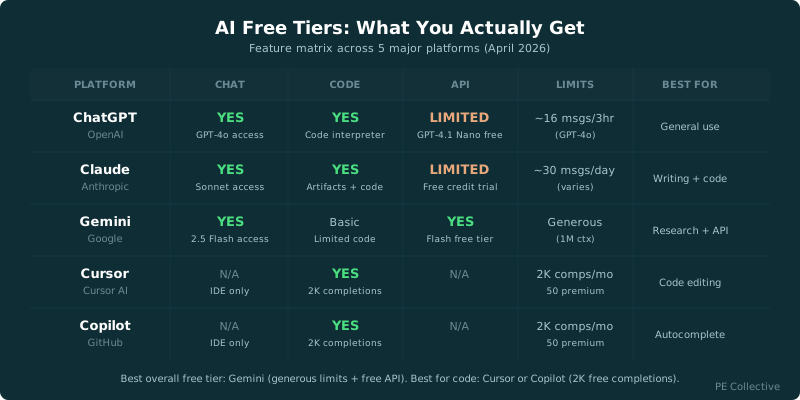
For the full Gemini free tier (rate limits, quotas, model access), see Gemini Free Tier Guide. For ChatGPT's free tier with GPT-4o access and limits, see ChatGPT Free Tier Guide. This page is the 11-tool comparison across all categories.
AI free tiers compared: OpenAI gives you a small, expiring credit balance, Gemini offers rate-limited API access, and Hugging Face provides rate-limited inference. Those are three very different starting points for a developer trying to build before paying.
“Free” means wildly different things across AI platforms. Some plans can carry a proof of concept through testing and early feedback. Others are a demo with a billing page waiting behind it.
The decision depends on whether a tool has a free tier. It’s whether that tier lets you finish the project you came to build.
TLDR
OpenAI’s starter credits expire, while Gemini and Hugging Face offer rate-limited access. Pinecone can support lightweight retrieval work, but several developer tools hit limits quickly. Pick the free tier that matches your prototype’s bottleneck: model calls, coding help, inference flexibility, or vector storage.
Master Free Tier Comparison Table
The strongest free tiers for builders are Gemini API access, Pinecone storage, and the tools that offer enough calls or completions to test a narrow workflow. OpenAI is useful for a short evaluation, but its credits have an expiration date. Hugging Face is useful when model choice matters more than guaranteed throughput.
| Tool | What's Free | Key Limits | First Paid Tier |
|---|---|---|---|
| Pinecone | Starter plan with 2 GB storage | Limited namespaces, 1 project, no hybrid search | Standard from $50/mo |
| Weaviate Cloud | 1 sandbox cluster | Limited collections, sandbox expires after 14 days idle, no production SLA | Standard from $25/mo |
| Replit | Basic editor and hosting | Limited AI features, no always-on, limited compute | Core from $20/mo |
| Windsurf | 50 completions/day, limited Chat | Daily completion cap, restricted model access, no priority queue | Pro from $15/mo |
| GitHub Models | Rate-limited model access | Low requests per minute, limited token throughput, playground only | Pay-as-you-go from $0 |
| GitHub Copilot | Free tier with 2,000 completions/mo | Monthly completion cap, limited chat messages, no CLI access | Pro from $10/mo |
| Cohere | 1,000 API calls/mo | Rate limited, no production use allowed, limited model selection | Production from $0 (pay-as-you-go) |
| Hugging Face | Free inference API (rate limited) | Shared GPU queue, timeout on large models, cold starts | Pro from $9/mo |
| OpenAI API | $5 free credits for new accounts | Credits expire after 3 months, rate limits on free tier, limited models | Pay-as-you-go (no minimum) |
| Anthropic API | No free tier | Pay-as-you-go only, $5 minimum credit purchase | Pay-as-you-go from $5 |
| Google AI Studio | Free Gemini API access | Rate limits (15 RPM on free tier), limited to specific models | Pay-as-you-go from $0 |
| Felo | Product access | Usage limits vary | n/a |
| CreateOS | Product access | Usage limits vary | n/a |
| Viggle | Product access | Usage limits vary | n/a |
A table can tell you where the walls are. It cannot tell you which wall matters first.
For a retrieval prototype, vector storage may decide the project. For an internal coding workflow, completions are the constraint. For an app that needs live model output, rate limits and credit expiry decide whether the free plan is a viable runway or a brief test drive.
The AI API free tiers guide is the better place to compare API-first products in more detail. If you are choosing between consumer-facing OpenAI access and developer API usage, the ChatGPT free tier guide separates those two decisions.
OpenAI API Free Tier: Credits, Expiry, and Limits
The OpenAI API free tier is easy to misunderstand because “free” sounds ongoing. It is an introductory credit balance for new accounts, not a permanent development plan.
The OpenAI API gives new accounts $5 free credits, and those credits expire after 3 months.
That makes OpenAI’s free access useful for a focused evaluation. Build a small workflow. Test prompts against representative inputs. Check latency, output quality, error handling, and the shape of your costs once the credit disappears.
It is a poor foundation for a prototype that needs months of casual iteration. Expiring credits create a deadline whether your project has reached a decision point or not. A builder can burn through them while experimenting with prompt formats, retries, structured outputs, and test data before anyone has seen the finished product.
The practical move is to treat the credits as a scoped technical trial. Decide what you need to learn before making the first call. A chatbot proof of concept might need a small set of realistic conversations. A document extraction workflow needs difficult documents, not a pile of easy samples. A coding assistant needs the messy repository where it will either help or waste everyone’s afternoon.
OpenAI wins when the evaluation is narrow and you already know what you are testing. It loses ground when the project needs an open-ended sandbox.
That is why teams should separate “Can this model perform the task?” from “Can we keep building on this plan?” The first question can fit inside starter credits. The second usually requires a budget decision.
If Gemini is on your shortlist, read the Gemini free tier guide before assuming all free API access behaves the same way. The pricing surface may look familiar. The constraints are not.
Hugging Face Free Inference API: What You Get
Hugging Face is a different kind of free-tier decision. Its appeal is model choice. You can explore a wider ecosystem than a single model provider offers, which is valuable when your prototype depends on a specialized model, an open model, or a task that needs comparison before commitment.
Hugging Face’s free inference API is rate limited, with Pro from $9/mo.
Rate limits are manageable during exploration. They become a problem when people start using the prototype at the same time, when automated tests make repeated calls, or when a workflow needs predictable response times.
That does not make the free tier weak. It makes it specific.
Use it to answer questions about model fit. Can an open model classify your data well enough? Does a specialized model handle the language, format, or image type that general-purpose APIs miss? Is the output good enough to avoid a more expensive vendor? Those are real questions, and Hugging Face gives you a way to investigate them.
It is less useful when the goal is to prove operational reliability. A proof of concept that only works when the API is quiet is not ready for a pilot. You need to know how the service behaves under the conditions your team will create by using it.
The Pro plan is the natural next step when inference becomes part of a repeatable workflow. Before upgrading, define the workload in plain language. How many people will use it? Will requests arrive in bursts? Are you comparing models, or have you selected one? The answer determines whether you are buying capacity or simply postponing a model decision.
Hugging Face wins for experimentation across models. A dedicated provider may win once the prototype needs a stable production path.
Free Tiers That Can Carry a Real Prototype
A free tier survives a real project when it supports the project’s actual constraint. That sounds obvious. It is where most comparisons go wrong.
Developers often compare plans by the word “free” and then discover that one product gives free storage, another gives a short-lived credit balance, and another gives access that cannot support production use. Those are separate offers aimed at separate moments.
Google AI Studio is strong for testing Gemini-based workflows where a rate limit is acceptable. Google AI Studio’s free Gemini API access is rate limited to 15 RPM. That can be enough for an early prototype with deliberate usage and a small testing group.
Pinecone is strong when your prototype needs retrieval and the corpus is still compact. Pinecone’s Starter plan includes 2 GB storage free. A retrieval project should validate chunking, embeddings, search quality, and source grounding before it worries about a much larger index.
GitHub Copilot is useful for individual developers who want to test whether AI assistance changes their daily work. GitHub Copilot’s free tier caps at 2,000 completions/mo. The cap can support a trial, though heavy use will find it quickly.
Windsurf offers another path for testing AI-assisted development. Windsurf’s free tier allows 50 completions/day. A daily allowance changes behavior. You may spend completions more carefully, which is fine for evaluation and less fine when the tool becomes part of the normal coding loop.
Cohere’s free tier has a sharper boundary. Cohere’s free tier allows 1,000 API calls/mo with no production use. That is an evaluation environment. It can help validate quality and integration, but it cannot carry the handoff from prototype to live use.
Anthropic makes the boundary even clearer. The Anthropic API has no free tier and requires a $5 minimum credit purchase. Builders who need to compare it should budget for a paid evaluation from the start.
The winner is not always the tool with the largest-looking allowance. It is the tool whose limitation you can live with while you learn the one thing that could kill the project.
Best Free Tiers by Category
Not all free tiers are equal. Here is how they stack up within each category.
Vector Databases
Best free tier: Pinecone
Pinecone's 2 GB of free storage is enough to index tens of thousands of documents for a small RAG application. The free tier does not expire as long as you stay active, which makes it practical for side projects and prototypes. Weaviate's sandbox is more generous in terms of features, but the 14-day idle expiration makes it impractical for anything you are not actively developing.
If you need a vector database for a personal project or proof of concept, Pinecone's free tier will get you further without worrying about the clock.
Coding Assistants
Best free tier: GitHub Copilot
GitHub Copilot's free tier with 2,000 completions per month is the most usable free coding assistant in 2026. That is roughly 65 completions per day, enough for several hours of active coding. Windsurf offers 50 completions per day, which is comparable in total volume, but Copilot's deeper IDE integration and broader language support give it an edge for most developers.
Replit includes some AI features on the free plan, but they are significantly limited compared to dedicated coding assistants. If AI-assisted coding is your primary goal, start with Copilot.
LLM APIs
Best free tier: Google AI Studio
Google AI Studio gives you free access to Gemini models with rate limits that are workable for development and testing. At 15 requests per minute on the free tier, you can build and test applications without spending anything. OpenAI's $5 credit is generous but temporary. Once it is gone, you are paying. Cohere's 1,000 calls per month works for light experimentation but runs out fast if you are iterating on prompts.
Anthropic does not offer a free API tier at all. If you want to use Claude via the API, you need to pay from day one.
Developer Platforms
Best free tier: Hugging Face
Hugging Face's free inference API gives you access to thousands of open-source models. The rate limits and cold starts are annoying, but the breadth of models available for free is unmatched. You can experiment with text generation, image classification, embeddings, and more without paying anything. GitHub Models is also free and gives you access to frontier models like GPT-4o and Llama, but the rate limits are stricter.
Best Free Tiers for Proof-of-Concept Prototyping
For a model-powered prototype, Gemini is a strong free option when you can work within its rate limit. You can build the interface, test real prompts, and gather feedback without relying on expiring introductory credits.
For a short, tightly scoped OpenAI evaluation, the API credits are useful. Treat the work as a sprint with a written test plan. If your prototype needs a long period of iteration, choose a provider whose free access does not vanish on a calendar.
For retrieval-augmented generation, Pinecone is the strongest free option in this group because storage is the thing you need to validate first. You can learn whether retrieval improves answers, whether your document preparation works, and whether users trust the citations.
For coding assistance, GitHub Copilot and Windsurf are both viable trials. Copilot’s monthly cap may suit developers who use the tool unevenly. Windsurf’s daily limit suits developers who want a regular but bounded test. The deciding factor is your working style, not a feature checklist.
For open-model evaluation, Hugging Face is the better free choice. It lets you test model alternatives before you commit to an API ecosystem. That matters when model selection itself is the prototype.
For production-adjacent testing, free access with a stated no-production rule is a warning label, not an invitation to stretch the terms. Cohere can help you evaluate. It cannot remove the need to choose a paid plan before launch.
There is no universal best free tier AI option. There is a best option for the uncertainty you need to remove.
A useful prototype should answer one of these questions: can the model do the task, can users understand the interface, can retrieval improve the answer, or can the team afford the workflow? Pick the free tier that gives you the cleanest answer.
What "Free" Actually Means
Every free tier comes with strings attached. Here are the patterns you will see across nearly every platform.
Rate Limits
Every free tier throttles your usage. This means you can make a limited number of requests per minute, per hour, or per month. For development and learning, this is usually fine. For anything with real users, you will hit the ceiling fast. Google AI Studio's 15 requests per minute sounds reasonable until you realize a single page load in your app might make 3-4 API calls.
Storage Caps
Vector databases and platforms that store your data impose hard limits on the free tier. Pinecone's 2 GB sounds like a lot until you start indexing large document collections with embeddings. A single embedding vector for one text chunk is small, but millions of them add up.
No Production Use
Read the terms of service carefully. Several platforms (including Cohere) explicitly prohibit production use on free tiers. This means you can prototype, but if you launch a product using the free tier, you are violating the TOS. Enforcement varies, but it is a risk you should not take for a real business.
Data Retention and Privacy
Free tiers often come with weaker data privacy guarantees. Your inputs may be used for model training, logged for longer periods, or subject to less strict access controls. If you are working with sensitive data, check the data processing terms before using any free tier.
When to Upgrade
Here are the signs that you have outgrown a free tier and should move to a paid plan.
You are hitting rate limits regularly
If you are waiting for rate limit resets multiple times per day, you are losing more in productivity than the paid plan costs. A $15-25/month upgrade that removes rate limits pays for itself if it saves you even an hour of waiting per week.
Your project needs uptime
Free tiers do not come with SLAs. Sandboxes expire, free compute shuts down, and there is no support channel when things break. If other people depend on what you have built, pay for reliability.
You need production-grade features
Features like SSO, audit logs, team management, priority support, and advanced model access are almost always gated behind paid plans. If your use case requires any of these, the free tier was never going to work.
Your storage is more than 50% full
Do not wait until you hit the storage cap. Migrating data under pressure is stressful and error-prone. If you are past 50% of your free storage limit and your data is growing, start planning the upgrade.
Hidden Restrictions You Will Not Find on the Pricing Page
Pricing pages are marketing documents. Here are the things they do not highlight.
Weaviate sandbox expiration
Weaviate's free sandbox cluster expires after 14 days of inactivity. The pricing page mentions this, but it is easy to miss. If you are building a side project and take a two-week break, your data is gone. You will need to re-create the cluster and re-index everything.
OpenAI credit expiration
The $5 free credit for new OpenAI API accounts expires after 3 months. If you sign up, experiment for a week, and then come back four months later, your credits are gone. Plan to use them intentionally during the window.
Cohere's production restriction
Cohere's free tier explicitly restricts usage to non-production purposes. This is buried in the terms of service, not on the pricing page. If you build a prototype on the free tier and want to launch it, you need to switch to the production plan immediately.
GitHub Copilot telemetry on free tier
GitHub Copilot's free tier includes code snippet telemetry that sends your code to GitHub's servers for product improvement. The paid plans let you opt out. If you are working on proprietary code, this matters.
Replit compute throttling
Replit's free tier throttles compute significantly after short bursts. Your app will start, but it may slow down or become unresponsive under any real load. The "always-on" feature that keeps your app running is only available on paid plans.
Free Tiers Worth Skipping
Skip a free tier when its main limit blocks the exact test you need to run.
A daily completion allowance is not useful for measuring a team-wide coding workflow if a full workday will exhaust it before the team has formed an opinion. Expiring credits are not useful for a prototype that depends on slow customer feedback. Rate-limited inference is not useful for a demo where several people must use the product at once.
Skip plans with no production use when you already know the project will move directly from proof of concept into a live pilot. You will end up rebuilding deployment assumptions at the point when the project has the most attention. That is avoidable friction.
Skip opaque free tiers when you cannot tell what happens after you hit the limit. A predictable constraint is easier to design around than a vague one. You can throttle requests, queue work, reduce test scope, or add a paid budget. You cannot plan around a plan that hides the important part.
There is also a more mundane reason to skip some free offers: integration cost. A tool can be free and still be expensive if it requires a separate authentication flow, a different SDK, special hosting, or a workflow that no one wants to maintain. The prototype should reduce uncertainty, not introduce a new pile of it.
The free plan should buy evidence. If it only buys a few minutes of novelty, move on.
How to Choose Before You Build
Start with the failure mode. A support assistant fails when answers are wrong or ungrounded. A coding tool fails when it slows people down. An image or video tool fails when output quality misses the creative brief. A retrieval system fails when it finds the wrong source with great confidence.
Then choose the plan that lets you test that failure mode first.
For OpenAI, protect the credit balance by using representative inputs instead of random experimentation. For Hugging Face, use the free API to compare models around the specific task. For Gemini, stay inside the request rate while you prove the workflow. For Pinecone, load the documents that create the most difficult retrieval problem.
Free tiers work best when you enter with a hypothesis. “We want to try AI” is not a hypothesis. “We need to know whether a model can extract fields from our messy invoices without creating unacceptable review work” is one.
That sharper question also makes the upgrade decision easier. You will know whether you need more capacity, a different model, a production agreement, or a different product entirely.
The free tier is the first filter. Your prototype decides the winner.
Key Takeaways
- OpenAI’s free API balance is best treated as a short, scoped evaluation.
- Hugging Face is useful when model comparison is the work.
- Gemini can support an early API prototype when its request limit fits the test.
- Pinecone is a strong free starting point for lightweight retrieval experiments.
- A free tier earns its place when it tests your project’s biggest uncertainty.
Frequently Asked Questions
Does Pinecone have a free tier?
Yes. Pinecone offers a Starter plan with 2 GB of vector storage at no cost. It includes one project, limited namespaces, and enough capacity to build small to medium RAG applications. The free tier does not expire as long as you remain active. For most prototypes and personal projects, 2 GB is sufficient. You will need to upgrade to the Standard plan (from $50/month) when you need more storage, multiple projects, or hybrid search capabilities. See our full Pinecone pricing breakdown for details.
What's the best free AI coding assistant?
GitHub Copilot has the most practical free tier for coding in 2026, offering 2,000 completions per month with solid IDE integration across VS Code, JetBrains, and Neovim. Windsurf is a strong alternative at 50 completions per day with more conversational AI features. If you are choosing between them, Copilot is better for pure code completion and Windsurf is better if you want an AI pair programming experience. Both free tiers are usable for real development work.
Can I use free tier AI tools in production?
It depends on the tool. Some platforms like Google AI Studio and Hugging Face allow production use on free tiers, just with rate limits. Others like Cohere explicitly prohibit it in their terms of service. Pinecone allows it but the storage and feature limits make it impractical for real production workloads. Always read the terms of service before deploying anything built on a free tier. The safest approach is to prototype on free tiers and switch to paid plans before launch.
Which AI API has the most generous free tier?
Google AI Studio offers the most generous ongoing free tier for LLM API access, with free Gemini API calls at 15 requests per minute. Unlike OpenAI's one-time $5 credit that expires, Google's free tier persists indefinitely. Cohere offers 1,000 free API calls per month, which is decent for light use. Hugging Face gives free access to thousands of open-source models through their inference API. For most developers, Google AI Studio is the best place to start building without spending money.
Is Replit free in 2026?
Replit has a free tier in 2026, but it is significantly more limited than it used to be. You get access to the basic editor and limited hosting, but AI features are restricted, there is no always-on capability, and compute is throttled. For casual learning and small experiments, the free tier works. For anything beyond that, you will need the Core plan at $20/month. The free tier is best thought of as a trial rather than a sustainable development environment. See our Replit pricing guide for the full breakdown.
Do free AI tool credits expire?
Some do, some do not. OpenAI's $5 free API credit expires after 3 months. Weaviate's free sandbox cluster expires after 14 days of inactivity. Pinecone's free tier does not expire as long as you stay active. Google AI Studio's free access has no expiration. Always check the specific terms for the tool you are using, because losing data or access unexpectedly can derail a project.
Google Gemini API free tier limits in 2026?
April 2026 limits: Gemini 1.5 Flash at 15 RPM, 1M TPM, 1,500 RPD. Flash-8B at the same. Gemini 1.5 Pro at 2 RPM, 32K TPM, 50 RPD. Gemini 2.0 Flash at 10 RPM, 1M TPM, 1,500 RPD. Gemini 2.5 Pro at 2 RPM, 32K TPM, 50 RPD. Free tier requires Google AI Studio account. Sufficient for development, testing, and low-volume production. For higher rate limits, upgrade to paid tier.
Google AI Studio free tier limits in 2026?
April 2026 AI Studio free tier mirrors Gemini API: Flash at 15 RPM and 1,500 RPD, Pro at 2 RPM and 50 RPD. AI Studio also includes a free playground UI for prompt experimentation that does not count against API limits. The combination of free playground UI plus free API tier makes Google AI Studio one of the most generous free AI development environments in 2026.
OpenAI API free tier limits in 2026?
April 2026: $5 credit for new accounts, expires after 3 months. Free tier rate limits: 3 RPM and 200 RPD for o3 reasoning. 500 RPM and unlimited RPD for GPT-4o-mini. Sufficient for testing and proof-of-concept work, not production traffic. Paid tier 1 (after $5 spend) raises limits significantly. Paid tier 5 (after $1,000+ spend) hits maximum production rate limits. The OpenAI free tier is more restrictive than Google AI Studio's.
Gemini API free tier limits comparison for 2026?
Across major AI APIs in April 2026: Google Gemini Flash at 15 RPM and 1,500 RPD on the most generous tier. OpenAI free tier at 500 RPM for GPT-4o-mini but only 200 RPD on reasoning. Anthropic does not have a permanent free tier (offers limited trial credits). Mistral La Plateforme: limited trial credits. Cohere: 100 RPM free tier. For permanent free production access, Google Gemini Flash wins. For development testing, OpenAI's $5 credit covers thousands of requests.
What is the most generous AI free tier in 2026?
Most generous in 2026 for permanent production-quality access: Google Gemini 1.5 Flash with 15 RPM, 1M TPM, and 1,500 RPD. For one-time trial credits: OpenAI's $5 credit and Mistral's free credits. For chat interfaces (not API): Google Gemini in AI Studio and Claude.ai consumer tier both offer unlimited free chat with daily message caps. Gemini wins for permanent free API access. For unlimited free coding assistance: GitHub Copilot Free at 2,000 completions and 50 premium requests monthly.
Free Tier Update Tracker (2026)
AI free tier limits change frequently. We track every update so this page stays the most current source. Last reviewed: September 2026.
- April 2026: No free tier changes from major providers. Google Gemini Flash and OpenAI GPT-4o-mini limits hold steady.
- March 2026: Google added Gemini 2.0 Flash to the free tier at 10 RPM. Anthropic introduced limited free trial credits for new API accounts (replaced earlier no-free-tier policy).
- February 2026: GitHub Copilot free tier expanded to 50 premium requests per month, up from 0. OpenAI's $5 trial credit expiration confirmed at 3 months.
- January 2026: OpenAI moved GPT-4o to legacy pricing. Free tier reasoning model access (o3) added at 3 RPM and 200 RPD.
Sources
- PE Collective AI free tiers compared: $5 free credits
- PE Collective AI free tiers compared: 15 RPM
- PE Collective AI free tiers compared: $9/mo
- PE Collective AI free tiers compared: 2 GB