 PE Collective
Best AI Code Editor 2026: Cursor Wins
AI-native editors that write, refactor, and debug alongside you. Not plugins, full IDEs.
Last updated: September 2026
Cursor is the best AI code editor for most developers in 2026 because it combines strong autocomplete, capable multi-file editing, and the VS Code extension ecosystem in one familiar workspace.
This guide compares Cursor, Windsurf, VS Code with GitHub Copilot, Replit, and Zed across autocomplete, multi-file editing, codebase navigation, integrations, and price. Cursor is the editorial top pick, but teams should validate the ranking on their own repositories.
Windsurf is the closest rival, particularly if you want an AI-first workflow with a slightly different feel. VS Code with Copilot remains the pragmatic choice for teams that have already standardized on Microsoft's editor. Replit fits developers who want to build and deploy in the browser. Zed is the pick for people who care most about a fast, stripped-down editor.
An AI code editor is a full IDE rebuilt around AI; an AI coding assistant is a plugin added to an existing editor.
TLDR
Cursor is the best AI code editor for most developers. It handles codebase-wide changes well without forcing you out of familiar VS Code habits. Windsurf is the closest alternative, while Copilot makes more sense for teams committed to a traditional IDE setup.
Key Takeaways
- Cursor is the best overall choice for AI-native coding and multi-file work.
- Windsurf is Cursor's closest rival for developers who want an AI-first editor.
- VS Code with Copilot has the lowest-friction path for established teams.
- Replit works best when browser-based development and deployment are part of the job.
- Zed is worth a look if editor speed matters more than agent-driven workflows.
Our Top Picks
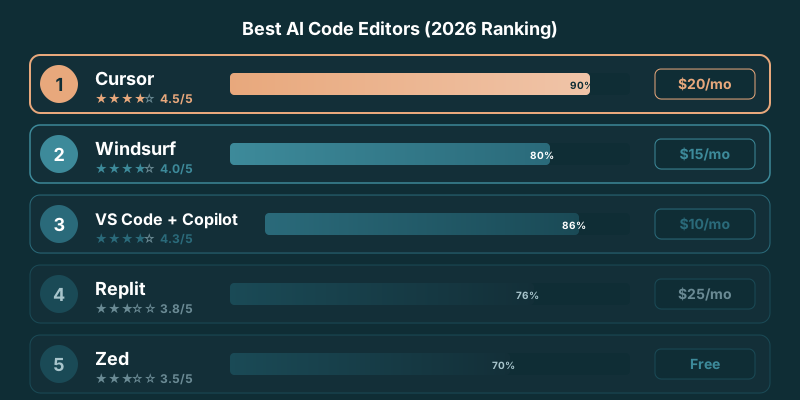
Best Editor for Working Across Multiple Files
Cursor is the best choice for work that spans multiple files.
That's where AI-native editors earn their keep. A useful coding agent has to understand the relationship between a component, its tests, its types, its API calls, and whatever config quietly breaks the build. Single-file suggestions are nice. They're not the difficult part.
Cursor's Composer-style workflow is built for that broader job. You can describe a change in plain language, point it at the relevant part of a codebase, review the proposed edits across files, and keep control over what lands. It works especially well for the unglamorous but frequent work of software development: changing a data model, updating every consumer, fixing tests, and untangling a feature that grew beyond its original shape.
We found that matters most in TypeScript monorepos and React apps, where one apparently small request can touch shared types, UI state, API clients, tests, and documentation. Cursor gives you a coherent view of the work instead of making you shuttle context between tabs and chat windows.
Windsurf also handles codebase-level tasks well and deserves serious consideration. Its agent workflow feels more opinionated, which some developers will prefer. But Cursor has the better combination of multi-file capability and a workspace that already feels familiar to a large part of the developer market.
VS Code with Copilot can help with multi-file changes, but it still feels like a traditional editor with AI added on top. That distinction shows up when the task gets messy. Cursor treats the codebase as the unit of work. Copilot often feels more like a smart collaborator inside the file you already have open.
For a closer head-to-head, see our Cursor vs Windsurf comparison. The choice comes down to whether you want the strongest all-around environment for broad edits or prefer Windsurf's particular agent workflow.
Easiest Switch From a Traditional IDE
Cursor is also the easiest AI-native editor to adopt if you're coming from VS Code.
That sounds mundane until you've watched a team resist a tool because it moved every keyboard shortcut, extension, setting, and muscle-memory habit they've built over years. Developers don't switch editors for a novelty demo. They switch when the new thing removes enough work to justify the disruption.
Cursor starts from a familiar place. Its VS Code roots mean the layout, project navigation, terminal, extensions, and general rhythm of the editor feel close enough that you can get productive without spending a week reorganizing your environment. The AI layer is the new part. The rest doesn't ask you to relearn how you work.
That makes it the cleanest recommendation for a developer who uses VS Code today and wants an AI-native workflow tomorrow. Install it, bring over the habits that matter, and start using the agent where it has an advantage.
JetBrains users have a slightly different decision. If your IDE setup depends on language-specific tooling, inspections, and workflows that are deeply tied to JetBrains, VS Code with GitHub Copilot may be the less disruptive move. You keep the editor you know and add AI assistance where you need it.
GitHub Copilot's free plan includes 2,000 completions per month PE Collective Cursor pricing breakdown. That makes it an easy way to test whether AI assistance changes your day before committing to a new editor.
Still, there's a difference between adding completions and adopting an editor designed around an agent that can work across the project. Cursor wins that comparison. Our full Cursor review gets into where that advantage is most obvious.
Team Plans Compared
Team pricing is more than a procurement detail. It tells you whether an editor can move from one developer's experiment into the part of the company where security reviews, shared billing, and management controls start showing up.
Cursor has the clearest step up for teams. Cursor Pro costs $20/mo with Business at $40/mo PE Collective AI code editor tests. That puts a defined business option next to the individual plan, which is what growing teams need when AI coding tools stop being a personal expense.
Cursor's top individual tier, Ultra, runs $200/mo PE Collective Cursor pricing breakdown. That plan is aimed at developers who burn through heavy usage, not a default team recommendation. Most organizations should decide whether the shared controls in Business are worth more than trying to standardize a collection of individual subscriptions.
GitHub Copilot has the most straightforward case for teams already living in GitHub and VS Code. VS Code + GitHub Copilot runs $10/mo Individual and $19/mo Business PE Collective AI code editor tests. GitHub Copilot Business costs $19/user/mo PE Collective GitHub Copilot pricing.
That lower business price makes Copilot attractive for a broad rollout, particularly where the goal is to give every developer assistance without changing editors. Cursor costs more, but it gives teams an AI-native environment rather than a plugin layer.
Windsurf has a lower individual entry point. Windsurf Pro costs $15/mo PE Collective AI code editor tests. It remains a strong option for smaller teams that want an AI-first editor and are willing to evaluate its workflow against Cursor before standardizing.
Replit belongs in a different category. Replit Core costs $25/month PE Collective Replit alternatives guide. Its appeal is primarily about letting people build, collaborate, and deploy from the browser. That's useful for certain teams. It doesn't make Replit the obvious choice for a codebase already built around local development.
Zed has a loyal audience because it is fast and focused. It is harder to recommend as a company-wide AI editor when the question is team administration and codebase-wide agent work. The editor has to fit how the organization builds software, rather than merely feel good in a benchmark or a demo.
Individual vs Team Pricing
Cursor Pro costs $20/mo with Business at $40/mo PE Collective AI code editor tests. The higher business price makes sense if your team wants to standardize on an AI-native editor rather than bolt assistance onto an existing one.
VS Code + GitHub Copilot runs $10/mo Individual and $19/mo Business PE Collective AI code editor tests. Copilot is the budget-friendly team choice if VS Code is already the house standard.
Windsurf Pro costs $15/mo PE Collective AI code editor tests. Replit Core costs $25/month PE Collective Replit alternatives guide. Those individual prices are useful starting points, but an editor decision should also account for where your code runs, how developers collaborate, and whether the tool handles the work your team does all day.
Detailed Reviews
Cursor
Best OverallThe most complete AI code editor. Tab completions are the best in class, Composer handles multi-file edits reliably, and Cmd+K inline editing feels natural. Built on VS Code so your extensions work. Agent mode can implement features across 10+ files.
Windsurf
Best ValueCascade is Windsurf’s killer feature, an AI agent that reads your codebase, plans changes, and executes across files. The autocomplete is solid but not Cursor-level. At $15/mo versus Cursor’s $20, it’s the value pick.
VS Code + GitHub Copilot
Most FamiliarThe default choice for most teams. Copilot’s autocomplete is reliable, chat works well for explanations, and the VS Code ecosystem is unmatched. Agent mode (Copilot Workspace) is catching up but still behind Cursor and Windsurf.
Replit
Best for PrototypingCloud-based editor with an AI agent that can build and deploy full applications from a prompt. Best for rapid prototyping and learning. The browser-based environment means you can code from anywhere.
Zed
Best PerformanceThe fastest code editor available, written in Rust. AI features are newer and less mature than Cursor or Copilot, but the editing experience is exceptional. Supports Claude, GPT, and local models through a unified AI interface.
Is Cursor still the best AI code editor in 2026?
Short answer: for most developers, yes. Cursor held the top spot through the 2026 update because it kept the lead on the two things that decide daily productivity, autocomplete that predicts the right next edit and a Composer flow that edits several files at once without losing the plot. It also inherits the full VS Code extension marketplace, so switching costs almost nothing if you already run VS Code.
The gap narrowed, though. Windsurf's agent has matured into a genuine alternative, and some teams now prefer it for large, multi-step refactors where they want the editor to drive. GitHub Copilot inside VS Code keeps closing the feature gap and stays the value pick at the lowest paid tier. If you searched "best AI code editor 2026" hoping for a single name, the honest answer is Cursor first, Windsurf as the strong second, and Copilot if budget or an existing VS Code setup is the deciding factor. Prices and free-tier limits move often, so confirm the current plan on each tool's own pricing page before you commit. For the head-to-head detail, see Cursor vs Windsurf and Cursor vs Copilot.
Evaluation Criteria
Compare each editor on autocomplete quality, multi-file editing, codebase navigation, responsiveness, model access, privacy controls, and current price. Rankings on this page are editorial judgments based on documented capabilities; validate them on a representative repository before standardizing a team.
Frequently Asked Questions
What is the best AI code editor in 2026?
Cursor is the best overall. It has the strongest autocomplete, best multi-file editing (Composer), and inherits VS Code’s extension ecosystem.
Is Cursor better than VS Code with Copilot?
Cursor emphasizes AI-native tab completion, Composer, and agent workflows. VS Code has a larger extension ecosystem, while GitHub Copilot integrates directly with several editors. Compare current features and pricing against your team's workflow.
Are AI code editors worth paying for?
If you write code daily, yes. The productivity gains from AI autocomplete and multi-file editing typically save 1-2 hours per day, easily justifying $15-40/mo.
Can I use my VS Code extensions in Cursor?
Yes. Cursor is built on VS Code and supports the same extension marketplace. Most extensions work without modification.
What’s the difference between an AI code editor and an AI coding assistant?
AI coding assistants like Copilot are plugins that add AI features to existing editors. AI code editors like Cursor and Windsurf are full IDEs rebuilt around AI, with deeper integration into every workflow.
Which AI code editor should I use in 2026?
Start with Cursor unless you have a specific reason not to. It leads on autocomplete and multi-file editing and supports VS Code extensions. Pick Windsurf if you prefer its agent flow for big refactors, or stay on VS Code with GitHub Copilot if you want the cheapest serious option and already use VS Code. Replit is the choice for a cloud IDE that deploys for you.
Is Cursor the best AI code editor in 2026?
For most developers, yes. Cursor kept the top spot through 2026 on autocomplete quality and Composer-style multi-file editing, plus VS Code extension support. Windsurf is the closest rival and Copilot is the value pick, but Cursor remains the default recommendation for daily coding.
Sources
- Cursor (official)
- Windsurf (official)
- GitHub Copilot (official)
- PE Collective AI code editor tests: 4.5 stars
- PE Collective AI code editor tests: $20/mo and $40/mo
- PE Collective GitHub Copilot pricing: $19/user/mo
- PE Collective Cursor pricing breakdown: $200/mo
- PE Collective Replit alternatives guide: $25/month