 PE Collective
LangChain vs CrewAI for AI Agent Builders
A practical comparison for teams building AI agents and LLM applications
Last updated: February 20, 2026
Quick Verdict
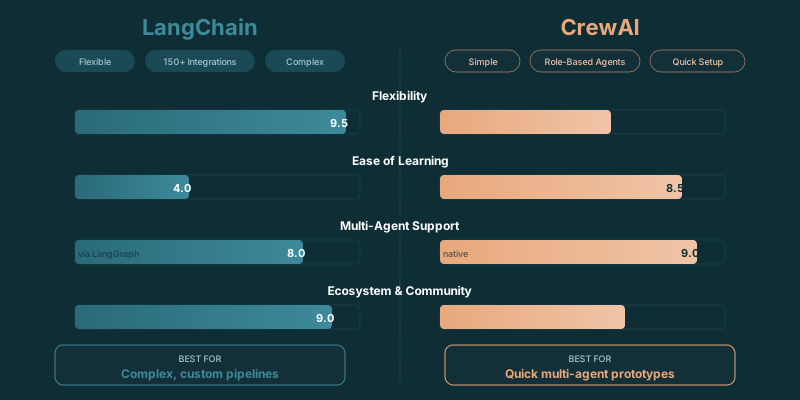
Choose LangChain if: You need a flexible framework that handles everything from simple chains to complex agent workflows, RAG pipelines, and tool integrations. LangChain (with LangGraph) gives you maximum control over every component in your AI system.
Choose CrewAI if: You want to build multi-agent systems fast without wiring together low-level components. CrewAI's role-based agent design lets you define agents, assign tasks, and orchestrate collaboration with minimal boilerplate.
LangChain vs CrewAI comes down to the shape of the work your application has to do. LangChain gives you a broad toolkit for retrieval, prompts, tools, model providers, and agent workflows. It lists 100+ integrations, which helps when your application needs to connect several services or swap components as requirements change.
CrewAI starts from a narrower, more opinionated premise. You define agents with roles, assign tasks, and control how work moves through the group. That fits products where specialized agents need to hand work to one another.
The distinction sounds simple. It saves a lot of wasted engineering time.
Teams often reach for multi-agent systems because the demo looks clever, then inherit a pile of handoffs, retries, and unclear failure states. Other teams build every workflow from components when a role-based crew would have made the product easier to explain and maintain.
Pick the architecture for the work. Pick the framework after that.
TLDR
LangChain fits applications that need flexible retrieval, tools, model choices, and custom control. CrewAI fits work that benefits from explicit roles and coordinated agents. A simple single-prompt application usually needs a raw model API, not another framework layer.
Key Takeaways
- LangChain is the better fit when RAG, tool connections, and component-level control drive the application.
- CrewAI fits workflows where distinct agents own research, review, writing, or execution tasks.
- A raw API call is often cleaner for a direct request-and-response product.
- The best framework is the one that removes complexity from the work instead of adding a new layer to manage.
LangChain vs CrewAI Decision Framework
Start with the path your application takes from input to output.
A user asks a question about internal documents. Your system finds relevant passages, adds them to a prompt, and returns an answer with citations. That is a RAG application. LangChain is a natural fit because it gives you a way to assemble loaders, retrievers, prompts, model calls, tools, and output handling without building every connection yourself.
A different product may need to research a company, assess the findings, write a recommendation, and send the result to another system. Those jobs can have different prompts, permissions, tools, and failure modes. CrewAI gives each role a defined job and makes the handoffs visible.
The first decision is whether the task needs a pipeline or a team.
Use LangChain when you need to control the path through a system. You may want a retrieval step before a model call, a tool only under certain conditions, a structured output parser, or the ability to replace one provider without rewriting the application. The value is composability. You can build exactly the workflow the product requires.
Use CrewAI when the work benefits from division of labor. A research agent can gather material, a reviewer can challenge weak conclusions, and a writer can turn the approved material into something usable. The role model gives the workflow a vocabulary that product teams and operators can understand.
That does not mean every workflow with several steps needs a crew. A retrieval pipeline also has several steps. The difference is whether those steps are functions in a process or distinct actors making decisions.
If your workflow has a clear sequence and fixed inputs, start with LangChain or ordinary application code. If it needs agents to interpret work, pass context, and make bounded decisions inside different roles, CrewAI earns its place.
The bad outcome is building a crew to simulate a checklist. A checklist already has an owner.
Ecosystem and Integration Comparison
LangChain has 100+ integrations. That is the practical argument for choosing it when your application touches a mix of model providers, vector stores, document sources, observability systems, and external tools. The best RAG tools comparison also matters here because 100+ integrations give builders more room to choose a retrieval stack that matches their existing systems.
Its 80K+ GitHub stars point to a large builder community around the framework. Community size does not fix an architectural mistake, but it can make troubleshooting less lonely when you hit an edge case involving a provider, parser, loader, or tool call.
CrewAI has 20K+ GitHub stars, which is meaningful for a framework centered on agent coordination. Its appeal is primarily about making a multi-agent workflow readable. A product manager can look at named roles and tasks and understand what the system is trying to do. That is harder when the same logic is spread across prompts, callbacks, and conditional branches.
CrewAI+ is listed at $39 per month. Treat that as an operating consideration, not a selection shortcut. A hosted or paid layer can be useful if it removes work your team would otherwise own. It is wasteful if the underlying workflow remains unnecessary.
| Consideration | LangChain | CrewAI |
|---|---|---|
| Best fit | Flexible LLM applications | Role-based agent workflows |
| Integrations | 100+ integrations | Focused on agent coordination |
| Community signal | 80K+ GitHub stars | 20K+ GitHub stars |
| Paid offering | n/a | CrewAI+ at $39 per month |
| Builder experience | Component-level control | Roles, tasks, and handoffs |
| Simple prompt application | Usually more than needed | Usually more than needed |
The table can make CrewAI look smaller by default. That misses the point. Purpose-built tools should be judged by whether their opinionated model matches the job. A small framework that matches the product is often easier to operate than a giant toolkit used reluctantly.
LangChain wins when the architecture is the product. CrewAI wins when coordination is the product.
When to Use a Raw API Instead
A simple single-prompt application may not need either framework.
Suppose a customer submits text and expects a transformed version back. Maybe they need a summary, a classification, an extraction, or a drafted response. If the application sends a well-formed prompt to a model and validates the result, raw API calls are often the clearest option.
You get fewer abstractions, fewer dependencies, and a smaller debugging surface. When the output is wrong, you inspect the prompt, the input, the model response, and your validation logic. There is no framework layer hiding the request path.
This is especially useful early in a product. You can learn what customers ask for before turning a direct workflow into a general system. Once requests require retrieval, multiple tools, branching logic, memory, or long-running work, a framework can start paying for itself.
Raw API calls are also a good choice when your team has strong application infrastructure already. You may have your own queues, tracing, data access layer, permissions model, and workflow engine. Adding an LLM framework simply to make a model call can create duplicate concepts that later fight each other.
The decision is not ideological. Frameworks save time when they remove repeated plumbing. They cost time when they add a vocabulary nobody on the team needs.
A direct API implementation can also make it easier to enforce product constraints. You decide exactly what context goes into the model, which tools it may call, how retries work, and where sensitive data can travel. That control matters in regulated or high-stakes workflows, where an agent acting freely can be more of a liability than a feature.
If the product needs one good answer from one good prompt, keep the stack boring.
RAG, Agent Roles, and Production Workflows
RAG is where LangChain often becomes useful quickly.
A production RAG system is more than a vector search attached to a chat window. You need a way to ingest material, update it, choose what to retrieve, construct context, track citations, handle empty results, and evaluate whether the answers stay grounded. The RAG architecture guide is useful alongside LangChain because its 100+ integrations can accommodate the storage, retrieval, and model choices a production system tends to accumulate.
LangChain gives you building blocks for these jobs. That does not remove the need for judgment. You still have to decide what documents belong in the system, how much context to pass, what makes a result trustworthy, and what the application should do when retrieval fails.
CrewAI can sit on top of a RAG workflow when different agents need to use knowledge in different ways. A research agent might retrieve source material. A reviewer might inspect the retrieved evidence and reject unsupported conclusions. A writer might produce the final answer from approved material. Those roles can help when the work has meaningful checkpoints.
But a crew does not repair weak retrieval. If the wrong material enters the context window, adding agents often creates a more elaborate version of the same mistake.
Keep the knowledge layer separate from the role layer. Build retrieval that can stand on its own. Then decide whether agents need to use it differently.
Production workflows also need clear ownership of state. Ask where conversation history lives, how tool results are recorded, what happens after a failure, and whether the system can resume work safely. These questions are mundane. They decide whether an agent application survives contact with real users.
CrewAI makes workflow ownership visible through roles and tasks. LangChain gives you more freedom to define state and control flow yourself. That freedom is useful when the application has unusual requirements. It can also become expensive when every product team invents a slightly different orchestration pattern.
There is a useful rule here: use role-based agents when the roles describe work that people would recognize outside the system. Researcher, analyst, reviewer, and operator are understandable roles. “Agent that calls tool A before prompt B” is a function wearing a fake mustache.
Choosing the Framework Your Team Can Operate
The framework choice should survive beyond the first demo.
Ask who will maintain prompts, inspect failures, change providers, add tools, and explain the system to customers. The answer may point toward LangChain if your team needs detailed engineering control. It may point toward CrewAI if the product is built around coordinated roles that non-engineers need to understand.
LangChain is broader. Its 80K+ GitHub stars and 100+ integrations make it appealing for teams building an LLM platform rather than a single agent workflow. You can support many types of applications without switching foundations every time a new use case appears.
CrewAI is more direct for a product whose value comes from agents working together. Its 20K+ GitHub stars reflect a substantial builder audience around that specific model. The framework gives you an opinion about how work should move. That is helpful when the opinion matches your product.
The strongest teams resist framework theater. They can explain why every layer exists, what it owns, and how they would remove it if the product changed.
Choose LangChain for flexible LLM systems, RAG pipelines, varied tools, and custom orchestration. Choose CrewAI for defined agent roles with real handoffs and shared goals. Choose a raw API when the application is a direct model interaction.
The question is not which framework looks more advanced. Which one leaves you with less software to explain when the workflow breaks?
Sources
- LangChain vs CrewAI, 100+ integrations
- LangChain vs CrewAI, 80K+ GitHub stars
- LangChain vs CrewAI, 20K+ GitHub stars
- LangChain vs CrewAI, $39 per month