 PE Collective
Pinecone vs Weaviate for RAG and AI Search
A practical comparison for building RAG systems and AI search applications
Last updated: May 2026
Quick Verdict
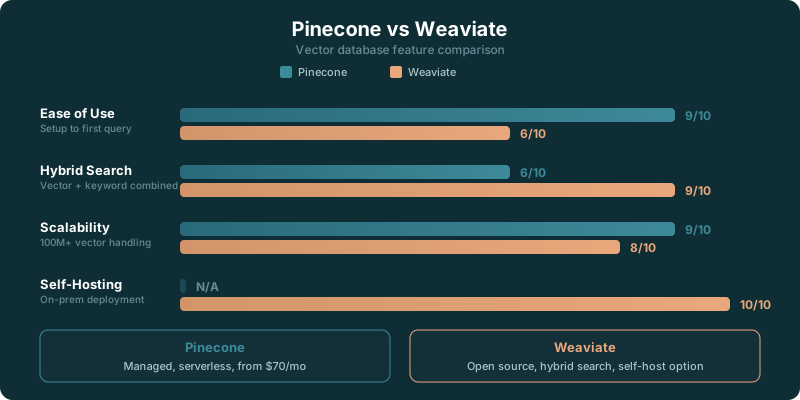
Choose Pinecone if: You want a fully managed, serverless vector database with zero infrastructure overhead. Pinecone handles scaling, indexing, and operations so you can focus on your application logic.
Choose Weaviate if: You want an open-source vector database with hybrid search capabilities, self-hosting options, and transparent pricing. Weaviate gives you full control over your data and deployment.
TLDR
Pinecone vs Weaviate comes down to managed simplicity versus deployment control. Pinecone suits standard RAG teams that want less database work. Weaviate suits teams that need self-hosting or hybrid retrieval. pgvector belongs in the conversation when Postgres already owns the application data.
Key Takeaways
- Choose Pinecone when managed operation matters more than infrastructure control.
- Choose Weaviate when self-hosting, hybrid search, or deployment flexibility shape the product.
- Compare recurring service cost with the engineering time required to run the database.
- Keep pgvector in the shortlist when Postgres is already part of the stack and the workload remains under 5M vectors.
Pinecone vs Weaviate is a deployment decision before it is a database feature decision.
Both can retrieve relevant chunks for a RAG application. Both can support semantic search. Both can sit behind an application that turns user questions into embeddings, finds relevant context, and passes that context into an LLM.
The difference shows up after the first demo.
Pinecone puts the operational burden on the service. You focus on data ingestion, chunking, metadata filters, retrieval quality, and the application experience. Weaviate gives your team more control over where the system runs and how it is configured. That matters when your architecture has hard requirements around infrastructure ownership, data location, or lexical retrieval.
A lot of teams should choose the simpler option. A lot of teams also discover too late that “simple” meant accepting constraints they were never willing to accept.
The right choice depends on who owns the system once the prototype becomes part of the product.
The Quick Verdict
Choose Pinecone if your team wants a managed vector database and would rather spend its time improving retrieval than operating search infrastructure.
Choose Weaviate if deployment control is part of the product requirement. That includes self-hosting, keeping data in a controlled environment, using hybrid retrieval as a core part of the search experience, or avoiding a database architecture tied to one managed vendor.
Neither choice fixes a weak retrieval design. A bad chunking strategy, thin metadata, poor evaluation data, or a prompt that asks the model to improvise will produce bad RAG results on either platform. The database is one part of the system.
The practical question is simpler: what would create more pain for your team, managing a database or giving up control over where and how it runs?
| Team situation | Pinecone | Weaviate |
|---|---|---|
| Small product team | Strong fit when database operations are a distraction | Fit if infrastructure control is already a team strength |
| Platform team | Useful when the platform standardizes on managed services | Useful when the platform owns deployment and data boundaries |
| Search-focused team | Good for semantic retrieval with managed operation | Good when lexical and vector retrieval must work together |
| Regulated environment | Depends on the managed-service requirements | Often a better fit when self-hosting is required |
| Postgres-first application | Worth evaluating against pgvector | Worth evaluating when search needs outgrow the Postgres path |
| Early RAG prototype | Fast path when simplicity matters | Useful when the prototype must match a self-hosted production design |
Pinecone vs Weaviate Deployment Choices
Pinecone is built for teams that want a managed service. That changes the daily experience of running a vector database.
You create and configure the database through the provider’s environment, load vectors and metadata, query it from your application, and let the vendor carry much of the work around availability, underlying infrastructure, and operational maintenance. That is attractive for teams whose scarce engineering time belongs in the product layer.
A managed service also creates a boundary. Your application relies on the provider’s deployment model, supported regions, service capabilities, and account structure. If those fit your needs, that boundary is useful. It keeps the database from turning into another internal system someone has to maintain.
Weaviate is more flexible because it can be self-hosted. Your team can run it in its own infrastructure and make more of the operating choices itself. For companies with established infrastructure practices, this can fit naturally into the environment they already manage.
That flexibility has a cost. A self-hosted database needs an owner. Someone is responsible for upgrades, storage, observability, failure recovery, access controls, and capacity planning. The work may be routine for a strong platform team. It can become a literal money pit for a small product group that only wanted to ship AI search.
Cloud deployment does not automatically make Weaviate the wrong choice. Some teams want Weaviate’s data model, module ecosystem, or hybrid retrieval support without running every layer themselves. The point is that Weaviate gives you a broader set of deployment paths, while Pinecone starts from the managed-service assumption.
Keep the decision tied to a concrete requirement.
If customer data must remain inside infrastructure you control, that requirement narrows the choice quickly. If your company already runs production databases and has clear ownership for them, self-hosting becomes less intimidating. If no one wants to wake up because a search cluster is unhealthy, Pinecone has a compelling argument.
The managed-versus-control choice also affects procurement. Pinecone can be easier to explain when the buyer wants one accountable provider for the database operation. Weaviate can be easier to explain when the buyer needs a database that fits existing cloud, security, or on-premises policies.
Do not pick self-hosting because it sounds more sophisticated. Pick it because the business or technical requirements make it worth owning.
Pricing and Scale Considerations
Pricing pages can make vector database decisions look cleaner than they are. The listed plan price is only one part of the cost.
The other cost is operational ownership. A managed service may carry a higher direct bill while saving engineering time. A self-hosted option may look cheaper on paper while requiring infrastructure, monitoring, incident response, and people who understand the database well enough to run it under pressure.
The 2026 comparison lists a $0 starter option for teams that want to test a small proof of concept before committing to a paid setup.
Pinecone lists a $50 standard option in the same comparison. That is useful as an entry point for comparing managed-service cost against the time your team would spend operating an alternative.
Pinecone lists a $500 enterprise option, which is where procurement, expected usage, support expectations, and architecture requirements deserve a more serious conversation.
Weaviate lists a $25 cloud option for teams that want its cloud path without treating self-hosting as the default.
Weaviate lists a $300 business option, a reminder that the comparison should include more than the lowest visible plan.
Those prices give you a starting point. They do not give you a complete budget.
Your data shape drives cost. Long source documents create more chunks. More chunks create more vectors. More metadata can improve filtering and relevance, but it also changes what you store and query. Heavy ingestion, frequent re-embedding, large retrieval traffic, and high availability expectations all affect the real operating profile.
Start by writing down what the product must retrieve, how often content changes, whether users need filters, and who will own the database. That exercise exposes the cost drivers better than a plan comparison alone.
Scale is also where teams often overbuild.
The 2026 page suggests pgvector for workloads under 5M vectors. If your application already keeps its core data in Postgres, that guidance should make you pause before adding a separate vector database on day one.
There is no prize for adding another service early. A simpler architecture can be easier to inspect, secure, and maintain while the product is still finding its retrieval patterns. You can move beyond it when the workload or feature set demands it.
The question is whether the database decision supports the application you have, rather than the architecture diagram you hope to show later.
Hybrid Search and RAG Requirements
RAG applications fail in different ways.
Sometimes the system retrieves semantically similar passages but misses the exact product name, error code, policy clause, or account identifier that should have driven the answer. Sometimes lexical matches produce a narrow result set that misses the conceptual language a user used in their question.
Hybrid search addresses that tension by combining vector search with keyword-oriented retrieval such as BM25. This is a stronger fit when users need both semantic discovery and exact matching.
Weaviate is often the more natural candidate when hybrid retrieval is a central requirement. Its value is more than that it can store vectors. Its value is that teams can design a retrieval layer around more than one matching method, then decide how those methods should work together.
That matters for internal knowledge systems, technical documentation, catalog search, legal or policy material, and applications where users mix plain-language questions with exact terminology. A person may ask for “the document about renewal rights” one moment and search for a specific clause or identifier the next.
Pinecone can still work well for standard semantic RAG. If your application’s retrieval task is primarily about finding meaningfully related chunks and you want the service operated for you, the managed path is often enough. Do not introduce hybrid complexity until your evaluation data shows why you need it.
This is where an LLM evaluation guide becomes useful alongside the $50 standard option. Build a test set from real questions, score retrieval quality, and look at the failures before declaring that hybrid search is a requirement.
Evaluation should include the answers users care about, rather than only synthetic benchmark prompts. Collect questions that contain product terms, acronyms, loosely phrased requests, and queries that need metadata filtering. Then inspect what the retriever returned before judging the final model answer.
A good RAG system retrieves context that is relevant, specific, current, and usable by the model. The vector database helps. It does not replace the work of deciding what documents to index, how to split them, what metadata to store, or when the application should decline to answer.
Your prompt layer also deserves scrutiny. The prompt engineering guide is worth reading while you assess the $25 cloud option, because retrieval quality and model instructions shape the same user experience.
Hybrid search should earn its complexity through evidence. If exact terms and semantic concepts both drive successful retrieval, Weaviate has a stronger case. If the use case is straightforward semantic retrieval and your team wants the database to disappear into the background, Pinecone stays attractive.
When pgvector Is the Simpler Fit
Pinecone and Weaviate are not the only sensible options.
pgvector deserves consideration when your product already runs on Postgres and the vector workload is still a natural extension of the application database. Keeping relational data and vector data close together can reduce moving parts, simplify permissions, and keep the engineering surface area smaller.
The 2026 page suggests pgvector for workloads under 5M vectors. That threshold is not a universal law. It is a practical prompt to assess whether a dedicated vector database solves a current problem or merely creates another system to run.
pgvector can be the right answer for an early product with a contained corpus, modest search requirements, and a team that already understands Postgres. It can also make development easier when the application needs to combine relational filters with vector similarity in one familiar environment.
The tradeoff is specialization. Pinecone and Weaviate exist because vector retrieval workloads can become demanding. As retrieval volume, data volume, tuning needs, or search features expand, a dedicated database may offer a better fit.
That transition should happen because your measurements demand it.
A team that starts with pgvector can still build a clean retrieval abstraction and move later. A team that starts with Pinecone or Weaviate can still avoid complexity by keeping the ingestion and retrieval design focused. The database choice does not excuse an unclear application boundary.
If you are still evaluating the surrounding stack, browse the available AI tools while reviewing the $0 starter option. The vector store is only one dependency in a system that also needs embeddings, evaluation, observability, and application logic.
How to Make the Choice
Start with deployment.
Pinecone is the stronger default when you want a managed vector database and do not have a hard requirement for self-hosting or deeper infrastructure control. It suits teams that want to ship a RAG feature without building an operational specialty around vector search.
Weaviate is the stronger choice when control is a requirement rather than an aspiration. Its self-hosting path, hybrid-search orientation, and broader deployment options make sense when your application has real constraints around data environment or retrieval behavior.
Then look at the retrieval problem.
If semantic similarity drives most successful answers, Pinecone’s simpler managed path may be enough. If the product needs exact keyword matching beside semantic retrieval, Weaviate has more room to design that search experience deliberately.
Then look at the scale you have now.
If Postgres already owns the application data and the vector workload fits the guidance for under 5M vectors, pgvector may be the simpler fit. If the application needs a dedicated vector-search system from the start, compare Pinecone’s managed operation with Weaviate’s control.
The winner is the option that matches your operating reality. Pinecone wins when simplicity saves your team from unnecessary database work. Weaviate wins when deployment freedom and hybrid retrieval are worth that ownership. pgvector wins when another database would be one more moving part without a clear payoff.
Can your team name the person who will own the database when retrieval stops being a prototype?
Sources
- PE Collective comparison, $0 starter option
- PE Collective comparison, $50 standard option
- PE Collective comparison, $500 enterprise option
- PE Collective comparison, $25 cloud option
- PE Collective comparison, $300 business option
- PE Collective comparison, 5M vectors guidance