 PE Collective
Vector Database Comparison: Best Picks by Use Case
Pinecone, Weaviate, Chroma, Qdrant, and Milvus compared by use case. If you want to understand how vector databases work before choosing, see our Vector Database Guide. This page is the opinionated picks list.
Last updated: 2026-09-03
This vector database comparison starts with the decision that saves the most grief: pick Pinecone for managed production, Weaviate when you want open-source flexibility, Chroma for early RAG work, Qdrant for performance-sensitive retrieval, and Milvus when the collection is getting large enough to need serious infrastructure.
The best vector database is rarely the one with the most features. It is the one that fits the operating model you can support. A small team shipping an internal RAG tool has a different problem from an engineering organization running filtered retrieval across a large, frequently changing corpus.
Every RAG pipeline needs a vector database. The question isn't whether you need one. It's which one won't become a headache at 3 AM when your similarity search starts returning garbage results.
Compare finalists with your own vector count, dimensions, metadata filters, update rate, latency target, and availability requirements. A database that looks fast in a clean similarity-search demo can behave differently once filtered search and frequent updates enter the workload.
TLDR
Use Pinecone when managed operations are worth the minimum commitment. Choose Weaviate, Qdrant, or Milvus when control matters, and Chroma when you are proving the pipeline. Postgres with pgvector is often the cheaper answer before your corpus forces a dedicated engine.
Vector Database Comparison at a Glance
Pinecone is the cleanest choice when your team wants a managed database and would rather spend its time on retrieval quality than cluster operations. Its Standard tier starts at a $50/mo minimum commitment, with read units billed at $16 per million. Related analysis That pricing makes the decision easy for a production application with meaningful usage and harder for a side project that may never leave staging.
Weaviate and Qdrant both start managed cloud plans from $25/mo. Related analysis They give smaller teams a lower-cost path into managed hosting while preserving the option to self-host later. That matters if your requirements are still moving and you do not want your architecture dictated by a billing floor.
Chroma belongs in the conversation because it removes friction early. It is simple to run locally, simple to embed in an application, and useful when the job is learning whether retrieval improves the product at all. Chroma Cloud Pro is approximately $0.05 per 1M embeddings stored per month and includes a 99.9% uptime SLA. Related analysis The storage cost looks friendly. Production retrieval still has to earn its place through reliability, filtering behavior, and operational fit.
Milvus is for teams that know they are building a data system, not adding a feature. It gives you room to tune and scale, but it also asks for more infrastructure judgment. That trade is sensible when the collection, traffic, or deployment requirements justify it. It is a bad bargain when you merely want a working RAG prototype by Friday.
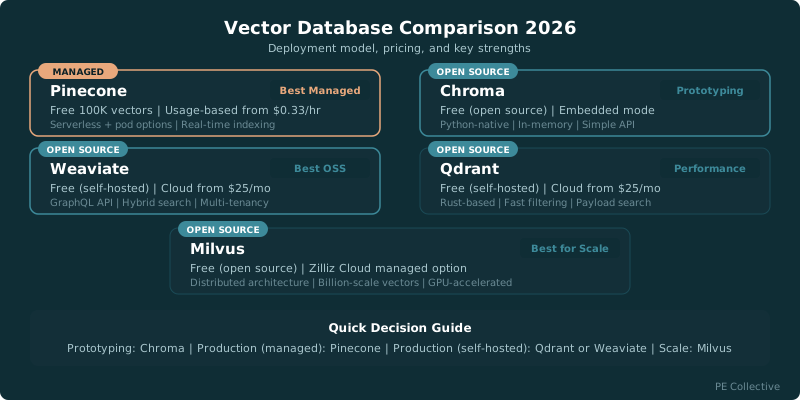
Which Vector Database Should You Pick? Quick Answers
What Each Database Gets Right (and Where It Falls Apart)
Pinecone
Best ManagedPinecone pioneered the managed vector database category and it shows. Serverless mode means you don't think about infrastructure at all. Queries are fast, the API is simple, and it handles scaling automatically. The free tier gives you 100K vectors, which is enough to build and test a real RAG application before spending anything.
Weaviate
Best Open SourceWeaviate gives you the most flexibility of any vector database. You can self-host it, use their cloud, or run it embedded. Hybrid search (combining vector similarity with keyword BM25) works out of the box. Built-in vectorization means you can send raw text and let Weaviate handle the embedding step. The GraphQL API is well-designed.
Chroma
Best for PrototypingChroma is the SQLite of vector databases. Install it with pip, and you're running queries in under five minutes. It stores everything locally by default, which makes development and testing dead simple. The Python API is intuitive and well-documented. For prototyping RAG applications or running local experiments, nothing gets you started faster.
Qdrant
Best PerformanceQdrant is written in Rust and supports payload filtering alongside vector similarity search. Its filtering model is useful when queries combine semantic similarity with metadata conditions. Benchmark it with your own dataset, filters, and hardware before making a performance claim.
Milvus
Best for ScaleMilvus was built from the ground up for billion-scale vector workloads. If you're storing hundreds of millions or billions of vectors, Milvus handles it with a distributed architecture that no other open-source option matches. It supports multiple index types (IVF, HNSW, DiskANN) so you can tune the speed/accuracy/memory tradeoff for your specific use case.
Which Vector Database Should You Pick?
Pinecone: Best Managed
Pinecone wins when operational simplicity has a direct business value. You create an index, load vectors, query it, and spend your attention on chunking, metadata, evaluation, and the rest of the RAG stack. Those are usually the parts users notice.
The cost structure is the caveat. Pinecone serverless storage is billed at $0.33/GB/month on the Standard tier. Related analysis Storage may not be the expensive line item at first, but the minimum commitment changes the economics for small deployments.
Enterprise buyers get another step up. Pinecone Enterprise carries a $500/month minimum, and HIPAA compliance is a $190/mo add-on. Related analysis That can be a sensible procurement decision when compliance and vendor support are part of the job. It is a steep entry point for an application still trying to prove demand.
Pinecone gets managed production right. It falls apart when the team needs self-hosting, needs to keep infrastructure costs close to zero, or wants lower-level control over its retrieval stack.
Weaviate: Best Open Source
Weaviate is the best fit for teams that want an open-source database without treating managed cloud as a betrayal. You can begin with self-hosting, use its managed offering, and retain a more portable architecture than a fully proprietary service.
It is also a good choice when vector search is tied tightly to structured data and metadata filtering. RAG systems do not live on nearest-neighbor search alone. They need document permissions, tenants, dates, content types, and all the other fields that decide whether an answer is useful or a liability.
Weaviate gets flexibility right. It can become heavier than a smaller project needs, especially if the team does not have a clear reason to own more infrastructure. Engineers love optionality. Finance gets to pay for it.
Chroma: Best for Prototyping
Chroma is the fastest path from “we should test RAG” to a functioning retrieval loop. It is approachable, works well in local development, and keeps the early architecture from turning into a week-long infrastructure project.
That makes it a strong free vector database option for experiments, internal tools, and product discovery. You can test chunk sizes, embedding models, retrieval prompts, and evaluation workflows before committing to a managed provider or a larger self-hosted system.
The limitation is that a prototype database can become production infrastructure by accident. It happens constantly. A team starts with a local store, users like the feature, traffic arrives, and suddenly the prototype has to handle reliability requirements it was never selected for.
Chroma gets speed of adoption right. It falls apart when your deployment has high operational requirements and nobody has made the deliberate decision to own those requirements.
Qdrant: Best Performance
Qdrant is the pick for teams that care about retrieval behavior enough to tune it. It has earned a following among engineers building search-heavy systems because it is efficient, predictable, and comfortable with filtered vector search.
That last point matters more than benchmark charts often admit. A RAG application rarely asks for “the nearest chunks.” It asks for the nearest chunks from this customer, this document class, this locale, this permission group, and this time range. Filtering changes the workload.
Qdrant offers a practical middle path. Self-host it if control is the priority, or start on managed cloud if the team wants to move sooner. The managed plan starting point keeps the initial commitment lower than Pinecone’s. Related analysis
Qdrant gets performance and control right. It falls apart for teams that want a fully hands-off service and do not want to make infrastructure choices once the system gets more complicated.
Milvus: Best for Scale
Milvus is built for teams that expect vector search to become a substantial part of their data infrastructure. If you are dealing with a large corpus, high ingestion volume, or a system that needs detailed tuning, Milvus gives you more room than a lightweight local-first database.
That room comes with a bill paid in engineering time. Self-hosting Milvus requires a team comfortable operating the surrounding components and diagnosing the issues that arise around ingestion, indexing, storage, and upgrades. The database may be free. The operating model is not.
Milvus gets scale right. It falls apart when your real requirement is “give us dependable retrieval without building a platform team around it.”
Free Vector Database Options
“Free” has two meanings here. One means a provider offers a free tier. The other means you can self-host the software without paying a database vendor. Neither means the system costs nothing once it needs backups, monitoring, compute, and someone on call.
Weaviate is a strong self-hosted option for teams that want open-source flexibility and expect to use richer metadata. It makes sense when data residency, customization, or vendor independence is part of the architecture discussion.
Qdrant is another strong self-hosted choice. It is a good fit when filtered retrieval performance is central to the product and the team can operate the deployment. Its managed cloud path also gives you a way to delay that work.
Chroma is the free option most teams should try first when they are still testing whether RAG helps. Local development is the point. Do not confuse easy local setup with a production decision.
Milvus is free to self-host and gives larger deployments room to grow. It is usually a better answer for teams that already have infrastructure maturity than for a product group looking for the shortest path to a first release.
Pinecone has a free tier, but the important distinction is between testing a service and committing a production workload to it. Once you need the Standard tier, the $50/mo minimum commitment becomes part of your monthly floor. Related analysis
What You Will Actually Pay Per Month
The database price is only one part of the monthly cost. Embeddings, model calls, document processing, observability, compute, and engineering time can easily outweigh it. Still, the database bill determines which options survive an early architecture review.
Pinecone gives you a predictable managed experience, but the Standard tier begins with a $50/mo minimum commitment and charges $16 per million read units. Related analysis If your workload is small, that minimum is the real price. If the application has steady retrieval traffic, it is easier to justify.
Weaviate and Qdrant managed cloud plans both start from $25/mo. Related analysis That lower starting point gives an early production application more breathing room, particularly when the team has not yet learned how retrieval usage will behave.
Chroma Cloud Pro is approximately $0.05 per 1M embeddings stored per month, with a 99.9% uptime SLA. Related analysis Storage is cheap. The harder question is whether the rest of the service fits the reliability and query requirements of the product you are shipping.
Self-hosting can reduce vendor spend, but it shifts costs into your cloud bill and your team. That can be the right move for a company with established platform support. For a small product team, it can turn a low database invoice into a literal money pit of maintenance work.
For a closer look at the managed option, see our Pinecone pricing breakdown. If Chroma is on your shortlist, the Chroma pricing page digs into its cloud model.
When Postgres With pgvector Is Enough
Postgres with pgvector beats a dedicated vector engine more often than database vendors would prefer. If your application already runs on Postgres, your data is relational, and your retrieval workload is still modest, keeping vectors beside the rest of the application data can simplify everything.
pgvector handles most workloads under 10 million vectors before a dedicated vector engine is worth adding. Related analysis That is a meaningful amount of data for many internal tools, focused RAG products, and applications with a narrow document corpus.
The appeal goes beyond cost. Postgres gives you transactions, familiar backups, user access controls, migrations, relational joins, and an operating model your team already understands. You do not need to synchronize metadata across another system or explain why the source-of-truth database and the retrieval database disagree.
It is especially useful when permission filtering is central to the product. Keeping documents, tenants, permissions, and vectors close together can make correctness easier to reason about. A retrieval result that leaks the wrong customer’s document is not a minor search-quality issue.
A dedicated engine wins once search requirements become the dominant constraint. Large collections, high query volume, aggressive latency targets, complex filtering, and heavy ingestion are all reasons to move. At that point, Postgres may still store the application data while a vector engine takes the retrieval workload.
Start with our pgvector review if you are weighing that path. The bigger RAG architecture question is covered in our best RAG tools guide.
How to Make the Final Call
Pick Pinecone if your team values managed operations enough to accept the minimum spend. Pick Weaviate if open-source flexibility and structured retrieval matter. Pick Chroma if you need to prove the RAG experience before making infrastructure commitments. Pick Qdrant if retrieval performance and filtered search deserve close control. Pick Milvus if vector search is becoming a serious data platform problem.
Then test the system with your own corpus. Public benchmarks are useful, but they cannot tell you whether your chunks are too broad, your metadata filters are too restrictive, or your source documents are stale. Those are the problems users feel.
The best vector database for RAG is the one that lets you improve answer quality without turning every retrieval issue into an infrastructure incident. Can your team support the choice once the prototype becomes a product?
Key Takeaways
- Pinecone is the strongest managed production choice when the minimum commitment fits the application.
- Weaviate and Qdrant offer open-source flexibility with managed cloud starting points.
- Chroma is a practical free vector database option for local development and early RAG experiments.
- pgvector is often enough before the collection reaches the point where dedicated vector infrastructure earns its complexity.
- Milvus fits teams building vector search as a substantial data system.
Our Benchmark Setup: 1M Vectors, Same Workload, Real Numbers
We benchmarked each database with 1M vectors at 1536 dimensions using OpenAI's text-embedding-3-small output. Tests covered insertion speed, query latency (p50 and p99), filtered search performance, and memory usage. We also evaluated developer experience: documentation quality, SDK maturity, and time-to-first-query for a new developer.
Frequently Asked Questions
Do I need a dedicated vector database, or can I use pgvector?
For most applications with under 1M vectors and simple similarity search, pgvector is fine. It keeps your stack simple since you're already using Postgres. Switch to a dedicated vector database when you need: filtered search performance, hybrid search, more than 5M vectors, or sub-10ms query latency at scale.
How many vectors can the free tiers handle?
Pinecone's free tier supports 100K vectors. Chroma, Qdrant, Weaviate, and Milvus are open source with no vector limits when self-hosted (limited only by your hardware). For cloud offerings, Qdrant Cloud and Weaviate Cloud start around $25/mo.
Which vector database is best for RAG applications?
For most RAG pipelines, Weaviate or Pinecone are the strongest choices. Weaviate's hybrid search (vector + keyword) improves retrieval quality for documents where exact keyword matches matter. Pinecone is simpler to operate. If you're still prototyping your RAG pipeline, start with Chroma locally and migrate later.
Can I switch vector databases later without rebuilding everything?
Switching is possible but not painless. You'll need to re-embed and re-index your data, update your query code, and adjust any filtering logic. The embedding vectors themselves are portable since they're just arrays of numbers. Plan for 1-2 weeks of migration work for a production system. This is why starting with the right choice matters.
Which vector database handles metadata filtering best?
Qdrant is the strongest for complex metadata filtering. Its payload filter system lets you combine vector similarity with arbitrary metadata conditions without a significant latency hit, which is rare. Weaviate is second, with solid support for hybrid queries that combine BM25 keyword search and vector similarity. Pinecone handles basic filtering well but can struggle when filter conditions return a small subset of vectors. For RAG pipelines where you filter by document date, category, or user permissions on every query, Qdrant or Weaviate are better defaults than Pinecone.