 PE Collective
Best LLM Testing Tools for Production Teams
Compare LLM testing tools for regression testing, human review, RAG evaluation, and production releases. Find the right fit for your team.
Last updated: April 2026
LLM testing tools help you test an application before a prompt change, model swap, retrieval change, or new feature lands in production. The work looks less like ordinary unit testing because the output can vary, even when the input does not.
A useful RAG evaluation set covers factual support, retrieval relevance, unsupported output, and response-format compliance. The practical question for any tool is whether it can show when an application stops giving grounded, useful, correctly formatted answers after a change.
A demo can hide a surprising amount. The prompt looks good. The answer sounds plausible. Then a customer asks a question that retrieves the wrong document, or a model update starts ignoring the required output format. A proper test suite catches the boring failures and the ugly ones.
This guide compares Promptfoo, Braintrust, LangSmith, Humanloop, Weights & Biases, and Arize Phoenix for teams testing LLM applications before production.
TLDR
LLM testing tools give you a repeatable way to catch regressions before model, prompt, or retrieval changes reach users. Start with a focused test suite when the workflow is stable. Move to a platform when evaluation volume, collaboration, and release risk outgrow a script.
Key Takeaways
- Test the application against factual accuracy, relevance, hallucinations, and response formatting.
- Use regression testing whenever you change a model, prompt, retrieval system, or evaluator.
- Promptfoo fits developer-led testing, while Braintrust and LangSmith fit broader production workflows.
- A small test suite works when one team owns a stable application and can inspect failures quickly.
- A platform earns its cost when review, datasets, experiment history, and release decisions need a shared home.
What LLM Testing Tools Evaluate Before You Ship
LLM evaluation is the process of running a repeatable set of inputs through an application and judging whether the outputs meet a defined standard. Those standards can be programmatic, model-based, human-reviewed, or some mix of all three.
The first job is to define what “good” means for your application. A support assistant might need to cite the right policy. A document extraction workflow might need valid structured output. A RAG assistant needs to answer from retrieved material instead of filling gaps with confident fiction.
The roundup used 500 evaluation cases across four dimensions: factual accuracy, relevance, hallucination detection, and response format compliance. Those four dimensions cover most of the failures that matter in a production RAG application.
Factual accuracy asks whether the answer is correct according to the source material. For RAG applications, this usually means checking whether the response stays anchored to the retrieved documents rather than relying on what the model happened to know.
Relevance asks whether the answer addresses the request. An answer can be factually correct and still miss the point. This failure shows up often when retrieval finds adjacent material, the prompt is too broad, or the application answers the first recognizable phrase instead of the actual question.
Hallucination detection asks whether the model invented a claim, citation, capability, or detail. You cannot solve this with one assertion. You need representative cases, source material, and a way to inspect why the evaluator marked an answer as unsafe.
Response format compliance covers the operational stuff that breaks downstream systems. If your application promises JSON, a prescribed set of fields, a short answer, or a fixed voice, a fluent response that ignores those requirements has still failed.
A useful LLM test suite includes easy cases and hostile ones. Include the questions users ask all the time. Add incomplete requests, ambiguous requests, outdated documents, conflicting source material, prompt-injection attempts, and inputs that should trigger a refusal or escalation.
The test case is the durable asset. Platforms come and go, model providers change pricing, and framework preferences turn over quickly. A well-maintained set of real production examples gives you a record of what your application must keep doing.
That is why “looks good to me” is not a release process. It is a spot check. Spot checks are useful when debugging, but they do not tell you whether a change improved the application across the cases that matter.
Choose a Tool for Regression Testing After a Model Update
A model update is not a neutral infrastructure change. Different models interpret instructions differently, select different details from context, and vary in how readily they follow formatting rules. The same is true of prompt edits, retrieval changes, chunking changes, and tool-call logic.
Run the same evaluation dataset before and after every meaningful change. Save the baseline outputs, compare the scores, and read the failures. If the new version raises average quality but fails on a high-value workflow, the average will not save you.
Regression testing needs three things: a stable dataset, evaluators you trust enough to use repeatedly, and an audit trail. The audit trail matters because a failure should lead to an answer. Was retrieval wrong? Did the prompt weaken an instruction? Did the new model introduce a behavior change? Did the evaluator misjudge a legitimate response?
Promptfoo is a strong fit when developers want configuration-driven tests close to the codebase. It is particularly useful for prompt variants, provider comparisons, red-team cases, and assertions that can run in a normal engineering workflow. Promptfoo Cloud starts from $50 per month, and the Promptfoo guide covers the developer workflow in more depth.
Braintrust works well when experimentation, datasets, scoring, and team review need to live together. It gives product-minded engineering teams a place to compare versions without leaving evaluation history scattered across notebooks and pull-request comments. Braintrust Pro starts from $100 per month.
LangSmith is the natural choice for teams already deep in the LangChain ecosystem, though it can also serve teams that need tracing and evaluation in one place. You can use traces to inspect a bad output, then connect that output back to an experiment or dataset. LangSmith Plus starts from $39 per month, and the LangSmith comparison is useful if your team is weighing it against a broader ML workflow.
Humanloop makes more sense when domain experts need a regular seat in the review process. Some quality decisions cannot be reduced to a simple assertion or an automated judge. Legal, support, editorial, and operations teams may know a bad answer the moment they see it, even if they cannot write the evaluator themselves.
Weights & Biases fits teams that already treat LLM work as part of a larger machine-learning practice. Its appeal is primarily about bringing experiments, artifacts, model work, and evaluation records into one familiar system.
Arize Phoenix is compelling for teams that want open-source observability and tracing without committing their core evaluation workflow to a closed platform. It is particularly useful when debugging RAG behavior requires visibility into retrieval, spans, prompt construction, and model responses.
At higher volume, manual release review becomes a bottleneck. The guide uses 1,000+ evaluations per day as a scale point for automated regression testing. At that point, your system needs repeatable scoring, failure grouping, and a clear way to decide which regressions deserve human review.
Do not let the tool choose the test strategy for you. Start with the failure modes that have hurt the product, then select the platform that makes those tests easy to run and investigate.
LLM Testing Tools Compared by Team, Workflow, and Starting Price
The six tools solve overlapping problems. Their differences show up in who owns evaluation, how much of the workflow stays in code, and whether your team needs collaboration around datasets and reviewer feedback.
| Platform | Best fit | Primary workflow | Starting price |
|---|---|---|---|
| Promptfoo | Developers | Config-driven prompt tests, provider comparisons, and automated checks | $50 per month |
| Braintrust | Product and engineering teams | Datasets, experiments, scores, and shared release review | $100 per month |
| LangSmith | LangChain users | Tracing, datasets, experiments, and application debugging | $39 per month |
| Humanloop | Cross-functional teams | Human review, prompt iteration, and domain-expert feedback | n/a |
| Weights & Biases | ML teams | Experiment tracking and broader model-development workflows | n/a |
| Arize Phoenix | Open-source-minded teams | Observability, tracing, and RAG debugging | n/a |
Promptfoo wins when the engineer writing the prompt also owns the test harness. It keeps evaluation near the development workflow and does not force a team into a heavy review process before it has earned one.
Braintrust wins when evaluation has become a shared operating practice. Engineers can run experiments, while product and domain experts can inspect examples and discuss the failures that a score alone cannot explain.
LangSmith wins for teams that need to travel from a poor production trace back to a testable case. This is especially useful when the application has multiple steps and the bad answer is only the final symptom.
Humanloop wins when feedback needs to come from people outside the engineering team. An automated evaluator can identify patterns. It cannot replace a subject-matter expert deciding whether a response would create a customer problem.
Weights & Biases wins for teams whose LLM application sits beside traditional ML work. The shared tooling can reduce friction when the same group is already tracking model experiments and artifacts there.
Arize Phoenix wins for teams that value control and observability. If the immediate question is “why did this RAG answer go wrong?” detailed tracing can be more useful than another aggregate score.
The loser is the team that buys a platform because the dashboard looks polished, then fills it with synthetic cases nobody trusts. Evaluation software cannot manufacture product knowledge. It can make a good testing discipline easier to run.
When a Small LLM Test Suite Is Enough
A small LLM test suite is enough when the application has a narrow job, the same team owns the prompt and release process, and failures can be reviewed quickly. You do not need a large platform to test a constrained extraction task or a focused internal assistant.
Keep the suite in version control. Store the input, the expected behavior, the relevant source material, and a concise explanation of why the case exists. When a bug reaches production, add the customer case after removing sensitive data. That turns each failure into protection against a repeat.
Use deterministic assertions where you can. Check that required fields exist. Check that citations point to provided sources. Check that the response parses. Check that a refusal appears when the application should not answer. These checks are cheap and reliable.
Use model-based scoring where the output needs judgment. Relevance, completeness, tone, and groundedness often need an evaluator that can compare the answer against context and a rubric. Then sample those judgments with human review, especially before you let them block a release.
A script starts to strain when the team cannot answer basic questions without a scavenger hunt. Which prompt version produced this answer? Which cases failed after the last model update? Did the regression affect a core customer workflow? Has anyone reviewed the borderline examples?
That is the moment to adopt a platform. Not when someone wants a nicer chart.
The platform also earns its keep when different people need different views of the same work. Engineers need traces and inputs. Product teams need trends and release comparisons. Domain experts need examples they can approve or reject without editing code.
A small suite can grow into a serious program if you keep the data clean. Give cases names that describe the behavior. Separate expected refusals from expected answers. Tag cases by workflow. Preserve the exact context used during testing. Treat evaluator prompts as production code.
The practical choice is simple. Start with the smallest system that gives you repeatable evidence. Upgrade when the work becomes collaborative, frequent, or expensive to inspect manually.
Build the Evaluation Workflow Before the Dashboard
The best LLM testing tool is the one your team will run before every meaningful release. That means the workflow needs to fit into how you already ship software.
Write down the application’s promises. For a RAG assistant, those promises may include answering from approved documents, admitting uncertainty, citing the correct material, and returning a predictable format. For an extraction tool, the promises may be about accuracy, parsing, and handling incomplete inputs.
Turn those promises into cases. Use production history where possible. A clean benchmark full of tidy examples will flatter your application. Real user requests are messier, and that is the point.
Set a release rule that people can follow. A model change should trigger the test suite. A prompt change should trigger the test suite. A retrieval change should trigger the test suite. If an evaluator changes, rerun the baseline before treating new scores as comparable.
Read failures instead of worshipping the aggregate. A score can tell you that something moved. It cannot tell you whether a newly broken workflow is trivial or a disaster for the customer.
The durable advantage is not having the most elaborate evaluation stack. It is knowing which failures you refuse to ship.
Sources
Our Top Picks
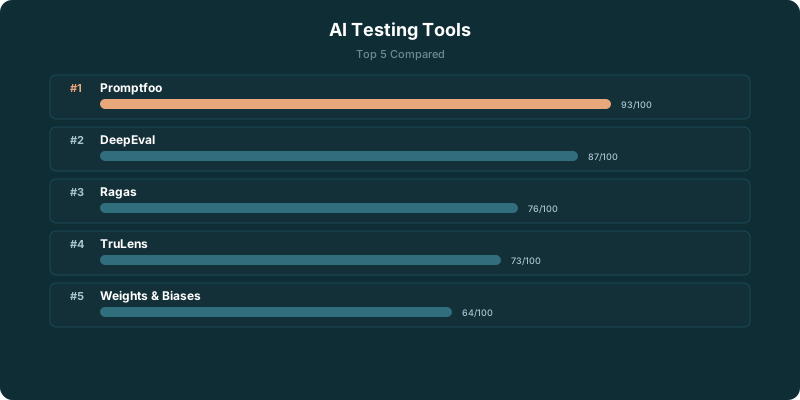
Detailed Reviews
Promptfoo
Best OverallPromptfoo is the most developer-friendly evaluation tool available. Configure your tests in YAML, run them from the CLI, and get a comparison table showing how different prompts perform across your test suite. It works with every major LLM provider out of the box. The open-source version is feature-complete for individual developers. Red teaming support helps you find adversarial failure modes before users do.
Braintrust
Best for TeamsBraintrust combines logging, evaluation, and dataset management in a single platform designed for teams. The scoring system lets you define custom metrics and track them over time, so you can see whether your Tuesday prompt change actually improved accuracy or just felt like it did. Comparison views make A/B testing prompts straightforward. The collaboration features are where Braintrust pulls ahead of Promptfoo.
LangSmith
Best for LangChainLangSmith is the observability and evaluation platform built by the LangChain team. If you're already using LangChain, the integration is effortless. Every chain execution gets traced automatically, so you can see exactly which step failed and why. The evaluation features let you build datasets from production traffic and run automated grading. The trace visualization for multi-step chains is the best in the market.
Humanloop
Best UIHumanloop has the most polished interface of any tool on this list. Prompt management, evaluation, and monitoring are all built around a visual workflow that non-technical team members can actually use. The prompt playground lets you iterate on prompts with side-by-side comparisons. Human review workflows are first-class, with annotation queues and inter-rater agreement tracking. If your evaluation process involves product managers or domain experts, Humanloop makes that practical.
Weights & Biases
Best for ML TeamsW&B expanded from ML experiment tracking into LLM evaluation, and the result is the most complete platform for teams that do both traditional ML and LLM development. Traces, evaluations, and model comparisons all live alongside your existing ML experiments. The Weave framework for LLM tracing is solid. If your team already uses W&B for model training, adding LLM evaluation is trivial.
Arize Phoenix
Best Open Source ObservabilityArize Phoenix is an open-source LLM observability and evaluation tool that has gained significant traction in 2026. It provides tracing, evaluation, and dataset management in a single local-first platform. The trace visualization helps you debug multi-step LLM pipelines by showing exactly what happened at each step, including token counts, latencies, and model responses. Built-in LLM-as-judge evaluators score responses for relevance, hallucination, and toxicity. The notebook integration makes it easy to experiment with evaluations in Jupyter before building automated pipelines. For teams that want LangSmith-level observability without vendor lock-in, Phoenix is the strongest open-source option.
Why LLM Testing Is Different From Software Testing
Traditional software testing relies on deterministic outputs. Call a function with the same input, get the same result. Write an assertion, and it either passes or fails. LLM testing breaks every assumption in that model.
First, outputs are non-deterministic. Ask the same question twice and you'll get two different phrasings of the same answer. Sometimes the differences are trivial (word order, synonyms). Sometimes they're meaningful (different facts emphasized, different reasoning paths). Exact string matching is useless. You need semantic comparison, and that's what these tools provide.
Second, prompt sensitivity is real. A single word change in your prompt can shift output quality by 20%. Temperature settings, system prompts, few-shot examples, and even the order of instructions all affect results. Testing one prompt variant isn't enough. You need to test across variations and measure which performs best on your specific evaluation criteria.
Third, model upgrades break things. When OpenAI ships a new GPT-4o version or Anthropic updates Claude, your carefully tuned prompts might degrade. Regression testing for model upgrades is a problem that doesn't exist in traditional software. You need baseline scores for your current model so you can compare when the provider pushes an update.
That's the core reason specialized tools exist. Unit test frameworks weren't designed for fuzzy, probabilistic outputs. The tools on this list were.
When to Build Your Own Eval Suite
Not everyone needs a dedicated evaluation platform. Here's when you don't.
If you have fewer than 10 evaluation criteria, a single model in production, and fewer than 50 test cases, a Python script with assertions is enough. Write a function that calls your LLM, checks the output against expected patterns (contains key facts, stays under token limit, returns valid JSON), and prints pass/fail. That's your eval suite. It'll take an afternoon to build and will catch the obvious failures.
The tipping point comes when you hit one of these thresholds: 50+ test cases that are painful to manage in a flat file, multiple team members who need to see results, multiple models or prompt variants you're comparing side by side, or the need for LLM-as-judge scoring because your criteria can't be checked with regex. That's when a tool pays for itself.
If you're at the "Python script" stage, start there. Don't adopt Braintrust at $100/month for a prototype with 12 test cases. When your eval suite starts feeling like a maintenance burden instead of a quick sanity check, that's the signal to pick a tool from this list. Promptfoo is the natural first step since it's free and CLI-based. It'll feel familiar if you're already running tests from the command line.
Evaluation Criteria
Compare setup effort, supported evaluation methods, human-review workflows, collaboration, CI integration, and current pricing. For a RAG system, use a representative case set covering factual support, retrieval relevance, unsupported output, and format compliance before choosing a platform.
AI Testing Tools by Use Case: Which Fits Your Pipeline
The right AI testing tool depends entirely on what you're testing and where it fits in your development workflow.
For unit and integration tests, tools like Codium (now Qodo) generate test cases by analyzing your code's logic branches. Feed it a function, and it produces edge cases you probably missed. This works well for Python and TypeScript codebases with clear function boundaries. The catch: generated tests still need human review. About 15-20% of auto-generated assertions test the wrong thing.
End-to-end testing is where AI tools save the most time. Playwright and Cypress both have AI-powered test generation now, but dedicated tools like Testim and Mabl handle the flakiness problem better. They use ML to adjust selectors when the UI changes, reducing false failures by 60-70% compared to hand-written E2E tests.
If you're building LLM applications, you need a different category entirely. LLM evaluation frameworks (like LangSmith, Braintrust, or Promptfoo) test prompt quality, hallucination rates, and response consistency. These aren't traditional testing tools, but they fill a critical gap. Most teams building with the major LLM frameworks need both application tests and LLM evaluation running in parallel.
Visual regression testing (Percy, Chromatic) uses AI to detect meaningful visual changes and ignore noise like anti-aliasing differences. This matters for teams shipping UI changes daily.
Budget matters too. Qodo and Promptfoo are free. Testim starts around $450/mo for teams. LangSmith's free tier gives 5,000 traces, enough for small projects. Scale your tool choice to your team size and test volume.
Frequently Asked Questions
How many test cases do I need for meaningful LLM evaluation?
Start with 50-100 diverse test cases covering your main use cases and known edge cases. That's enough to catch major regressions. For production systems, aim for 500+ across different categories. The key is diversity, not volume. Fifty well-chosen test cases beat 500 that all test the same thing.
Can I use LLMs to grade LLM outputs?
Yes, and it works better than you'd expect. LLM-as-judge scoring correlates well with human judgment for factual accuracy and relevance. It's weaker for subjective qualities like tone and creativity. All tools on this list support LLM-based scoring. Use it for fast automated checks, but keep human review in the loop for high-stakes decisions.
Do I need an evaluation tool if I have unit tests?
Unit tests verify deterministic behavior. LLM outputs are non-deterministic. Your function can return the correct information in wildly different phrasings, making exact-match assertions useless. Evaluation tools use fuzzy matching, semantic similarity, and LLM-based grading to handle this. They're complementary to unit tests, not a replacement.
Which tool should I start with if I've never done LLM evaluation?
Promptfoo. It's free, open source, runs locally, and you can have your first evaluation running in under 30 minutes with a YAML config file. Graduate to Braintrust or Humanloop when you need team collaboration features.
What's the difference between LLM testing and LLM observability?
Testing evaluates your LLM outputs against expected results before deployment. Observability monitors what's happening in production: latency, token usage, error rates, and output quality over time. Most tools on this list do both to varying degrees. Promptfoo and Braintrust lean toward testing. LangSmith and Arize Phoenix lean toward observability. The best workflow uses both: test before you ship, monitor after.
Related Resources
- System Prompt Design Guide - Build testable prompts from the start with the right structure
- LangChain Review - The most popular framework for building the LLM apps you'll need to test
- Promptfoo Review - In-depth look at the open-source evaluation tool
- Prompt Engineering Guide - Write prompts worth testing
- Building AI Agents - Agent-specific testing considerations