 PE Collective
pgvector vs ChromaDB: Which Fits Your Stack?
A practical comparison for developers who don't need a heavyweight vector database
Last updated: February 20, 2026
Quick Verdict
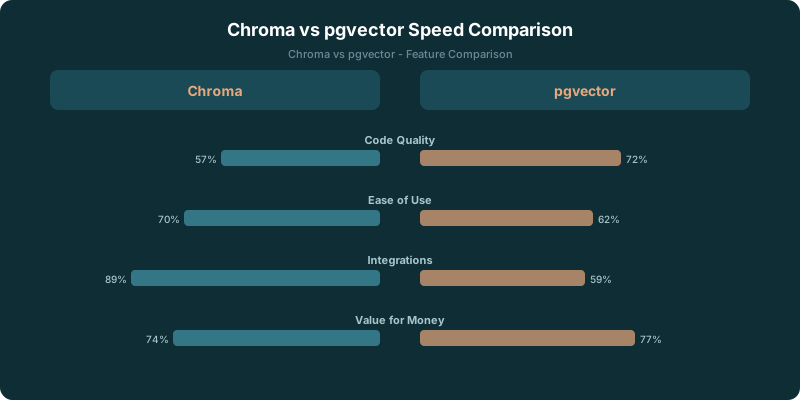
Choose Chroma if: You want a purpose-built vector database that's dead simple to set up, works great for prototyping and small-to-medium production workloads, and has native Python/JS SDKs designed for AI workflows. Chroma gets you from zero to vector search in five minutes.
Choose pgvector if: You already use PostgreSQL and want to add vector search without introducing a new database. pgvector keeps everything in one place: your relational data, your vectors, and your queries. No new infrastructure, no new operational burden.
pgvector vs chromadb comes down to a stack decision. Chroma gives an AI application a focused place to store documents, embeddings, and metadata. pgvector keeps vectors inside PostgreSQL, where they can sit beside the relational records your product already depends on.
Neither option wins universally. A fast prototype and an established application have different constraints, different failure modes, and different people on call when something breaks.
Chroma is built for AI developers who want to create a collection, add documents with embeddings, and query without configuring a database server or writing SQL. pgvector fits teams already using PostgreSQL because vectors live beside relational data and can be queried through existing SQL.
The decision gets clearer when you stop treating a vector store as an isolated infrastructure purchase. Where does the source data live? Who generates embeddings? Does a retrieved result need a relational join before the application can use it? Those questions do more work than a feature checklist.
TLDR
Choose Chroma when you need to move from documents to retrieval quickly and want embedding-oriented defaults. Choose pgvector when PostgreSQL already holds the records your application needs. SQL joins, operational ownership, and migration cost usually decide the standard.
Key Takeaways
- Chroma suits teams building retrieval features quickly from documents and text.
- pgvector suits products whose vectors need to live beside relational records.
- SQL joins give pgvector a material advantage for filtered, permissioned application data.
- Embedding generation belongs with the system that can own failures, updates, and backfills.
- Migration is feasible, but query code and operational habits travel with the data.
pgvector vs Chroma Decision Matrix
The cleanest choice depends on what you are standardizing around.
| Decision area | Chroma | pgvector |
|---|---|---|
| Early retrieval prototype | Strong fit for collections, documents, and embedding-oriented workflows | Works well when PostgreSQL is already part of the prototype |
| Existing application database | Adds a separate data system to operate | Keeps vectors with application data |
| Relational filtering | Metadata filters handle common retrieval needs | SQL can join vector results to relational tables |
| Embedding generation | Built-in embedding functions can handle raw text | Your application or pipeline owns embedding creation |
| Local development | In-memory mode is useful for development and testing | Uses the same PostgreSQL conventions as the rest of the application |
| Production operations | Requires a clear plan for persistence, backup, and service ownership | Fits managed PostgreSQL infrastructure and its existing habits |
| Migration direction | Export vectors and metadata, then adapt query code | Import vectors and metadata, then adapt query code |
Think about the seniority of the decision, too. A developer choosing a local prototype tool has a different job than a platform owner deciding what every product team must operate.
| Team situation | Better default | Why |
|---|---|---|
| Individual developer testing retrieval | Chroma | The collection model gets an experiment moving with less database setup |
| Product team with PostgreSQL application data | pgvector | Vectors can sit beside the records that define customers, permissions, and products |
| Data platform team | Depends on ownership | The answer follows backup, access control, observability, and support boundaries |
| Team building a document-focused AI feature | Chroma | Documents, metadata, and embeddings are the center of the workflow |
| Team adding semantic search to a relational product | pgvector | SQL joins can keep retrieval tied to the application’s source of truth |
The PE Collective comparison uses 10 similar products as an SQL-join example, which is close to the real decision many product teams face: vector search is only the first filter, not the final answer.
If your retrieval result can stand alone as a chunk of text plus metadata, Chroma has an attractive shape. If the result needs to become a product record, an account-scoped resource, or a permission-checked recommendation, pgvector begins pulling away.
The comparison is explicitly framed for 2026 in the PE Collective comparison, and that framing matters because the standardized choice is rarely about whether either tool can perform a nearest-neighbor search. Both can handle large workloads with proper indexing. The harder question is which system becomes ordinary for your team.
When PostgreSQL Integration Wins
pgvector is the stronger default when PostgreSQL already runs the application. That is less glamorous than spinning up a purpose-built vector database, but operational boringness has a lot going for it.
Vectors can live beside customers, documents, products, permissions, events, and every other relational record already in PostgreSQL. Your team can use existing connections, access controls, backups, monitoring, migration practices, and managed database contracts. A second system may still be worthwhile. It should earn the extra operational surface area.
SQL joins between vector results and relational data are pgvector’s central advantage.
Imagine a product search feature. An embedding query finds candidate products, but the application must only return products that are active, available in a specific region, visible to a given customer, and priced under a certain threshold. With pgvector, that work can live in a query that joins vectors to the relational data that defines those constraints.
The PE Collective comparison filters products priced under $50 in its example. That is a small filter, but it illustrates the broader point: semantic similarity often needs business logic attached before it becomes useful.
This matters even more for permissioned data. Retrieval augmented generation can return a semantically relevant document that the current user has no right to see. You can manage this with metadata in any vector store, but PostgreSQL gives teams a familiar place to express account membership, role checks, record state, and other relational rules.
Chroma can store metadata and apply filters. That may be enough for a document library, an internal knowledge prototype, or a focused retrieval service. Trouble starts when metadata becomes a shadow version of the application database. At that point, someone must keep two representations of the same business state synchronized.
That person is often the application engineer who had hoped to spend the week on the AI feature.
PostgreSQL integration also wins when the embedding pipeline needs a clear owner. pgvector does not generate embeddings for you. Your application, worker, or data pipeline creates them and writes them to the database. That sounds like additional work because it is additional work.
It also makes responsibility obvious.
A source record changes. The system marks its embedding stale. A job creates a replacement. The application records the model or version used. A failed job can be retried, inspected, or backfilled through the same workflow that handles other application data. There is no mystery about where the source document ends and the vector index begins.
That ownership model suits teams with mature application infrastructure. They already have queues, workers, migrations, observability, and a database owner. pgvector slots into that world without asking everyone to learn a separate data product.
The pgvector tool profile is worth evaluating alongside 22,000+ job postings published weekly by PE Collective in its comparison data. The number does not choose a database for you. It does show why the operational standard matters once a retrieval feature becomes part of a product people depend on.
When Chroma Speeds Up a Prototype
Chroma is appealing because it starts with the concepts an AI developer already has in hand: text, documents, metadata, embeddings, and queries.
Create a collection. Add documents. Ask for similar material. That workflow is direct. You do not need to design a relational schema before proving that retrieval improves an answer, search result, or recommendation.
Chroma’s built-in embedding functions can handle raw text. That is useful when the first version of a feature should answer a practical question quickly: does semantic retrieval help at all?
For an in-memory development environment, Chroma is especially convenient. Developers can test chunking strategies, metadata choices, and retrieval behavior without building a persistent database setup around every experiment. The feedback loop stays close to the application code.
This is where Chroma wins. The product model matches the job.
A prototype often has uncertain source data, changing chunk rules, and a retrieval prompt that will be rewritten repeatedly. Forcing that work through a production PostgreSQL model too early can turn an experiment into an infrastructure project. Chroma lets a developer discover whether the experience is worth operationalizing.
That does not make Chroma a toy. It makes it a good fit for a focused system where embedding-centric retrieval is the main problem.
The Chroma tool profile can sit beside the 2,700+ subscribers identified by PE Collective’s newsletter on the same comparison page. The audience count is not proof of a technical claim. It is a reminder that a comparison page should help a developer choose a stack, not pretend every workload needs the same answer.
Chroma also has a clear advantage when the vector collection is separate from the core product database by design. An internal research tool, a support-content search layer, or a document corpus may not need deep relational joins. The application can retrieve chunks, inspect metadata, and pass the best material to a model.
Keep the boundary honest. If Chroma holds only retrieval-specific data, its simplicity stays valuable. If it begins carrying customer state, authorization rules, and product truth copied from PostgreSQL, the convenience bill arrives later.
Embedding-pipeline ownership deserves extra scrutiny here. Chroma can reduce the setup burden because built-in embedding functions can work from raw text. That is useful for development. Production teams still need answers to basic operational questions.
Who chooses the embedding model? Who records the version? What happens when a source document changes? How do you re-embed a corpus after changing chunking rules? Which service owns retries when an embedding request fails? How do you detect that metadata and source data no longer agree?
A prototype can defer some of those decisions. A standard cannot.
Relational Joins and Embedding-Pipeline Ownership
Vector search is usually one stage in a larger application query.
The embedding identifies candidates. The application filters them by product rules. It may join the result to a customer, document owner, subscription state, inventory record, or access policy. It may also need a canonical record for display.
pgvector keeps those steps close together. The vector and the relational record share a database, and SQL can express the relationship. This reduces the need to copy business fields into a separate vector-store metadata model.
That does not mean every query should become a sprawling SQL statement. The useful point is simpler: the database can answer retrieval and relational questions from one source of truth.
Chroma works best when the retrieval system has a narrow contract. Give it documents and metadata. Ask it for relevant candidates. Let another layer handle the rest. That architecture can be clean, especially when the retrieval corpus is independent from application records.
The failure mode is unclear ownership.
When raw text enters Chroma through built-in embedding functions, developers can get useful results fast. When a source system changes, though, someone must decide how the collection updates. That pipeline may be a lightweight worker. It may be a formal ingestion service. Either way, it needs an owner.
pgvector makes the same work visible because the application has to generate and store embeddings itself. Some teams see that as friction. I see it as a useful forcing function when the feature is headed toward production.
The right choice follows the source of truth. If PostgreSQL owns the records and the product depends on relational rules, pgvector keeps the system legible. If the AI feature owns an independent corpus and needs quick iteration, Chroma keeps the first version lighter.
Migration and Production Checklist
Migration between Chroma and pgvector is possible because both systems can transfer vectors and metadata. The data move is only part of the project.
Query code changes. Filtering behavior changes. The application may need a different way to represent metadata, distance calculations, indexes, and result handling. A team moving from Chroma to pgvector should expect to rewrite the retrieval layer around SQL and PostgreSQL conventions. A team moving the other direction should decide which relational constraints belong in metadata and which remain in the application.
Before standardizing, check the following.
- Identify the canonical source for every field used in retrieval, filtering, and display.
- Decide who owns embedding generation, retries, backfills, and model-version changes.
- Test the retrieval query with the filters the product needs, including permissions and record state.
- Create the index plan before measuring performance. Both systems need proper indexing at scale.
- Define backup, restore, observability, and access-control expectations.
- Test development workflows separately from production workflows. Chroma’s in-memory mode is useful for development and testing, while production requires persistence and operational ownership.
- Run a migration rehearsal with representative vectors, metadata, and query behavior.
- Keep the old path available until the new retrieval results meet the product’s requirements.
Production readiness is not a badge a database earns once. It is the set of routines your team can maintain after the prototype has become someone’s daily workflow.
Chroma can be production-ready when the collection boundary is clear, persistence is planned, and the team owns ingestion and operations. pgvector can be production-ready when PostgreSQL is sized, indexed, and operated for the workload. Both paths demand discipline. They just demand it in different places.
A team with managed PostgreSQL infrastructure has a strong reason to start with pgvector. A team proving a new document-retrieval experience has a strong reason to start with Chroma. The expensive mistake is standardizing before you know where business rules, source data, and embedding ownership belong.
The Weaviate tool profile provides another comparison point alongside the 10 similar products used in the PE Collective comparison. But the choice between Chroma and pgvector stays grounded in your existing infrastructure.
Use Chroma when the retrieval layer should move quickly and remain focused on documents and embeddings. Use pgvector when vectors belong inside the relational application you already operate.
Can your retrieval system stay independent, or will it spend its life joining back to PostgreSQL?