The Chroma vector database is free when you run the open-source package yourself. Chroma uses the Apache License, while Chroma Cloud is the paid hosted option. New Chroma Cloud accounts get $5 in free credits, and PE Collective rates Chroma 4.1/5.
That split explains most of Chroma's appeal. You can start locally with almost no ceremony, then decide later whether a hosted service is worth paying for. Four lines of Python and you have a working vector database.
Chroma is the SQLite of the vector world, and that's meant as a compliment. It is Python-native, runs in memory by default, and gets out of your way. A project that needs to test retrieval, embeddings, or a small RAG workflow can spend its energy on the application instead of standing up infrastructure.
Our verdict: Chroma earns its 4.1/5 rating because it makes the first useful version of vector search unusually easy to build. It fits RAG experiments, internal tools, local development, and teams that want a working system before they commit to a larger operating burden. Production is where the decision gets more specific.
TLDR
Chroma is free to self-host under its open-source license, while Chroma Cloud gives new accounts $5 in credits. It is one of the fastest ways to add vector search to a Python project. Production teams should decide whether they want to own operations or pay for managed infrastructure.
What is Chroma?
Chroma is an open-source vector database designed around developer experience. It's Python-native, runs in-memory by default, and gets out of your way. Where Pinecone requires a cloud account and Weaviate requires Docker, Chroma requires a pip install. That's it.
The project positions itself as the "AI-native open-source embedding database." In practice, it's the vector database that shows up in every tutorial, quickstart guide, and proof-of-concept. That's not an accident. Chroma was designed to minimize the distance between "I want to try vector search" and "I have vector search working."
Is Chroma Free?
Yes. Chroma is free when you self-host the open-source package.
That answer needs a qualifier because “free” can mean two different things in a database evaluation. The local package is free to run, but the machines, storage, monitoring, backups, and engineering time still belong to you. Chroma removes the software license bill. It does not remove the work of operating a service once your application depends on it.
Chroma Cloud changes the arrangement. You pay for managed infrastructure rather than assembling the operational layer yourself, and new accounts receive $5 in free credits. That is useful for trying the hosted product without treating a prototype as a procurement event.
The open-source route is the better answer for a developer who wants to learn whether retrieval improves an application at all. Install the package, load a small collection, run queries, inspect the results, and find out whether the product experience is better. A managed database cannot compensate for irrelevant documents, weak chunking, or embeddings that do not match the job.
The hosted route becomes attractive when the database has crossed from experiment to dependency. If a customer-facing assistant needs search to work every day, somebody owns availability, recovery, access control, and the dull failures that appear at inconvenient times. That somebody can be your team or the vendor.
Chroma's open-source model gives you an unusually clean way to postpone that call. Start local. Build enough to know what you need. Then choose the level of ownership that matches the application.
Why Developers Start With ChromaDB
ChromaDB has become a common starting point because the setup has very little friction. PE Collective says pip install chromadb and you're running in 30 seconds. That sentence captures the product better than a long architecture diagram.
The database is built around the developer who already has a Python project and wants vector search inside it. You create a collection, add documents and embeddings, attach metadata, and query for similar items. The model is easy to understand because it resembles work developers already do with local tools and application libraries.
That matters early in a project. Most vector-search experiments fail for product reasons, not because the database could not ingest data. The answer quality may be poor. Users may not ask questions that benefit from retrieval. The source material may be too stale or too inconsistent. A lightweight database lets you test those risks before spending days on a platform decision.
Chroma also makes local work pleasant. You can develop against a small collection, inspect documents directly, adjust metadata, and rerun the workflow. There is no mandatory cloud account between an idea and a test.
The easy start can become a trap if a team treats it as proof that the production decision is also easy. It is not. A prototype proves that retrieval may be useful. It does not answer who maintains the data, how failures are handled, or how the system behaves when multiple parts of the application need it at once.
That distinction is where many Chroma reviews become too generous. Chroma is excellent at minimizing the distance between wanting vector search and having it work. Production requirements still need to be named plainly.
Key Features
In-Memory and Persistent Modes
Chroma runs in two modes. In-memory mode stores everything in RAM for maximum speed during development. Persistent mode writes to disk so your data survives restarts. Both modes use the same API. Start with in-memory for prototyping, switch to persistent when you need durability. No code changes required.
Python-Native API
Chroma's API is Python through and through. Create a collection, add documents with metadata, and query by similarity. The API uses Python data structures (lists, dicts) rather than requiring you to learn a custom query language. If you're building in Python, Chroma feels like a natural extension of your codebase rather than an external service.
import chromadb
client = chromadb.Client()
collection = client.create_collection("my_docs")
collection.add(documents=["doc1", "doc2"], ids=["1", "2"])
results = collection.query(query_texts=["search term"], n_results=2)
That's a working vector database in five lines. No configuration files, no connection strings, no schema definitions.
Automatic Embedding
By default, Chroma uses a local embedding model to vectorize your documents automatically. You add text, Chroma creates the vectors. You can also bring your own embeddings if you prefer a specific model, or configure Chroma to use OpenAI, Cohere, or other embedding providers.
Framework Integrations
Chroma is a first-class citizen in the LangChain and LlamaIndex ecosystems. It's the default vector store in many of their examples and tutorials. If you're following a LangChain RAG tutorial, there's a good chance it uses Chroma. The integrations are well-maintained and straightforward.
Metadata Filtering
Like other vector databases, Chroma supports attaching metadata to documents and filtering on it during queries. Combine vector similarity with where clauses to narrow results by category, date, source, or any other attribute. The filtering syntax uses Python dicts and supports comparison operators.
Chroma Cloud Pricing in 2026
Chroma Cloud is the managed hosting option. It provides a serverless, distributed architecture so you don't have to run Chroma on your own infrastructure. Chroma Cloud is the managed option for teams that want Chroma without owning every part of the operating environment. New accounts receive $5 in free credits, which gives developers room to evaluate the service before usage becomes a bill.
The decision depends on whether the credit exists. It is what you are buying after the trial period: managed infrastructure, less operational ownership, and a route to keep using the same Chroma-centered workflow as the project grows.
That makes Chroma Cloud a sensible option for a team that has already validated its retrieval use case and does not want to turn database maintenance into a side job. It is less compelling for someone who only needs a local prototype, a disposable experiment, or a private development environment where self-hosting is already simple.
You should compare the hosted cost against the cost of ownership you are avoiding. A self-hosted package is free, but a production database has demands that never show up in a quickstart: durable storage, backups, access controls, deployment choices, observability, and a plan for recovery. Every team has a different tolerance for those jobs.
For a closer look at the hosted offering and how to think about the decision, see our Chroma pricing breakdown. The decision depends on whether Chroma Cloud is cheap in isolation. It is whether the managed path costs less than distracting your own engineers from the product.
Limitations
Chroma's simplicity comes with tradeoffs. There's no built-in hybrid search (keyword + vector). There's no native multi-tenancy. Replication and high availability aren't part of the open-source offering. Performance at scale (millions of vectors, high query throughput) doesn't match dedicated solutions like Pinecone or Weaviate.
These aren't bugs. They're scope decisions. Chroma optimized for developer experience and getting started fast. Production features at massive scale aren't the primary goal, at least not yet.
What Changed in Chroma in 2026
Chroma Cloud launched in the first quarter of 2026. Before that, the Chroma story was mostly about an approachable open-source vector database for developers building locally or operating their own deployment.
The cloud launch gives Chroma a more complete answer for teams that begin with a prototype and later want managed infrastructure. That is a meaningful change because the handoff from local success to production ownership has always been the uncomfortable part of the vector database category.
It also puts Chroma in a more direct comparison with vendors that began as managed services. Those vendors have always sold operational relief alongside vector search. Chroma can now offer a hosted path without abandoning the open-source route that made it popular.
The question for buyers is whether that flexibility matches their team. A small engineering group may value a local package for early work and a hosted option later. A company with established database operations may prefer to self-host for longer. A team already committed to a managed platform may have little reason to switch unless Chroma's developer experience changes the speed of delivery.
Performance for large collections improved. Collections with 500K+ vectors are noticeably faster on both inserts and queries compared to a year ago. Multi-tenancy support got better, though it's still not at the level of Pinecone or Weaviate for true SaaS isolation.
The JavaScript/TypeScript client caught up to the Python client in feature coverage. If you're building a Node.js backend, Chroma is now a first-class option rather than a Python-only tool. The core project remains Apache 2.0 licensed and fully open source. No license rug-pulls here.
Chroma vs Managed Vector Databases
PE Collective ran the same workload across each engine: 1M vectors at 1536 dimensions with mixed read/write patterns. That is the right way to compare a category full of confident claims. A vector database is not useful because its marketing page says it is fast. It is useful when it fits the workload, the team, and the operational model.
| Database | Best fit | Hosting model | Cost detail from the available data |
|---|---|---|---|
| Chroma | Python prototypes and teams that want an open-source starting point | Self-hosted or Chroma Cloud | Self-hosted package is free; Cloud accounts get free credits |
| Pinecone | Teams that want a managed-first vector database | Managed | Usage-based beyond the free tier |
| Weaviate Cloud | Teams choosing a hosted service with a conventional monthly starting point | Managed | Monthly starting point available |
| Qdrant Cloud | Teams choosing a hosted service with a conventional monthly starting point | Managed | Monthly starting point available |
Pinecone's managed tier is usage-based from $0.33/hr beyond its free tier. Its free tier caps at 100,000 vectors, with the Starter tier at $70/month. That structure makes Pinecone easy to understand for a team that wants managed infrastructure from the beginning, but it also means cost becomes part of the architecture discussion sooner.
Weaviate Cloud and Qdrant Cloud start around $25/mo. Those options make sense when the team wants a hosted service with a more familiar monthly entry point and does not need Chroma's local-first development style.
Chroma wins when the first job is to get retrieval working inside a Python application with minimal setup. Managed alternatives win when the team has already decided that operating the database is not part of its comparative advantage.
There is no prize for running your own infrastructure if it turns a product team into an unwilling database team. There is also no prize for paying for a managed service before you know whether vector search belongs in the product.
Our best vector databases guide compares the broader field. If your choice has narrowed to a database that lives beside your application versus one that lives in your existing Postgres stack, read Chroma vs pgvector next.
When Chroma Makes Sense (and When It Doesn't)
Use Chroma when you're prototyping a RAG app and want a vector database running in five minutes. Use it when you're building demos, running in development, or shipping a small production app with under 100K vectors. Use it when you want an embedded database with zero external dependencies. If your app is a Python script or a small web service, Chroma fits like a glove.
Don't use Chroma when you need more than 1 million vectors. Don't use it when you need high availability, automatic replication, or guaranteed uptime SLAs. Don't use it when you're running a multi-tenant SaaS product where tenant data isolation is a hard requirement. And don't use it when your production system needs to handle thousands of concurrent queries per second.
The sweet spot is development through early production. Chroma gets you moving fast with zero friction. Once your dataset outgrows it or your reliability requirements tighten, migrate to Pinecone, Weaviate, or pgvector. The migration isn't painful because vector database APIs are similar enough across tools.
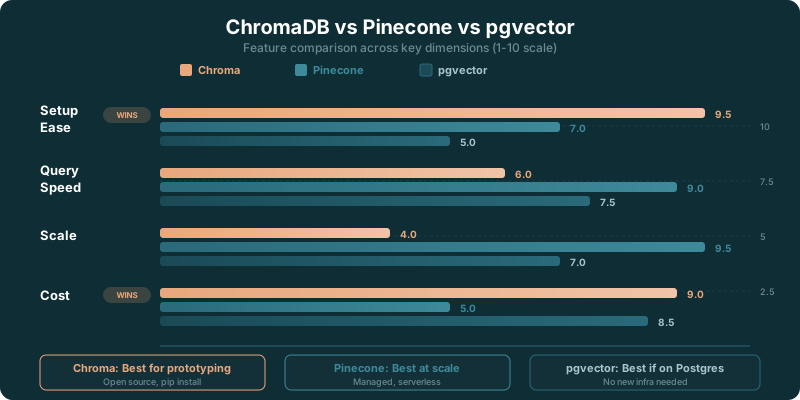
Chroma vs Pinecone vs pgvector: Quick Decision Guide
Picking a vector database comes down to what you value most. Here's the short version.
- Need zero ops? Go with Pinecone. You create an index and forget about infrastructure. It costs money, but it saves you from managing anything.
- Need open source and embedded? Go with Chroma. Pip install, import, done. No servers, no cloud accounts, no billing surprises.
- Already run Postgres? Go with pgvector. One extension, and your vectors live next to your application data. SQL joins between vector results and relational tables are the killer feature.
- Need hybrid search (keyword + vector)? Go with Weaviate. It's the only option here with built-in BM25 and vector search in the same query.
- Budget is $0/month? Chroma (self-hosted) or pgvector (if you already have Postgres). Both are free and open source.
Most teams prototype with Chroma, evaluate with pgvector if they run Postgres, and land on Pinecone when they need managed production infrastructure. That's not a failure of planning. It's a reasonable progression.
Chroma vs Pinecone
Pinecone is the managed production choice. Chroma is the lightweight development choice. Pinecone handles billions of vectors with managed infrastructure. Chroma handles development and small-to-medium workloads with minimal setup. Start with Chroma, move to Pinecone when scale demands it.
Chroma vs pgvector
pgvector makes sense if you already run PostgreSQL. Chroma makes sense if you want the fastest possible setup without existing infrastructure. Both are free. The choice usually depends on whether you have a Postgres database already.
Where Chroma Fits Best
Chroma is a strong fit when you need to move from idea to working retrieval quickly. That includes a RAG prototype, a semantic search feature, an internal knowledge assistant, or a local tool that needs to find related documents.
It is especially useful when the application itself is still changing fast. During that stage, the best database is often the one that lets you test document formats, metadata, chunking strategies, and retrieval behavior without turning every iteration into an infrastructure project.
Chroma also works well for teams that prefer to keep their early stack legible. A Python package inside a Python application has fewer moving parts than a separate hosted service, a new account, and a deployment workflow. That simplicity makes debugging easier when the first results are disappointing.
The product is less automatic once the application reaches production expectations. You need answers about persistence, uptime, access, data lifecycle, and the owner of an incident. Chroma Cloud may be the cleaner path for teams that want to keep the familiar developer experience without taking on every operational task.
Self-hosting remains attractive when you have the right operational capabilities, need control over where data lives, or simply prefer to run the service yourself. The open-source option keeps that choice available.
Chroma's Production Tradeoffs
Chroma's strength in prototyping is not a minor feature. It is the product's main advantage. Developers can prove whether semantic retrieval is useful before committing to a more complicated platform.
But production has a way of making implicit choices expensive. A vector database becomes part of the application path. Documents need to be updated or removed. Retrieval needs to remain predictable. Permissions may need to flow through the system. Someone has to know what happened when the service returns an empty result set at the worst possible moment.
Those are not arguments against Chroma. They are arguments for treating the deployment model as a product decision, not a package-install decision.
A team evaluating Chroma should ask a few direct questions. Is this retrieval feature experimental or customer-facing? Who will operate the database? How sensitive is the data? Do we need a hosted service now, or are we paying to avoid a problem we do not yet have?
Chroma is legitimate because it is good at a specific job: making vector search accessible to developers. The rating, the open-source package, and the Cloud path all support that conclusion. The right deployment choice depends on how much of the database job your team wants to own.
✓ Pros
- Simplest setup of any vector database: pip install, import, done
- In-memory mode is perfect for development, testing, and prototyping
- Native integrations with LangChain and LlamaIndex work out of the box
- Python-native API feels natural, no new query language to learn
- Lightweight enough to embed directly in your application
✗ Cons
- Limited scalability for large production workloads with millions of vectors
- No built-in hybrid search or BM25 keyword matching
- Chroma Cloud is still relatively new and evolving
- Missing production features like multi-tenancy and replication that Weaviate offers
Who Should Use Chroma?
Ideal For:
- Developers prototyping RAG applications who want a vector database running in minutes, not hours
- Small to medium projects with under a million vectors where simplicity matters more than scale
- Tutorial and learning projects where Chroma's low setup cost lets you focus on the AI logic
- Applications using LangChain or LlamaIndex where Chroma is often the default vector store in examples and tutorials
Maybe Not For:
- Large-scale production systems with millions of vectors where Pinecone or Weaviate handle the load better
- Teams needing hybrid search since Chroma doesn't combine keyword and vector search like Weaviate does
- Multi-tenant SaaS products where native tenant isolation features aren't available in Chroma
Our Verdict
Chroma is the vector database you reach for when you want to start building instead of configuring. pip install chromadb, create a collection, add documents, query. You can go from zero to working RAG prototype in under ten minutes. No Docker, no cloud accounts, no API keys for the database itself. That developer experience is Chroma's defining feature.
The limitations show up at scale. Chroma works well for thousands to hundreds of thousands of vectors. Once you're pushing into the millions with high query throughput, you'll want Pinecone or Weaviate. Chroma Cloud is evolving to address the production gap, but it's still catching up to established managed offerings. The smart play is to prototype with Chroma and migrate to a production database when your scale demands it. The APIs are similar enough across vector databases that the migration isn't painful.
Key Takeaways
- Chroma is free to self-host under its open-source license.
- Chroma Cloud gives new accounts $5 in free credits.
- Chroma is a strong choice for Python-first prototypes and early RAG work.
- Managed alternatives are a better fit when operational ownership is the bigger problem.
- Chroma Cloud gives teams a hosted path after local development proves the use case.
Sources
- PE Collective Chroma review: $5 in free credits and 4.1/5
- PE Collective Chroma pricing: 30 seconds
- PE Collective vector database benchmark: 1M vectors at 1536 dimensions
- PE Collective Pinecone pricing: $0.33/hr
- PE Collective managed vector database pricing: $25/mo
- PE Collective AI API free tiers: 100,000 vectors and $70/month