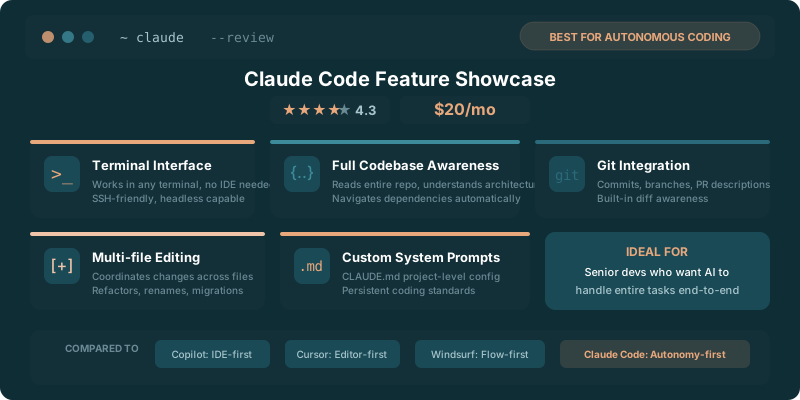
Claude Code costs $20 according to the Claude Code Review, and that price makes sense only if you want an agent working from the terminal inside a real repository.
Autocomplete helps with the line under your cursor. Claude Code can inspect the surrounding code, search the project, change related files, run commands, and report back on what happened. That creates a different workflow. You give it a task, then judge the diff, test output, and tradeoffs.
The 2026 Claude Code review describes it as a terminal coding agent. That is the core buying decision. Developers who live in an editor and want quick suggestions may find the terminal overhead annoying. Developers who spend their day tracing logic through a repository may find it far more useful than another chat window.
TLDR
Claude Code is a terminal agent for repository work, with a listed $20 price figure. It can read code, make multi-file edits, run tests, and handle git tasks. Buy it when terminal-driven implementation fits how you already work.
Key Takeaways
- Claude Code works from the terminal, where it can inspect and change a repository.
- The listed $20 price figure fits developers who want help with implementation work across files.
- Test execution and git commits make it useful for reviewing a complete change, not a single suggestion.
- Editor-first developers may prefer tools that keep the interaction beside their code.
What Claude Code Does in a Terminal
Claude Code starts where many development tasks end up anyway: the command line. You install it, open a repository, describe the job, and let it examine the project before it proposes or makes changes.
That repository access matters because code rarely lives in one file. A request that sounds small can touch a component, a shared type, a test fixture, a configuration file, and a deployment script. A tool that only sees the open buffer leaves the developer to reconstruct the rest of the dependency chain.
Claude Code can read files, write files, search the codebase, and execute commands. The 2026 Claude Code review frames it as a terminal coding agent, which puts those actions in the same place developers already use for package scripts, test runners, git, and project setup.
The useful workflow is concrete. Ask it to find where an API response gets transformed. Ask it to trace a failing validation rule. Ask it to replace an old helper across the repository while preserving its callers. The agent can gather context before writing code, rather than treating each prompt as a blank slate.
That does not remove the need for judgment. Repository access gives the agent more evidence, but it also gives it more room to make a change that looks tidy locally and causes trouble elsewhere. The developer still owns the architecture, the acceptance criteria, and the final diff.
The terminal also changes the pace of the interaction. You are not selecting a completion every few seconds. You are handing off a bounded piece of work, reading its explanation, inspecting what changed, and deciding whether to keep going. For work with a clear goal and several moving parts, that can feel less like autocomplete and more like pairing with someone who has permission to search the whole project.
The catch is obvious. If your work is mostly drafting a function, navigating one file, or learning an unfamiliar language, a terminal agent can feel like bringing a toolbox to tighten one screw. Claude Code earns its place when the task involves codebase context.
Multi-File Editing, Tests, and Git Workflow
Multi-file work is where Claude Code has a chance to pull away from a chat assistant. A normal coding chat can suggest an answer. You then paste it into the right place, find the other places it affects, update tests, and deal with the fallout.
Claude Code can do more of that loop inside the project. It can locate the relevant files, make edits where they belong, and show the result as a change set. The value is not that it writes every line perfectly. The value is that it can carry context across a task that would otherwise require constant copy-pasting.
Imagine a repository with a renamed field moving through a frontend, an API client, a validation layer, and tests. The agent can search for the old field, identify the live call sites, update code, then run the project’s checks. That is a better fit for an agent than asking for a generic code snippet and hoping the project accepts it.
The 2026 Claude Code review says Claude Code can run tests. That is a meaningful boundary between a tool that produces code and a tool that can participate in implementation. Tests are where a plausible answer meets the actual repository.
Test execution does not make every change safe. A passing suite can miss a broken edge case, a design regression, or an assumption that never made it into a test. Still, having the agent run the same checks you would run changes the quality of the conversation. You can ask why a test failed, have it inspect the failure, and decide whether the fix belongs in the implementation or the expectation.
Git fits the same pattern. The 2026 Claude Code review says Claude Code can make git commits. That is useful when the change is coherent and you want the agent to package its work with a meaningful message.
Do not hand over commits casually. A commit is a record other people will read later, often while they are tired and trying to understand why something broke. Review the staged changes. Read the diff. Make sure the message describes the actual change rather than the optimistic version of it.
A sensible Claude Code loop looks like this in practice:
- Give it a bounded task with an observable outcome.
- Let it inspect the relevant code and explain its plan.
- Ask it to make the change across the files it identifies.
- Run the project checks and inspect failures with it.
- Read the diff before accepting or committing the work.
The last step is where senior developers will either love or distrust the tool. Claude Code can make work move faster, but speed without diff review is how a small cleanup becomes a Friday afternoon incident.
| Developer context | Claude Code fit | Why |
|---|---|---|
| Junior developer learning a codebase | Useful with supervision | It can explain repository structure, but its output needs close review |
| Mid-level developer shipping scoped changes | Strong fit | Repository search, edits, tests, and git reduce repetitive setup work |
| Senior developer handling architecture | Selective fit | It can handle implementation chores while the developer owns the design |
| Developer writing a small isolated function | n/a | An editor assistant may be faster for a narrow local change |
Claude Code also changes code review habits. The agent may produce a broad diff quickly, which means reviewers need to demand a clear explanation of intent. What changed? Why did each file need to change? Which tests ran? What did the agent leave alone?
Those questions apply to every pull request. They become more valuable when a tool can edit several areas of a repository in one pass.
Claude Code Cost and Workflow Fit
The page lists a $20 price figure in the Claude Code Review. That is inexpensive if the tool regularly saves you from repository archaeology, repeated search-and-replace work, and the tedium of wiring tests around a small feature.
It is expensive if it becomes a novelty you open for tasks your editor already handles faster.
The best way to evaluate the cost is to look at your actual work. Do you frequently need to understand code written by someone else? Do feature requests touch several files? Do you spend time translating a ticket into a sequence of searches, edits, test runs, and git commands? Claude Code has a clean case there.
The tool is less compelling for developers who work mostly in small scripts, isolated notebooks, or an editor-driven flow with a mature completion tool. Terminal interaction adds friction when the task does not need repository-wide context.
The pricing question also gets tangled up with model usage, but the practical question is simpler: will you delegate enough real implementation work to justify having the agent available? A tool can look cheap in a comparison chart and still waste money if it sits unused.
Claude Code works best when you treat it as an implementation partner with a defined lane. Give it migration work, test repair, repetitive refactors, project exploration, and changes where the diff can be checked against clear requirements. Keep product decisions, security-sensitive changes, and architectural calls under direct human control.
The Claude vs ChatGPT for coding comparison is useful alongside the $20 figure because the Claude Code Review focuses on a terminal coding agent rather than a general chat workflow. One tool may be better for thinking through a problem; another may be better for carrying out the repository work.
A $20 tool does not need to replace every part of your development process. It needs to own a frustrating, recurring slice of it. For Claude Code, that slice is the path from “make this change” to a reviewed diff with tests behind it.
When an Editor-Based Tool Is a Better Fit
Editor-based tools win when the job stays close to the cursor. They can offer completion, inline chat, quick refactors, and a visual view of the surrounding code without asking you to switch modes.
That matters for exploratory work. You may be sketching an interface, learning a library, or refining a function where the open file contains most of the context. In those moments, a terminal agent can feel slower because it asks you to articulate a task that you are still discovering.
The distinction is not terminal versus editor as a matter of ideology. It is local context versus repository context.
Use an editor-based tool when you need rapid back-and-forth while writing. Use Claude Code when the task requires searching, changing, testing, and validating work across the project. Plenty of developers will use both, because the jobs are different.
The Cursor vs Claude Code comparison belongs in the decision when the $20 price figure from the Claude Code Review looks appealing but you spend most of your time inside an editor. Cursor keeps the interaction near the code you are actively editing. Claude Code gives the terminal a more central role.
That difference affects trust as much as convenience. An editor can make you feel close to every change because you see it arriving in context. A terminal agent can make larger progress without requiring constant intervention, but then your review discipline has to catch up.
The best developers are already switching modes all day. They inspect files, search a repository, run tests, use git, and return to the editor. Claude Code fits that existing rhythm when it can take ownership of a contained stretch of the loop.
It is a worse choice when the terminal is peripheral to how you work. If you dislike command-line workflows, forcing yourself into one for the sake of an AI agent is unlikely to last. Tools that fit your habits get used. Tools that demand a new ceremony get abandoned after the first week.
Claude Code wins when repository work is the bottleneck. Editor-based tools win when the bottleneck is writing and revising code in front of you. The important question is where your development time disappears.
The Verdict
Claude Code is worth considering for developers who want an AI agent to operate inside a repository from the terminal. The 2026 Claude Code review describes a tool that can read, write, search, run tests, and make git commits, which gives it a credible role in multi-file implementation work.
The $20 price figure is easy to justify when the agent handles recurring repository tasks that you can review with clear diffs and test results. It is harder to justify if your work rarely leaves the active file.
Use it for bounded work with a visible finish line. Read every meaningful diff. Keep your own standards for tests, commits, and architecture. Then decide whether the terminal agent is saving time or simply making the same work feel more futuristic.