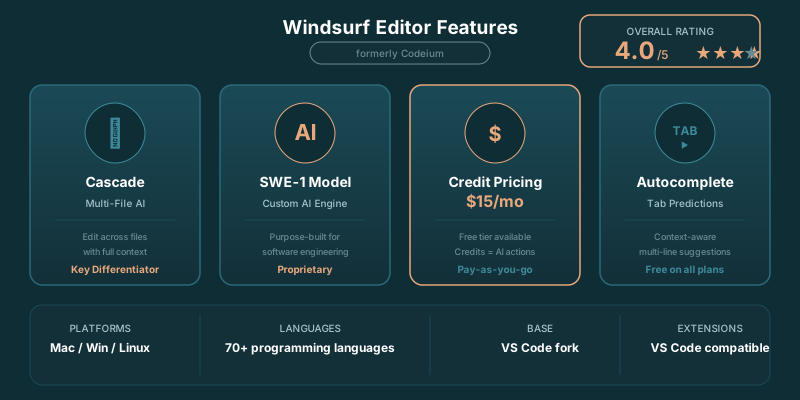
This Windsurf review is for developers deciding whether the editor deserves a place in their daily workflow. Windsurf pairs familiar VS Code conventions with Cascade, an agent that can work across a codebase instead of merely finishing the line in front of your cursor.
The short version: Windsurf is a strong daily AI editor for developers who want capable multi-file help without paying Cursor prices. Cursor remains the better pick when your work lives in dense, fragile refactors where planning and judgment matter more than speed.
TLDR
Windsurf is a capable AI code editor built around Cascade, a useful agent for everyday multi-file work. Its credit system makes the free tier easy to test and keeps Pro below Cursor’s monthly price. Choose Cursor when intricate refactoring dominates your week.
What Is Windsurf?
Windsurf is a VS Code-based AI code editor from the company formerly known as Codeium. It combines inline Tab completions with Cascade, an agent that can inspect a codebase, edit files, run commands, and work through larger changes from a conversational panel.
The rebrand from Codeium to Windsurf happened in late 2024, and it confused some people. But the product underneath kept improving. If you tried Codeium a year ago and weren't impressed, Windsurf today is a different story.
That makes Windsurf more useful than a simple autocomplete tool. A completion can save a few keystrokes. Cascade can trace a request through the relevant files, make coordinated edits, explain its choices, and leave you with a diff worth reviewing.
The editor feels familiar if you already work in VS Code. Your project structure, terminal habits, extensions, and Git workflow remain close at hand. That familiarity is part of the product. Developers evaluating AI-native editors rarely want a new ritual around opening a repository.
Windsurf’s bet is that an AI editor should stay out of the way until you need it, then take on meaningful implementation work. Tab handles the small stuff. Cascade handles the broader request.
That split works well when you are moving through normal product work: adding a component, following an existing pattern, updating a service, writing tests, or chasing down the files involved in a modest feature. The editor gives you a faster path from idea to diff without asking you to become an operator of some elaborate agent console.
The Verdict First
Windsurf is one of the better choices for developers who want an AI editor to carry real weight in day-to-day work. Cascade is useful, the VS Code foundation lowers the learning curve, and the pricing gives it an edge for people who want a serious editor without drifting into an expensive stack of subscriptions.
Its strengths are practical.
Cascade is good at gathering context from a repository and turning a plain-language request into coordinated edits. The inline completion experience is fast enough to become habitual. The interface keeps the agent close to the editor rather than moving the work into a separate environment. You can make progress without spending half the session explaining your codebase from scratch.
Windsurf also wins on price for developers comparing the mainstream AI-native editors. The PE Collective Windsurf review says Windsurf’s price advantage over Cursor is $15 vs $20 per month. That gap will not transform a company budget, but it adds up for an individual developer choosing a tool they will use every workday.
There are tradeoffs.
Cascade can move quickly through routine changes, but speed creates its own review burden. An agent can identify the right files and still misunderstand a local convention, a hidden dependency, or the reason an awkward-looking abstraction exists. Treat its output like a fast contributor’s pull request. Read the diff. Run the tests. Check the edge cases it had no way to infer.
Cursor still has the stronger reputation for intricate refactoring work. If you spend most of your time untangling old systems, redesigning major flows, or making changes where a wrong assumption can create a quiet production bug, Cursor may justify the higher monthly cost. Windsurf is better suited to the steady stream of implementation work that fills most engineering weeks.
Developers who should skip Windsurf include people who only want autocomplete inside an existing editor, teams with strict approval requirements around AI-assisted code, and anyone whose work involves highly sensitive repositories without a clear policy for using these tools. The editor can be productive. Productivity is not permission.
For most multi-file work, PE Collective’s Windsurf review estimates that Windsurf delivers 90% of Cursor's capability at 75% of the cost. That is the cleanest way to understand the product. Windsurf does not need to beat Cursor in every difficult case. It needs to handle the work developers do most often, at a price that makes the choice easy.
Where Cascade Earns Its Keep
Cascade is the reason to consider Windsurf rather than treating it as another VS Code fork with AI autocomplete pasted on top.
Give it a bounded request and it can inspect the repository, find related code, propose a plan through its actions, and make changes across files. That is useful for the work that often creates friction without demanding deep architectural invention: adding validation, extending a feature already present elsewhere, updating a set of related components, writing a test around an existing behavior, or tracing a bug through a familiar code path.
The value comes from context gathering. Developers lose time locating the relevant files, rebuilding a mental model of code they last touched months ago, and confirming how a project already handles a common task. Cascade can shorten that setup phase. It gives you a starting point and a draft implementation while you stay in the editor.
Its effectiveness rises with a well-organized repository. Clear names, predictable patterns, focused modules, and a test suite give an agent something useful to follow. A chaotic codebase produces chaotic prompts, and no coding agent has discovered a magic cure for that problem.
Windsurf has also updated Cascade with improved multi-step reasoning. The practical promise is simple: the agent should hold onto a longer chain of work with fewer dropped assumptions. That matters when a change crosses frontend, backend, tests, and configuration.
Still, agent output needs supervision. A polished explanation can make a wrong change feel more convincing than it is. The risk is rarely an obvious syntax error. It is the plausible edit that quietly breaks a special case, duplicates a pattern the team was trying to retire, or solves the stated request while missing the actual business rule.
Use Cascade for momentum. Keep ownership of the judgment.
Key Features
Cascade (Agentic AI)
Cascade is Windsurf's answer to Cursor's Composer. It's an AI agent that can read your codebase, plan multi-step changes, and execute them across files. You describe what you want in plain language, and Cascade builds a step-by-step plan before making changes.
For prompt engineers working on LangChain applications or complex API integrations, Cascade is a solid partner. It won't always match Cursor's Composer for the most intricate refactoring jobs, but for 80% of multi-file tasks, it gets there.
Supercomplete (Autocomplete)
Windsurf's autocomplete is fast. Noticeably fast. It uses a custom model optimized for code completion, which means suggestions appear almost instantly. There's none of the lag you sometimes get with cloud-based completions.
The predictions are context-aware and span multiple lines. It can anticipate more than the next line but the next several lines of code, especially in repetitive patterns like API route definitions or test cases.
Flows (Contextual Chat)
Flows is Windsurf's chat interface, and it maintains context across your conversation. Ask about a function, then follow up about its tests, and Flows remembers what you were discussing. It's aware of your full codebase, open files, and recent edits.
Terminal Integration
Windsurf includes AI-powered terminal commands. You can describe what you want to do in natural language, and it generates the shell command. This is particularly useful for developers who can never remember the right flags for ffmpeg or docker compose.
What Changed in April 2026
Credit-Based Pricing
Windsurf moved to a credit system in early 2026, replacing the old unlimited-use Pro subscription. Every Chat, Cascade, and Command interaction costs credits, with the exact amount depending on the model and conversation length. Tab completions remain unlimited and free on all plans. The current plan numbers are broken down in the pricing section below.
SWE-1 Model
Windsurf introduced its own SWE-1 model, purpose-built for software engineering tasks. SWE-1 costs a fixed number of credits per interaction regardless of conversation length, making credit consumption more predictable than third-party models like Claude Sonnet 4.6, which charge based on token volume. For routine coding tasks, SWE-1 is a good balance of quality and credit efficiency. For complex reasoning or architectural decisions, switching to Claude Sonnet 4.6 or GPT-4.1 through Windsurf is worth the higher credit cost.
Cascade Improvements
Cascade has improved significantly since its initial launch. The multi-step planning is more reliable, context preservation across steps is better, and it handles larger codebases without losing track of the task. The gap between Cascade and Cursor's Composer has narrowed, though Composer still handles the most complex cross-repository refactoring more cleanly. For typical feature-building workflows (adding a new API endpoint, creating a component with tests, refactoring a module), Cascade gets the job done at a lower price point.
Windsurf vs Cursor in April 2026
The competitive landscape has shifted. Both editors now use credit systems, and the per-feature comparison is tighter than it was six months ago. Cursor's advantage is Auto mode (unlimited, does not consume credits) and deeper model selection flexibility. Windsurf's advantage is the lower price ($15 vs $20) and the predictable credit cost of SWE-1. For developers who primarily use AI for autocomplete and occasional multi-file edits, Windsurf delivers 90% of Cursor's capability at 75% of the cost. For developers who run Agent mode sessions all day and need to select premium models per request, Cursor's unlimited Auto mode is the better deal.
Windsurf Pricing: How the Credit System Works
Windsurf uses credits for agent work. That makes its pricing easier to understand once you accept the basic trade: your monthly plan buys a pool of agent usage rather than an unlimited promise with fuzzy boundaries.
The free tier now gives 25 credits per month with unlimited Tab completions, according to the PE Collective Windsurf review. That is enough to test whether Cascade fits your work while keeping everyday inline help available.
Pro at $15/month gives 500 credits and access to Claude Sonnet 4.6, GPT-4.1, and Gemini through the credit system, according to the PE Collective Windsurf review. For an individual developer, that plan is the practical center of the lineup. It gives you enough room to use the agent as part of normal development rather than saving every request for a special occasion.
The credit model asks you to pay attention to how you use the tool. Large exploratory requests, repeated retries, and broad codebase changes can consume more than concise, well-scoped tasks. That does not make the system bad. It does make vague prompting more expensive.
A useful Windsurf habit is to narrow the assignment before you hand it to Cascade. Name the intended behavior. Point to the existing pattern it should follow. State the files or area of the product involved when you know them. Ask for a plan before asking for edits when the work has risk.
Add-on credits are available at $10 for 250 credits if you run out mid-month, according to the PE Collective Windsurf review. That makes an occasional busy month manageable, though frequent add-ons are a sign that your plan or usage pattern deserves another look.
Teams at $30/user adds admin controls and SSO, according to the PE Collective Windsurf review. Enterprise at $60/user includes Zero Data Retention and advanced compliance features, according to the PE Collective Windsurf review. Those tiers are about governance as much as usage. A team buying an AI coding tool needs answers about access, data handling, billing, and who gets to set the rules.
See our full Windsurf pricing breakdown.
Windsurf Plans Compared
| Plan | Price | Credits | Included access | Best for |
|---|---|---|---|---|
| Free | n/a | 25 credits per month | Unlimited Tab completions | Trying the editor |
| Pro | $15/month | 500 credits | Claude Sonnet 4.6, GPT-4.1, and Gemini | Individual developers |
| Teams | $30/user | n/a | Admin controls and SSO | Managed engineering teams |
| Enterprise | $60/user | n/a | Zero Data Retention and advanced compliance features | Organizations with stricter requirements |
The table shows why pricing belongs near the top of any Windsurf review. The product may be a technical choice, but it is also a recurring spend. Developers want to know whether the free tier is useful, whether Pro gives them enough room to work, and whether a team can manage the tool without turning procurement into a side project.
The free plan is a better fit for evaluation than heavy agent use. Unlimited Tab completions let you experience the editor’s rhythm, while the monthly credit allowance gives you a chance to test Cascade on a few meaningful tasks.
Pro is where Windsurf becomes a serious daily tool. The key question is whether its credits align with how you work. Developers who rely on an agent for occasional changes may find the pool generous. Developers who use it as a constant implementation partner should watch usage closely during the first billing cycle.
Windsurf vs Cursor
Cursor is the comparison that matters most because the products serve the same kind of developer. Both aim to make an AI agent part of the coding environment rather than a detached chatbot with access to snippets.
Windsurf’s advantage is accessibility. The editor feels close to VS Code, the experience is easy to adopt, and the Pro plan costs less. Cascade is competent enough for the work that occupies a large share of product engineering: shipping contained features, modifying established patterns, writing tests, and moving through a repository with a clear request.
Cursor’s advantage is depth under pressure. Its stronger fit is the difficult work where the desired outcome is clear but the implementation path is ugly: legacy cleanup, broad refactors, architectural changes, and changes that need a careful model of relationships across the codebase.
A developer who spends the morning adding a workflow, the afternoon fixing a regression, and the evening cleaning up tests may prefer Windsurf. A developer charged with reshaping a difficult subsystem may prefer Cursor before the work even starts.
Our Cursor vs Windsurf comparison goes deeper on the differences in workflow, pricing, and agent behavior. The decision comes down to where your codebase fights back. If most tasks have clear boundaries, Windsurf is a good value. If every change seems to expose another historical accident, Cursor may earn its premium.
Windsurf vs GitHub Copilot
GitHub Copilot is often the simpler choice for teams that want AI assistance inside their existing editor and workflow. Its appeal is distribution. Many developers already use GitHub, already work in VS Code, and already understand the role of code completion in their day.
Windsurf asks for a bigger commitment because it wants to become the editor, rather than merely a feature inside your current editor. In return, it gives you a more agent-centered workflow through Cascade.
That difference changes the evaluation.
Copilot is a good fit when your team wants assistance with code suggestions, chat, and a familiar ecosystem. Windsurf is more compelling when you want to hand off defined implementation work and keep the whole interaction inside a purpose-built AI editor.
Neither choice removes the need for engineering standards. Good tests, code review, dependency discipline, and clear ownership still do the work that tools cannot do for you. An agent can write the patch. Your team still decides whether the patch belongs in the codebase.
Read our GitHub Copilot review if Copilot is the alternative on your shortlist. Developers choosing among all three can also use our Cursor vs Copilot vs Windsurf comparison.
✓ Pros
- Free tier is the most generous of any AI editor
- Cascade agent mode handles multi-file tasks well
- Fast autocomplete that stays out of your way
- VS Code extensions mostly work out of the box
- Lower price than Cursor at the Pro tier
- Built-in terminal AI commands
✗ Cons
- Cascade can lag behind Cursor's Composer on complex refactors
- Cursor still offers deeper per-request model selection and unlimited Auto mode
- Brand confusion from the Codeium rename
- Some VS Code extensions have compatibility quirks
- Smaller community and fewer tutorials available
Who Windsurf Fits Best
Windsurf is a strong fit for developers who want their editor to help beyond autocomplete but do not want every coding task to begin with a long prompt and a separate AI workspace.
It works especially well for people building product features in codebases with established conventions. Cascade can find examples, mirror patterns, and get a draft into the right shape quickly. That is useful when the job is clear and the main burden is implementation.
It also fits developers moving from VS Code who want a more opinionated AI experience without abandoning the habits they have already built. The familiar foundation makes the switch feel manageable.
Students and hobbyists have a sensible place to start with the free tier. The unlimited Tab completions are useful even when you are saving agent credits for work that needs broader context. The best way to evaluate an AI editor is to give it work from your actual projects, not a tidy demo prompt designed to flatter it.
Teams should evaluate Windsurf with more discipline. Start with a small group. Define what kind of code can be shared with the tool. Check the data policy. Decide how reviewers should treat agent-written changes. Watch whether the tool shortens the time from task to merged code or merely generates more diffs to inspect.
Windsurf is a good editor. Cascade is a useful agent. The price makes the package hard to dismiss. The remaining question is whether its style of fast, practical assistance matches the work sitting in your backlog.
Ideal For:
- Budget-conscious developers who want strong AI features without paying $20/month
- Solo developers and freelancers who need a capable AI pair programmer at a lower cost
- Teams evaluating AI editors where the free tier lets everyone try before buying
- Python and JavaScript developers where Windsurf's autocomplete shines brightest
Maybe Not For:
- Power users who need the deepest model flexibility since Cursor offers more per-request model selection
- Enterprise teams with strict compliance needs where Copilot's GitHub integration matters more
- Developers deeply invested in JetBrains since Windsurf is VS Code-based only
Our Verdict
Windsurf is the best value proposition in AI code editors right now. Its free tier is generous enough for hobbyists and students, and the $15/month Pro plan undercuts Cursor by $5 while offering comparable features for most workflows.
Where it falls short is at the edges. Cursor's Composer still handles complex multi-file refactoring better, and power users who want unlimited Auto mode and deeper per-request model selection will still prefer Cursor. But for the majority of developers who just want solid AI assistance without overthinking it, Windsurf gets the job done at a price that's hard to argue with.
Key Takeaways
- Windsurf combines VS Code familiarity with Cascade for multi-file AI-assisted development.
- It is a strong fit for bounded implementation work, established patterns, and daily coding help.
- Cursor remains the better choice for intricate refactoring and difficult architectural changes.
- The credit system makes plan choice depend on how heavily you use the agent.
- Teams should evaluate governance, review practices, and data handling before broad adoption.
Sources
- PE Collective Windsurf review: 25 credits per month
- PE Collective Windsurf review: $15/month
- PE Collective Windsurf review: 500 credits
- PE Collective Windsurf review: $30/user
- PE Collective Windsurf review: $60/user