 PE Collective
Cursor vs Claude Code for Developers
Two fundamentally different approaches to AI-assisted development
Last updated: February 20, 2026
Quick Verdict
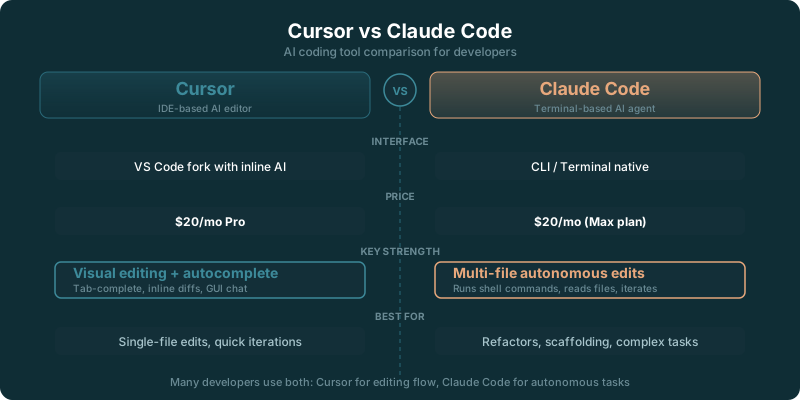
Choose Cursor if: You want AI deeply integrated into a visual IDE with inline completions, a polished GUI, and the ability to switch between AI models. Cursor feels like VS Code with superpowers, and its Composer handles multi-file edits through a familiar interface.
Choose Claude Code if: You want an autonomous coding agent that reads your entire codebase, runs commands, edits files, and executes multi-step tasks from a single natural language prompt. Claude Code works in your terminal alongside your existing editor, not instead of it.
Cursor vs Claude Code comes down to where you want AI to work. Cursor puts autocomplete, chat, Composer, and visual diffs inside an IDE. Claude Code works alongside your editor from the terminal, where it can inspect a repository, edit files, run commands, and carry a larger task across the codebase.
Both cost the same on their individual plans. Cursor lists an individual price of $20 per month Related analysis. Claude Pro for Claude Code is listed at $20 per month Related analysis.
That shared price removes the easy answer. You are choosing a working style.
Cursor is usually the better fit when you want AI in the moment: finish the line, suggest the next block, explain a highlighted function, and show edits before they land. Claude Code is stronger when the job starts with a broad instruction and ends with a changed repository, tested code, and a useful summary of what happened.
The distinction gets sharper once the task has consequences. A small autocomplete suggestion is easy to accept or reject. A change that touches configuration, tests, source files, and generated output needs an agent that can move through the project without losing the thread.
TLDR
Cursor is the better default for developers who want inline autocomplete and visual editing inside an IDE. Claude Code fits terminal-first work that spans a repository, commands, and tests. Both individual plans cost $20 per month, so workflow matters more than price.
Cursor vs Claude Code for Autocomplete and Agentic Editing
Cursor is an IDE. Its advantage is proximity. You are already looking at the file, the selection, the error, or the diff when it offers help.
Inline completions are the clearest example. Cursor can suggest code while you type, making it useful for the small decisions that fill most engineering days: finishing a conditional, wiring a function call, adding a type, or matching the local pattern in a component. You retain a tight feedback loop because the suggestion arrives where the code lives.
Claude Code has a different job. It does not offer inline autocomplete or inline suggestions in the editor. It operates from the terminal beside an existing editor, taking instructions about the repository and working through files, commands, and tests.
That may sound like a missing feature until the task gets bigger. Autocomplete helps you write the next line. A terminal agent can inspect the project structure, identify related files, make a coordinated edit, run the relevant command, and react to the result.
Neither workflow replaces judgment. Cursor keeps judgment close to every keystroke. Claude Code asks you to define the outcome and then review the work it produces.
The best fit depends on the friction you feel most often. If you lose momentum while writing ordinary code, inline completion earns its place quickly. If you lose time tracing how a feature crosses a codebase, a terminal agent has more room to help.
Cursor also gives you model choice within the editor. The 2026 comparison names GPT-4.1 among Cursor's model choices Related analysis. That matters for developers who want to vary the model based on the task without leaving their daily environment.
A developer who spends most of the day in a familiar editor may find Claude Code perfectly compatible with that habit. It works beside the editor rather than asking you to replace it. The tradeoff is simple: the editor remains your editing surface, while the terminal becomes the place where you direct longer-running work.
$20 Per Month Comparison Table
Cursor lists an individual price of $20 per month Related analysis, and Claude Pro for Claude Code is listed at $20 per month Related analysis. Price will not settle this choice.
| Workflow fit | Cursor | Claude Code |
|---|---|---|
| Early-career developer learning a codebase | Inline completions and visible edits keep each change close | Repository exploration and command execution can help explain unfamiliar systems |
| Developer shipping within one editor all day | Strong fit for autocomplete, chat, and Composer | Works beside the editor, with the terminal handling agent tasks |
| Senior developer coordinating a broad change | Visual review helps when using Composer across files | Strong fit for tasks that require reading files, editing, commands, and tests |
| Terminal-first developer | n/a if the IDE workflow feels like overhead | Strong fit for directing work from the command line |
| Developer who wants inline suggestions | Strong fit | No inline autocomplete |
| Developer reviewing large diffs | Visual diff workflow inside the IDE | Review happens through the files and changes produced by the agent |
The table is deliberately less dramatic than most tool comparisons. Both products can help with multi-file work. Both can contribute to a serious development workflow. The difference is how much of that workflow happens under your eyes in an IDE and how much starts from an instruction in a terminal.
Cursor’s visual environment gives it an edge when review is the work. You can see the code around a suggestion, compare a diff, make local corrections, and keep moving. That matters when the implementation is straightforward but the details are fussy.
Claude Code gains ground when investigation is the work. The agent can read a repository before proposing an edit, use command-line tools to learn what is happening, and test its own assumptions through the project’s existing commands. That is a different kind of speed.
The comparison page is labeled as updated in 2026 Related analysis. Tool plans and model access move quickly, but the interface divide has held up: Cursor is an AI-first visual IDE, while Claude Code is a terminal-based coding agent.
Choose an IDE Workflow or a Terminal Workflow
Choose Cursor when the editor is where you think.
That is more common than tool vendors like to admit. Plenty of developers work through code by reading nearby functions, noticing naming patterns, checking types, and making small corrections before a problem becomes a bigger one. Inline completion fits that rhythm because it does not ask you to stop and formulate a larger prompt.
Cursor Composer adds another layer. You can describe a multi-file change from the IDE, inspect the proposed work visually, and keep the rest of your development environment nearby. The feature table names VS Code extensions for Cursor Related analysis, which will matter if your current setup depends on that ecosystem.
Choose Claude Code when you prefer to start with an outcome.
A terminal workflow works well for instructions such as “trace this failing behavior,” “update the implementation and tests,” or “find every call site affected by this API change.” The agent can operate across files and commands without requiring you to navigate each location first.
That makes Claude Code useful for work with a natural beginning and end. You hand it a task, it investigates, edits, runs the project’s checks where appropriate, and reports back. Then you review the changes with the same skepticism you would apply to a teammate’s pull request.
The terminal also keeps Claude Code portable across editor preferences. If your editor is part of a highly personal setup, replacing it for AI features may be a bad bargain. Claude Code lets you keep the editor and add an agent beside it.
A developer choosing between Cursor and Claude Code should pay attention to where context already lives. In Cursor, the active file, selection, tabs, and diff are part of the immediate conversation. In Claude Code, context expands through the repository and the commands available to the agent.
One workflow is not more serious than the other. They solve different sources of drag.
Cursor wins when the bottleneck is writing and reviewing code in front of you. Claude Code wins when the bottleneck is understanding enough of the repository to make the right change.
At $20 per month, you can compare each workflow against the hours it saves rather than against a cheaper plan. The Claude Code review is useful if you want a closer look at the terminal-agent side of that decision.
When Multi-File Changes Matter More Than Inline Suggestions
Multi-file editing is where these tools stop feeling interchangeable.
A feature request may begin in one component and end up touching types, validation, tests, documentation, and configuration. An inline completion can help at each stop, but it will not carry the whole plan for you. You still decide where to go next.
Cursor Composer narrows that gap by supporting edits across files inside the IDE. Its advantage is the review loop. You can see what changed, compare it against the surrounding code, and step in before the edit becomes a mess.
Claude Code approaches the same problem from the opposite direction. You describe the result, then give it room to explore the repository and make the connected edits. The agent can use terminal commands as part of the task, which is useful when the answer depends on build output, test failures, generated files, or project conventions that are easier to discover than to explain.
The catch is review. Broad edits deserve more scrutiny, regardless of which tool produced them. Code that looks plausible in a diff can still misunderstand a product requirement, introduce a brittle assumption, or miss an edge case that only appears in a less obvious path.
Cursor makes review feel native because the IDE is built around files and diffs. Claude Code makes execution feel native because the terminal is built around commands and repository-level work.
If you regularly make large changes but want to stay visually close to the implementation, Cursor is the better starting point. If you regularly delegate investigation and execution from a high-level instruction, Claude Code has the clearer advantage.
That does not mean you must choose one tool forever. Some developers will use an IDE for the daily editing loop and a terminal agent for the tasks that would otherwise turn into an afternoon of searching, changing, testing, and searching again.
The key is to avoid buying an AI IDE when what you want is an autonomous repository agent. The reverse mistake is just as common: buying a terminal agent when what you miss most is a fast suggestion while you type.
For a broader comparison of coding assistants, Cursor’s $20 monthly individual price and Claude Pro’s $20 monthly price make the Claude vs ChatGPT for coding guide a useful next read.
The Practical Buyer Decision
Pick Cursor if you want an editor to become more helpful without changing the shape of your day.
You will get the most value from Cursor when autocomplete is a frequent need, when visual diffs make you faster, and when you want multi-file assistance without abandoning the IDE. The model choices add flexibility for developers who like to adjust their tool to the task.
Pick Claude Code if you want to assign work from the terminal and keep your existing editor.
You will get the most value from Claude Code when your tasks involve repository exploration, shell commands, test runs, and coordinated changes across a project. It is designed for the moments when typing the code is the smaller part of the job.
The price tie makes this a workflow decision. Cursor lists an individual price of $20 per month Related analysis. Claude Pro for Claude Code is listed at $20 per month Related analysis.
Start with the pain you encounter most. If the answer is “I want help while I write,” choose the IDE. If the answer is “I want to hand off a meaningful chunk of work,” choose the terminal agent.
Key Takeaways
- Cursor is built around an IDE workflow, with inline completions, visual diffs, model choice, and Composer for multi-file edits.
- Claude Code works from the terminal alongside an existing editor and focuses on repository-level agent work.
- Cursor lists an individual price of $20 per month, while Claude Pro for Claude Code is listed at $20 per month.
- Cursor fits developers who want help during editing. Claude Code fits developers who want to direct longer tasks across files and commands.