 PE Collective
Replit Pricing 2026: Free vs Core vs Teams
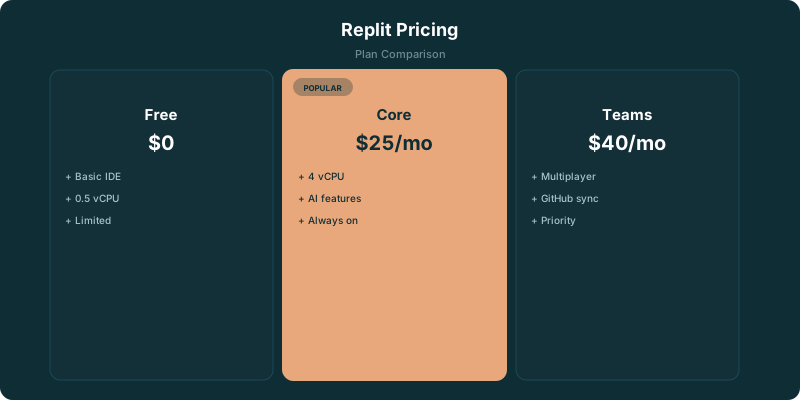
Replit pricing comes down to three choices: a free plan for trying the workspace, Core at $25/mo for solo builders who need AI and deployment, and Teams at $40/user/mo for shared projects. Compute can add to the bill once you host an app. For how Replit Agent actually performs on real app builds, see our Replit Agent Review.
TLDR
Replit is free to try, but the free plan stops quickly when you need AI volume, stronger compute, or persistent deployments. Core at $25/mo is where the useful features start for solo developers. Teams at $40/user/mo makes sense when shared projects and collaboration are part of the job.
Free (Starter)
- ✓ Basic Repl environment
- ✓ Limited compute (0.5 vCPU, 512MB RAM)
- ✓ Basic AI code completion
- ✓ Community deployments (public only)
- ✓ No always-on capability
Replit Core
- ✓ Full AI Agent access (build apps from prompts)
- ✓ Upgraded compute (4 vCPU, 4GB RAM)
- ✓ Always-on Repls
- ✓ Private Repls
- ✓ Custom domains for deployments
- ✓ SSH access to Repls
Teams
- ✓ Everything in Core
- ✓ Multiplayer editing with team members
- ✓ Shared team projects and templates
- ✓ Centralized billing
- ✓ Role-based permissions
- ✓ Priority support
Is Replit Free?
Yes. Replit offers a free plan, and it gives you a working browser-based development environment without asking for a card up front.
The limits are the point. Replit's free plan gets 100 AI completions PE Collective Replit pricing. That is enough to test how Replit feels, learn the environment, and build a small experiment. It is not much runway if AI assistance becomes part of how you write code every day.
Free-plan compute is limited to 0.5 vCPU, 512MB RAM PE Collective Replit pricing. Small scripts, static experiments, and lightweight demos fit comfortably within that boundary. A project that needs to stay available, handle meaningful traffic, or run heavier dependencies will find it restrictive.
The free plan also has a practical social boundary. It is useful for getting your feet wet, publishing something public, and deciding whether Replit’s browser-first workflow works for you. It becomes less useful when the project matters enough that you need dependable deployment, more capable compute, or a larger AI allowance.
That distinction saves a lot of bad purchase decisions. If you want a place to learn, prototype, or make a quick public demo, free is a fair starting point. If you are trying to ship a project you expect people to use, you are probably evaluating Core.
Free vs Core vs Teams
Replit’s plans map neatly to three jobs: trying the platform, building independently, and working with other people.
Core at $25/mo gives you the AI Agent, better compute, and deployment capability PE Collective Replit pricing. That is the plan where Replit starts making a coherent case as an all-in-one development and deployment environment.
Teams at $40/user/mo adds collaborative editing and shared projects PE Collective Replit pricing. The team plan is for work that needs shared ownership, not for a solo developer who happens to have a few repos.
Replit restructured its plans in early 2026, and Core now includes unlimited Ghostwriter completions. That makes the Core plan easier to assess than it was when AI usage felt like another meter running in the background. You still need to watch compute costs, but routine code-completion work no longer forces the same kind of tradeoff.
Core is where the useful features start. The free plan proves whether you enjoy working in Replit. Core is the plan for someone who has already answered that question and wants to build without constantly managing around the platform’s smallest limits.
Replit Agent Pricing and Free Limits
Replit Agent is one of the main reasons developers look beyond the free tier. It changes the product from a browser IDE with AI suggestions into something closer to a guided builder that can help turn a prompt into a working project.
With Replit Agent, a basic CRUD app with authentication can be up and running in 10-15 minutes PE Collective Replit Agent review. That is the appeal. You can move from idea to an editable application quickly, then inspect the result, change the code, and deploy from the same environment.
The free plan gives you a taste of AI assistance through its completion allowance. It is not the same thing as having the Agent available as a practical daily tool. A few completions disappear fast when you are iterating on an unfamiliar codebase, debugging an integration, or trying several directions before one sticks.
Core is the sensible plan if Agent is central to why you are using Replit. Paying for the platform while avoiding its defining workflow is usually false economy. You may be better off using the free tier for a small test and choosing another editor if you do not want browser-based development or managed deployment.
There is a useful difference between code completion and agentic work. Completion helps you write the next piece of code. Agent can help assemble a project, work through files, and get a basic application into a state where you can react to something tangible. Developers who know exactly what they are building may value completions more. Builders who want to get a rough product into the world may find Agent worth the Core subscription by itself.
That does not mean Replit Agent removes the need to review code. It makes fast output easier. You still own the security choices, architecture, dependencies, data handling, and maintenance after deployment. A fast first version is valuable. It can also become a maintenance problem if you treat generated code as finished software.
For a closer look at the workflow and its tradeoffs, read our Replit Agent review.
The Hidden Cost: Compute Charges on Top of Plans
The subscription price is only part of Replit cost. Once you host an app, compute becomes part of the budget.
Hosting a small web app runs $5-20/month in compute on top of your subscription PE Collective Replit pricing. For many side projects, that is still a reasonable price for avoiding the usual pile of separate development, hosting, and deployment tools.
The important word is “on top.” Core is not a flat promise that every deployed project costs exactly the subscription price. A live application uses resources, and those resources have a cost. You should expect the subscription to cover the development environment and plan access, then evaluate hosting based on what the application needs.
This is where Replit can feel either convenient or expensive, depending on your use case.
A lightweight personal tool with modest usage may be cheap to host. In that situation, the ability to edit code, use AI, deploy, and manage the project in one place is a strong deal. You avoid stitching together a local editor, a host, deployment tooling, environment configuration, and separate AI subscriptions.
A project with heavier runtime demands requires more scrutiny. The bill can move as you add background work, larger dependencies, database activity, traffic, or services that need to stay awake. The platform is still useful, but the simple headline price stops telling the whole story.
Before committing to Replit for an app you expect to grow, decide whether its convenience is worth the managed compute premium for your particular workload. That answer depends less on how much code you write and more on what happens after you deploy it.
Developers who only need help writing code should compare the editor alternatives. Cursor Pro at $20/month is the alternative if you want a more powerful coding environment without hosting PE Collective Replit Agent review. It puts more of the deployment and infrastructure decisions back in your hands.
Our Cursor vs Replit comparison gets into that split in more detail. Replit is attractive when you want one place to build and ship. Cursor is attractive when you already have a development setup and want a stronger local coding environment.
5 Hidden Fees That Make Replit Cost More Than $25/Mo
- ⚠ Deployments cost extra. Hosting a small web app runs $5-20/month in compute on top of your subscription. Replit isn't free hosting.
- ⚠ AI Agent usage is included in Core, but heavy users report hitting soft throttling during peak hours. There's no published rate limit, which makes budgeting harder.
- ⚠ The free tier's 0.5 vCPU is barely enough to run a Python script. Any real development needs Core's upgraded compute.
- ⚠ Storage is limited. Free gets 10GB, Core gets 50GB. If you're working with datasets or large dependencies, you'll feel the squeeze.
- ⚠ Egress costs apply for deployments serving traffic. High-traffic apps can see surprise charges.
Which Replit Plan Should You Pick? Quick Decision Guide
Student or learner
Free tier works for learning and small projects. You'll hit compute limits quickly on anything beyond basic scripts, but it's enough to learn Python, JavaScript, or web dev basics.
Solo developer building side projects
Core at $25/mo gives you the AI Agent, better compute, and deployment capability. It's a good deal if you're building and hosting small apps entirely within Replit.
Small team
Teams at $40/user/mo adds collaborative editing and shared projects. Consider whether you actually need these features or if individual Core plans plus GitHub would be cheaper.
Professional developer
Replit's compute limits and browser-based workflow won't replace a local development setup for serious projects. It's best as a prototyping and deployment tool, not your primary IDE.
Who Should Pay for Replit Core?
Core is a solid deal for a solo developer who wants an all-in-one development and deployment environment with AI built in.
That description is narrower than “anyone who writes code.” A developer with a mature local setup, established hosting, and strong preferences about editors may not need Replit at all. Replit wins when reducing setup work has real value and you would rather spend the next hour building than configuring.
Core fits several common situations.
You are building a side project and want it live without learning a separate deployment stack. Replit gives you a place to start, edit, and publish from the same workflow. The cost is easier to justify if the project would otherwise die in the gap between “the code works locally” and “someone else can use it.”
You are learning by making things. A browser-based environment removes installation friction, and the AI tooling can help explain, draft, and revise code as you go. The free plan is still the right first stop here. Move to Core once the free limits begin interfering with the work rather than before.
You are a founder or operator who can describe the product clearly but does not want to begin with a blank repository. Agent can get a basic application moving quickly. The value is not that it replaces engineering judgment. The value is that it gives you something concrete to test, revise, and hand to a more technical collaborator.
You are an experienced developer making internal tools, prototypes, or small customer-facing applications. In that case, Replit’s all-in-one model can remove busywork. Its value rises when deployment speed matters and falls when your project needs infrastructure control that the platform abstracts away.
Core is less compelling if you are only looking for an AI autocomplete tool. You may get more value from a dedicated editor and your existing hosting setup. Replit’s advantage is the combination of coding, Agent, and deployment. Remove deployment from the equation and the comparison gets closer.
For a wider shortlist, see Best AI code editors.
When Teams Is Worth It
Teams is for groups that need to work in the same projects and avoid the usual confusion over who owns what.
Teams at $40/user/mo adds collaborative editing and shared projects PE Collective Replit pricing. That makes sense for a small product team, an agency building client prototypes, or a technical group that wants a shared browser-based workspace.
The plan is primarily about making the workspace usable across people. Shared projects keep work from living in one person’s account. Collaborative editing reduces the awkward handoff cycle when multiple people are working on the same product.
Small teams should still be honest about their workflow. If everyone already works locally, relies on a mature version-control process, and deploys through an established pipeline, moving the team into Replit may add a second way of working. That is rarely a win.
Teams makes more sense when the product is already central to how the group builds. A founder, designer, developer, and operator can all work around the same projects without each person recreating the environment on a different machine. That convenience is valuable when speed and accessibility matter more than customizing every layer of the stack.
The price is easiest to justify when shared access prevents delays. If the team only needs an occasional review, Core accounts and existing collaboration tools may be enough. If the team builds together in Replit every week, the shared-project model earns its place.
Replit Pricing Verdict
Start free if you are testing Replit, learning to code, or deciding whether its browser-first workflow suits you. The free plan has enough substance to answer that question without forcing a commitment.
Choose Core if you are a solo developer building side projects, prototypes, or small applications you want to deploy. It is where the useful features start: AI Agent access, better compute, deployment capability, and unlimited Ghostwriter completions after the early-2026 plan restructure.
Choose Teams when shared projects and collaborative editing are part of the actual work. A team does not need a team plan merely because it has more than one person. It needs one when shared ownership inside Replit is worth paying for.
Then account for compute. A small hosted app can add to the subscription, and that is the part of Replit pricing most likely to surprise someone who only looked at the plan card. The all-in-one setup remains a solid deal when it saves enough setup and deployment work to justify the total bill.
The question is whether you want Replit to be your development environment and your path to production. If the answer is yes, Core is the obvious place to start.
The Bottom Line
Replit Core at $25/mo is a solid deal if you want an all-in-one development and deployment environment with AI built in. The AI Agent is impressive for prototyping. But costs can creep up with deployments and compute, and the browser-based experience has limits for large projects. Think of it as a prototyping and hosting platform with AI, not a replacement for your local dev setup.
Key Takeaways
- Replit’s free plan is useful for testing the workspace, but AI and compute limits arrive quickly.
- Core at $25/mo is the best fit for solo developers who want AI Agent access and deployment in one place.
- Teams at $40/user/mo is built around shared projects and collaborative editing.
- Hosted apps can add compute charges beyond the subscription price.
- Cursor may be the better buy if you want an AI coding environment without managed hosting.
Sources
Related Resources
Frequently Asked Questions
Is Replit free?
Replit has a free tier with basic compute (0.5 vCPU, 512MB RAM), limited AI features, and public-only projects. It's fine for learning but not for real development. Core at $25/mo is where the useful features start.
What does Replit's AI Agent do?
Replit's AI Agent can build full applications from text descriptions. You describe what you want, and it writes the code, sets up the project structure, and configures deployment. It works well for simple web apps and prototypes. Complex apps still need manual intervention.
How much does it cost to deploy on Replit?
Deployment costs are separate from your subscription. A small web app typically costs $5-20/month in compute charges. High-traffic apps can cost more due to egress and compute scaling. Replit's pricing calculator can estimate costs for your specific workload.
Is Replit good for professional development?
Replit is excellent for prototyping, teaching, and small projects. For professional development on large codebases, most developers prefer local IDEs (VS Code, Cursor) with more compute power and flexibility. Replit's browser-based approach has inherent limitations for complex workflows.
How does Replit compare to Cursor?
They serve different needs. Cursor is a local AI code editor focused on writing and editing code. Replit is a cloud-based development and deployment platform with AI features. Cursor is better for coding in existing projects. Replit is better for building new apps from scratch and deploying them quickly.