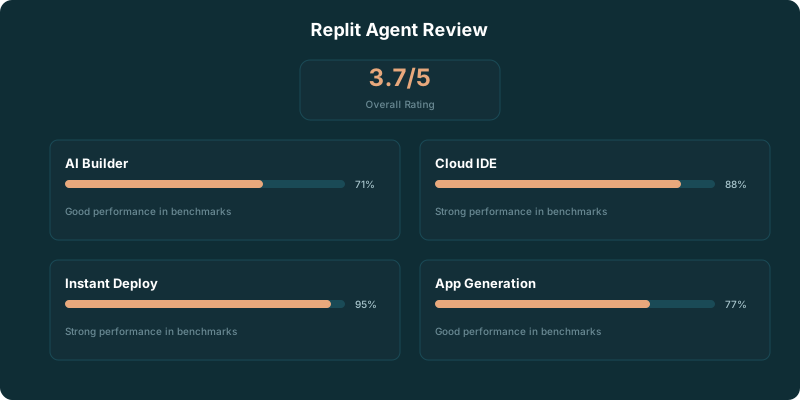
Replit Agent is a browser-based AI app builder that turns a text prompt into a working full-stack application. Our verdict: Replit Agent earns a 4.0/5 for prototypes, internal tools, and straightforward web apps. It gets less convincing when the product depends on complicated rules, careful architecture, or code you need to understand line by line.
The appeal is obvious. You describe the app, watch it take shape, test it in the same browser tab, and publish it without setting up a local development environment. For a founder with an idea, a designer who wants to test a workflow, or a developer who wants a fast starting point, that is a useful amount of friction removed.
It also creates a particular risk. A polished screen can arrive before the underlying application deserves your trust. If the work involves payments, permissions, business-critical data, or a tangle of edge cases, the part after the first prompt is where the real work begins.
TLDR
Replit Agent is a strong way to turn a text prompt into a prototype or simple deployed app. It removes setup and keeps building in the browser. Complex logic still needs careful review, testing, and often a developer who can take ownership of the code.
What Replit Agent Is
Replit Agent takes natural-language instructions and scaffolds an application around them. You can ask for a tool, describe its users and workflow, then refine the result through follow-up prompts while the project runs in the browser.
That is the cleanest definition of Replit Agent: prompt to app, with the code, runtime, database work, and deployment path gathered in one place.
A request can be as plain as “build a client portal with sign-in, project updates, and an admin view.” Agent translates that request into an application structure, creates screens, writes code, and gives you something usable enough to click through. The first version is often much closer to a product than a wireframe.
Replit’s strongest advantage is that it avoids the usual opening ceremony of software work. There is no local installation to troubleshoot, no editor configuration to copy from a tutorial, and no early argument over where to host a small project. You open the workspace and start describing what you need.
That makes Replit Agent especially useful for people who have product judgment but do not spend their day inside an editor. The app builder lets them test whether an idea has legs before they fund a larger build. Developers can use it the same way: as a fast scaffold, a rough internal tool, or a disposable experiment.
A basic CRUD app with authentication can be up and running in 10-15 minutes PE Collective Replit Agent review.
The phrase “can be” does a lot of work there. CRUD apps have familiar parts: forms, records, user accounts, and a few screens that read and update data. Replit Agent has a fair chance of producing a coherent first pass because the pattern is familiar. The gap widens once the app has domain-specific behavior that cannot be guessed from a generic product brief.
Replit Agent is not a substitute for deciding what the app should do. It is a fast way to make those decisions visible.
It's part of a broader trend toward "AI-first" development environments, but Replit takes the most aggressive stance. Where Cursor and Windsurf augment your coding, Replit Agent tries to replace as much of it as possible.
Key Features
Natural Language App Building
This is Replit Agent's headline feature. You type something like "build me a task management app with user authentication, drag-and-drop task boards, and dark mode" and it starts working. It creates files, installs dependencies, sets up a database, and gives you a running application.
For simple applications, the results are impressive. The agent handles file structure, routing, database setup, and even basic styling without any manual intervention.
Instant Deployment
Every Replit project gets a URL. There's no separate deployment step, no CI/CD to configure, no server to provision. Hit deploy, and your app is live. For prototypes and demos, this removes an entire category of complexity.
Collaborative Editing
Replit has always been strong on collaboration. Multiple people can edit the same project simultaneously, like Google Docs for code. Combined with the AI agent, this means a team can brainstorm features and see them implemented in real time.
Built-in Database and Storage
Replit provides built-in database solutions (Replit Database and PostgreSQL), file storage, and secrets management. You don't need to set up external services for basic data persistence, which keeps the prototyping speed high.
How Replit Agent Performs on Prompt-to-App Work
Replit Agent performs best when the prompt describes a narrow, recognizable product. A simple marketplace mockup, an intake portal, a directory, a lightweight dashboard, or an internal tracker fits the tool well. The result gives you something to evaluate with actual users instead of a slide deck.
Its interface also helps with momentum. The code, running app, and changes live close together. You do not need to shuttle a project between a local editor, a terminal, a database console, and a hosting dashboard before anyone can see it. That browser-based workflow is the main reason Replit Agent feels faster than a conventional coding setup for the right job.
The zero-setup experience is a real pro. So is the built-in deployment path. So is the fact that a non-traditional developer can make progress without learning every layer of the stack before the first useful screen appears.
The limitation is not that Agent writes bad code by default. The limitation is that natural-language instructions become less reliable as the hidden rules pile up. An app may need different permissions for different account types, unusual billing rules, approval chains, audit logs, integrations with old systems, and exceptions that only make sense to the business. A prompt can describe those requirements. It cannot guarantee that the resulting implementation handles them correctly.
This is where the work becomes less magical and more familiar. You need to inspect the flows, test the unhappy paths, read the code, and decide whether the data model makes sense. If you cannot do that yourself, someone on the project needs to.
Replit Agent also works better when you treat it as a collaborator with a short memory than as a senior engineer who understands the whole product. Give it a defined task. Review the output. Run the app. Fix the mismatch. Then move to the next task.
That rhythm produces better work than one oversized prompt asking for an entire company in a browser tab. It also makes failures easier to locate. When Agent changes a small, explicit part of the product, you can tell whether it improved the application or created a new problem somewhere else.
Our 4.0/5 rating reflects that split. PE Collective rates Replit Agent 4.0/5 PE Collective Replit Agent review.
For prototype work, that score feels right. Replit gives you a low-friction route from idea to interface, and it can get a simple app into the hands of real users quickly. For serious software with complex logic, the same tool becomes more valuable as a starting point than as the final authority.
The winner is the builder who needs a working first version and knows how to keep the scope contained. The loser is the team that mistakes generated momentum for product readiness.
Where Replit Agent Struggles
The code quality conversation is important. Replit Agent generates functional code, but "functional" and "production-ready" are different things. The generated code often lacks proper error handling, input validation, and the kind of defensive programming that production applications need.
Complex applications hit a wall. Once you're past basic CRUD operations and need things like real-time updates, complex business logic, or custom integrations, the agent starts producing code that needs heavy manual intervention.
The browser-based editor is also a limitation. Experienced developers will miss the speed, extensions, and customization of desktop editors like Cursor or even plain VS Code. Keyboard shortcuts, custom themes, debugger integration, and Git workflows are all more limited in the browser.
Can You Deploy Replit Agent Apps to Production
Yes, Replit Agent apps can be deployed. The more useful question is whether the deployed app is ready for the kind of production use you have in mind.
For a small public tool, an internal dashboard, a client-facing prototype, or a lightweight workflow app, Replit’s integrated deployment removes a lot of operational drag. You can build, test, and publish from the same environment. That is an unusually direct path from prompt to live URL.
Replit Agent improved significantly in Q1 2026 with better database integration and deployment automation.
That improvement matters because deployment is where many AI app builders stop being helpful. Producing screens is easy compared with connecting persistent data, managing changes safely, and getting a running app into a stable environment. Replit’s advantage is that it keeps those pieces close to the build process.
Small deployments still carry costs beyond the subscription. Hosting a small web app runs $5-20/month in compute on top of your subscription PE Collective Replit pricing.
That is a sensible trade for a useful internal tool or a fast market test. It is less attractive if the app needs predictable economics at larger scale, deeper infrastructure control, or a setup that your engineering team already knows how to operate elsewhere.
Production readiness also depends on the application, not the hosting button. Before publishing something people will rely on, test authentication, permissions, data handling, error states, and every workflow that changes money or sensitive records. Generated code deserves the same scrutiny as code written by a hurried contractor. Maybe more, because the confident parts are often the easiest parts to trust too quickly.
Replit Agent can ship a real application. It cannot decide what level of risk your business can carry.
The sensible path is to use it for the work it handles well: proving demand, building small tools, getting a functional prototype in front of users, and reducing the time between a product decision and a live test. When the product starts accumulating complexity, bring in someone who can own the codebase and make deliberate technical choices.
That is not a knock on Replit. It is the dividing line between an app that demonstrates an idea and an application that becomes part of how a business runs.
For more detail on expected subscription and hosting costs, see our Replit pricing breakdown.
Replit Agent Pricing and Alternatives
Replit is more expensive than Cursor if your main goal is a capable pure-coding environment. Replit earns that premium when its browser workspace, built-in app generation, and deployment flow save you enough time to matter.
The free tier is useful for getting a feel for the product before committing to a paid plan. Replit's free tier gets 100 AI completions and limited compute of 0.5 vCPU, 512MB RAM PE Collective Replit pricing.
The Core plan at $25/month gives you more compute, storage, and agent usage PE Collective Replit Agent review.
Teams pricing is $40/user/month with additional collaboration and admin features PE Collective Replit Agent review.
Cursor Pro is $20/month and gives you a more powerful coding environment PE Collective Replit Agent review.
| Option | Price | Best fit | Main tradeoff |
|---|---|---|---|
| Replit free tier | 100 AI completions with limited compute | Trying Agent and small experiments | Limited compute |
| Replit Core | $25/month | Browser-based building with more Agent usage | Costs more than Cursor Pro |
| Replit Teams | $40/user/month | Collaborative work with admin needs | Higher per-user cost |
| Cursor Pro | $20/month | Developers who want a more powerful coding environment | n/a for Replit’s integrated browser deployment flow |
Cursor is the better fit when you already know how to work in a coding environment and want more control over the code. Replit is the better fit when the environment itself is the obstacle, or when you want to move from an idea to a testable web app without assembling the stack yourself.
Neither choice removes the need for judgment. Cursor gives a developer a stronger place to write and change code. Replit gives a broader range of builders a faster way to create an application around a prompt.
The decision comes down to where the bottleneck sits. If the bottleneck is coding depth, Cursor has the edge. If the bottleneck is getting from a product idea to a live prototype, Replit has the edge.
Our Cursor vs Replit comparison goes deeper on that tradeoff. You can also compare the broader market in our guides to the best AI agents and best AI code editors.
✓ Pros
- Zero setup: everything runs in your browser, no local install needed
- Built-in deployment makes going from idea to live app remarkably fast
- Agent can scaffold entire applications from natural language descriptions
- Great for prototyping and MVPs when speed matters more than polish
- Works on any device with a browser, including Chromebooks and tablets
- Collaboration features make pair programming easy
✗ Cons
- Generated code quality varies wildly depending on project complexity
- Browser-based editor lacks the performance and extensions of desktop editors
- Limited control over infrastructure and deployment configuration
- $25/month is expensive for what you get compared to Cursor's $20/month
- Complex debugging is harder in the browser than in a local environment
- Not practical for large production codebases
Who Should Use Replit Agent?
Replit Agent is a good fit for founders who need to test an idea before hiring a full engineering team. It is good for operators who need a small internal tool and would rather describe the workflow than start from a blank repository. It is good for designers and product people who want to turn a detailed product brief into something users can touch.
It is also useful for developers who want to skip the repetitive opening work. A rough scaffold is not a finished product, but it can be a valuable place to begin. The key is knowing that you are inheriting code you need to review, not receiving a finished answer.
Replit becomes a weaker choice when the project needs intricate business logic from the start, tight integration with existing systems, or engineering practices that require close control over every part of the stack. In those cases, the browser-based convenience can become a constraint. You may spend more time correcting generated assumptions than you saved at the beginning.
There is a useful middle ground. Build the prototype in Replit Agent. Use it to learn which flows users care about. Then decide whether the code deserves a more deliberate home. That sequence keeps the early product process fast without pretending that early software decisions are permanent.
The hardest part of building an app is often discovering whether anyone needs it. Replit Agent makes that discovery cheaper. The question is whether your app remains simple enough for the tool to stay ahead of the complexity it helped create.
Ideal For:
- Non-technical founders who need to prototype an idea without hiring a developer
- Students and learners who want to experiment with AI-assisted development without any setup
- Rapid prototypers who need to go from concept to deployed demo in hours, not days
- Hackathon participants where speed of deployment matters more than code architecture
Maybe Not For:
- Professional developers with local setups because the browser editor is a downgrade from VS Code or Cursor
- Large or complex projects because the AI-generated code doesn't scale well past MVP stage
- Teams with specific deployment requirements since you're locked into Replit's hosting infrastructure
Our Verdict
Replit Agent is the fastest path from "I have an idea" to "I have a working app." It's impressive for prototyping. Describe what you want in plain English, and within minutes you have a functional application deployed on a live URL. For founders validating ideas, students learning to build, and hackathon teams racing against the clock, nothing else comes close to that speed.
But it has real limits. The code it generates often needs significant cleanup for production use. The browser-based editor can't match desktop tools for serious development. And at $25/month, you're paying more than Cursor while getting a less capable coding environment. Replit Agent is best thought of as a prototyping accelerator, not a replacement for professional development tools.
Key Takeaways
- Replit Agent turns natural-language prompts into browser-based full-stack apps and works well for prototypes and simple tools.
- A basic CRUD app with authentication can be up and running in 10-15 minutes.
- Built-in deployment makes it practical to publish small applications quickly, but deployment does not make complex software production-ready.
- Replit costs more than Cursor while offering a less capable pure-coding environment.
- Replit is strongest when getting from idea to testable app is the bottleneck.
Sources
- PE Collective Replit Agent review: 10-15 minutes
- PE Collective Replit pricing: 100 AI completions
- PE Collective Replit Agent review: $25/month
- PE Collective Replit Agent review: $40/user/month
- PE Collective Replit Agent review: $20/month