 PE Collective
Best AI Coding Assistants 2026: Our Picks
Five picks with documented capabilities, current pricing, and clear tradeoffs.
Last updated: September 2, 2026
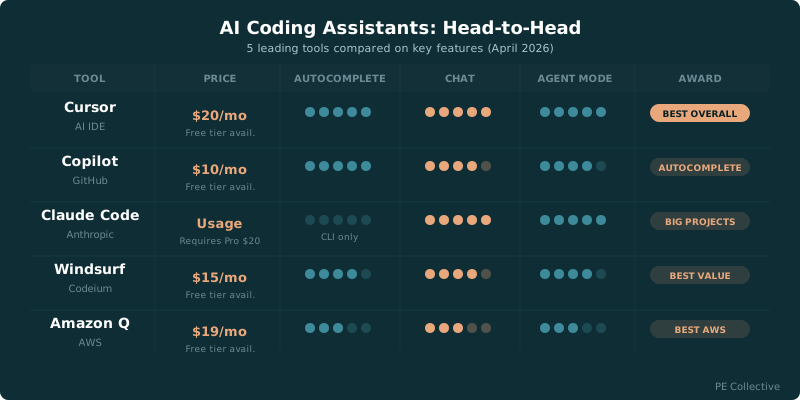
The best ai coding assistants 2026 list starts with Cursor for most developers. Cursor Pro, the best-overall pick, costs $20/mo with a free tier available Related analysis.
GitHub Copilot is the autocomplete pick. Claude Code is where I'd look for sprawling repositories and work that needs more judgment than tab completion. Windsurf makes the strongest value case for developers who want an agentic editor without Cursor's price. Amazon Q Developer fits teams whose work already lives inside AWS.
We spent three months using these tools on production codebases. Not toy projects or demo apps. Real refactors, debugging sessions, unfamiliar repositories, and changes that crossed multiple files. The differences show up when the assistant has to understand the codebase before it starts proposing edits.
Cursor wins the broadest share of developer workflows. Copilot wins when you want completion to stay out of your way. Claude Code wins when the task needs a larger working context and a better plan. Windsurf wins when price is part of the decision. Amazon Q wins when AWS knowledge is more valuable than a general-purpose editor.
TLDR
Cursor is the best overall choice for most developers, with a free tier and a paid plan for heavier work. Copilot remains the autocomplete pick. Claude Code handles large projects well, Windsurf offers strong value, and Amazon Q fits AWS-centered teams.
What Changed Since Our Last Test
The useful comparison has moved past whether an assistant can produce a function from a prompt. Most of them can handle that job when the request is clean and the surrounding code behaves itself.
The purchase decision sits in the ugly parts of software work. Can the assistant find the actual call path? Does it understand that a schema change affects validation, test fixtures, and a client integration? Will it notice the stale assumption in a nearby file before it writes a confident patch that breaks the build?
That is why autocomplete alone no longer settles the category. Fast completions still matter. Nobody wants to hand-write boilerplate or repeat a familiar pattern for the tenth time. But a coding assistant earns its place when it can move from suggestion to investigation without making you babysit every step.
Pricing also needs more scrutiny than the headline monthly fee. Premium model access is often metered separately, and credit systems make two plans with similar prices behave differently in daily use. A developer deciding between tools should know what the plan includes before moving a project into a new editor.
Our AI coding tools tested on real codebases review covers the wider market. This page narrows the field to the picks that held up when the work got messy.
Our Top Picks
Detailed Reviews
Cursor
Best OverallCursor is the editorial top pick for developers who want a VS Code-based editor with autocomplete, multi-file editing, codebase indexing, and model selection. Existing extensions and keybindings can carry over, though teams should verify compatibility and results on their own repositories.
Cursor is the easiest recommendation because it covers the most ground without forcing developers to choose between a familiar editor workflow and agent-style work. It is useful for the mundane stuff. Ask it to explain a confusing branch, generate a focused test, clean up an awkward component, or trace a value through a service boundary. It is also useful when the task grows. Cursor can search through a repository, pull relevant files into context, propose coordinated edits, and keep the developer in the loop while it works.
Cursor Pro, the best-overall pick, costs $20/mo with a free tier available Related analysis. Cursor Pro's $20 per month includes a $20/mo credit pool for premium model requests Related analysis.
That credit pool is worth understanding before you commit. The base plan gets you into the product, but premium model requests draw from a separate allowance. Developers doing occasional agent work may find that arrangement sensible. Developers who use premium models for every investigation should watch how quickly that pool moves.
Cursor is the default pick for a developer who wants one assistant for coding, debugging, refactoring, and codebase exploration. It gives you the most room to grow into the workflow.
GitHub Copilot
Best for AutocompleteCopilot's inline autocomplete is still the fastest and most natural in the market. It predicts what you want to type next with scary accuracy, especially in popular languages like TypeScript and Python. The GitHub integration is where it really pulls ahead: it understands your PRs, issues, and repo context natively. Copilot Chat has improved a lot, though it's still not as capable as Cursor's Composer for complex edits.
Its strongest moments are small and frequent. It notices the pattern you are writing, completes the next block, fills in repetitive tests, and reduces the friction of working through familiar code. That does not sound glamorous. It saves time anyway.
Copilot is a less persuasive choice if your main job is planning broad codebase changes. It can help with those tasks, but its identity is still autocomplete first. The benefit is that the workflow feels less disruptive than tools built around large prompts, chats, and agent loops.
GitHub Copilot costs $10/mo for individuals and $19/mo for Business Related analysis. Copilot Pro includes 300/mo premium requests Related analysis.
Premium requests introduce a second layer to the buying decision. If your work mostly consists of inline completion and short questions, Copilot can be an efficient, low-friction option. If you expect to lean heavily on higher-end models and longer agent tasks, compare those limits against your actual workflow instead of treating the listed plan price as the whole bill.
Copilot is a good fit for developers who already like their current environment and want better throughput without changing the way they work.
Claude Code
Best for Large ProjectsClaude Code is different from the others on this list. It's a terminal-based agent, not an editor. You point it at your codebase and tell it what to do in plain English. It reads files, writes code, runs tests, and iterates until the task is done. For large-scale refactors or unfamiliar codebases, nothing else comes close.
Claude Code is the pick for work that needs patience. Large repositories punish shallow context, especially when the change touches infrastructure, application code, tests, configuration, and a few old conventions nobody documented.
The tool is at its best when you can describe the job clearly, let it inspect the repository, and then judge its proposed path before accepting edits. That makes it feel more like a capable technical collaborator than an aggressive autocomplete engine.
It also changes the rhythm of development. You are not constantly waiting for the next suggestion to appear. You give the system a substantive problem, ask it to investigate, and use its work to move through the codebase faster. That suits migrations, broad cleanup work, difficult bugs, and tasks where understanding the existing system is most of the job.
The useful question is whether your work has enough complexity to justify that mode. If most of your day is spent in a small, familiar service, it may be too much tool for the job. If you regularly inherit unfamiliar repositories or make changes across layers, it becomes much more compelling.
Windsurf
Best ValueWindsurf (formerly Codeium) is the best Cursor alternative at a lower price point. The Cascade feature handles multi-step agentic workflows surprisingly well. It indexes your full codebase and supports multiple models.
Windsurf Pro, the best-value pick, costs $15/mo Related analysis. Windsurf Pro includes 500 credits per month Related analysis.
That credit system should shape your decision. A plan can look cheap until the workflow you depend on consumes its included usage quickly. On the other hand, developers who use agent features selectively may find that the lower plan cost makes Windsurf the better deal.
Windsurf is especially attractive for developers who want an assistant that can move beyond completion, search through a project, and help coordinate edits without paying Cursor's listed monthly rate. It gives up some of Cursor's all-around polish, but the gap will not matter equally to every team.
Price-sensitive developers often make the mistake of choosing based on the free tier alone, then abandoning the tool the moment their work gets more demanding. Windsurf is a better fit when you already know you want an agentic editor and want a lower-cost paid option.
Amazon Q Developer
Best for AWSAmazon Q Developer (the successor to CodeWhisperer) has a specific superpower: AWS infrastructure intelligence. It understands CloudFormation templates, CDK constructs, and IAM policies in a way no other tool does. The free tier is generous and includes security scanning. If you're building on AWS, Q catches configuration mistakes that would take you hours to debug manually.
Amazon Q Developer is the specialist pick. It makes the most sense when AWS is already central to your development work and cloud-specific knowledge is more useful than a general assistant's broad flexibility. Developers working through AWS services, permissions, cloud configuration, and related implementation questions do not need another generic chat window. They need help that understands the environment they are already operating in.
Amazon Q loses ground when the work is not AWS-heavy. Cursor, Copilot, Claude Code, and Windsurf are built around broader software development workflows. Their value does not depend on a particular cloud stack.
AWS teams should take Amazon Q seriously. Everyone else should start with the general-purpose picks and only come back if cloud-specific assistance is the actual bottleneck.
Evaluation Criteria
Compare each tool on autocomplete, multi-file editing, codebase navigation, model flexibility, security controls, and total cost. Rankings are editorial judgments based on documented capabilities and pricing; teams should validate quality and adoption in their own languages and repositories.
Pricing at a Glance
| Tool | Plan | Price | Free tier |
|---|---|---|---|
| Cursor | Pro | $20/mo | Available |
| GitHub Copilot | Individual | $10/mo | n/a |
| GitHub Copilot | Business | $19/mo | n/a |
| Windsurf | Pro | $15/mo | n/a |
| Claude Code | n/a | n/a | n/a |
| Amazon Q Developer | n/a | n/a | n/a |
Cursor Pro's $20 per month includes a $20/mo credit pool for premium model requests Related analysis. Copilot Pro includes 300/mo premium requests Related analysis. Windsurf Pro includes 500 credits per month Related analysis.
The table is deliberately plain. Pricing pages often put the real constraint in usage terms rather than the plan name. A monthly fee tells you what it costs to enter. Request limits and credits tell you how the tool behaves once it becomes part of your day.
If you are choosing between Cursor and Windsurf, compare the credit mechanics with the models and workflows you expect to use. If Copilot is your choice, decide whether premium requests will be occasional or routine. Those details are where a cheap plan becomes a useful plan or an annoying one.
For more detail, see our GitHub Copilot pricing and Windsurf pricing guides.
Best Free AI Coding Assistants
Cursor is the best place to start for developers looking for free access because it has a free tier available. That does not settle the decision, but it gives you a practical way to test whether its editor workflow fits the way you work before paying for a plan.
Free access is useful for evaluation, rather than just saving money. You can point the assistant at a real repository, use it during a debugging session, ask it to explain a file you did not write, and see whether its suggestions make you faster or create more review work.
The wrong way to test an assistant is to ask it for a toy function and admire the result. Almost every credible tool will look competent in that setting. Give it a task with imperfect context. Ask it to trace a request through an unfamiliar part of the codebase. See whether it finds relevant files, explains its assumptions, and recovers when its first answer is wrong.
Cursor's free tier makes that evaluation easier. Start there if you are budget-constrained or skeptical of the category. If it changes how you work on a real project, then the paid plan becomes a concrete decision instead of an abstract subscription.
Developers considering Copilot, Windsurf, Claude Code, or Amazon Q should apply the same standard to whatever access their organization provides. Free access is only valuable if you can test the work you would actually hand to the tool.
Multi-File Refactoring: Which Assistant Handles It Best
Cursor is the best all-around choice for multi-file refactoring. Its editor-centered workflow makes it easier to inspect the proposed changes, pull in missing context, and keep moving when a refactor exposes a second-order problem.
Claude Code is the better pick when the refactor is large enough to require more investigation before edits begin. It is strongest when the assistant needs to understand the project's structure, identify dependencies, and formulate a plan before changing anything. That is common in older repositories, platform migrations, and codebases with uneven conventions.
Windsurf is a credible value option for this kind of work. It can help search, coordinate changes, and keep the developer from manually hunting through every related file. The tradeoff is primarily about how much confidence you have in its understanding of a complicated repository.
Copilot is useful during the refactor, especially for implementing the local changes once you know what must happen. It is less compelling as the primary system for mapping the entire job. Copilot works best when the developer remains the planner and uses the assistant to speed up execution.
Amazon Q has the clearest advantage when the multi-file work is tied to AWS. A refactor involving cloud configuration, AWS services, or related application code can make its specialized knowledge more valuable than a broader assistant's flexibility.
No assistant should get a blank check to rewrite a project. The best workflow is still controlled: ask for the affected areas, review the plan, make the changes in understandable pieces, run the relevant checks, and inspect the diff. The assistant helps you cover ground faster. You still own the code that ships.
This is where Cursor and Claude Code pull ahead. They are more useful before the first edit, when you are trying to understand the blast radius of a change. Copilot helps most after you have already done that thinking. Windsurf offers a lower-cost route into the same general category. Amazon Q earns its place when the refactor has AWS at the center.
For a deeper head-to-head, read Cursor vs Claude Code.
How to Choose the Right Assistant
Pick Cursor if you want the most balanced tool. It handles everyday coding work well and has enough depth for debugging, exploration, and multi-file changes.
Pick Copilot if autocomplete is the job. It is the cleanest fit for developers who want help completing code without reorganizing their workflow around an agent.
Pick Claude Code if your repositories are large, unfamiliar, or full of dependencies that need to be understood before anyone edits a file. It is the tool I would want beside me for a broad change with a lot of hidden edges.
Pick Windsurf if you want an agentic editor workflow and care about monthly cost. Its included credits deserve attention, but the lower plan price makes it a sensible contender.
Pick Amazon Q Developer if AWS is where your hardest problems live. Its specialization is the reason to choose it. Without that need, the general-purpose tools are stronger starting points.
The assistant should fit the work, not the other way around. A developer writing a familiar application feature needs something different from a developer untangling a large migration. The best tool is the one that removes real friction without adding a new layer of supervision.
Key Takeaways
- Cursor is the best overall pick, with a free tier and a paid plan built for broader coding work.
- Copilot remains the strongest choice for fast, low-friction autocomplete.
- Claude Code is best suited to large projects and refactors that need deeper repository understanding.
- Windsurf is the value pick for developers who want an agentic editor at a lower listed monthly price.
- Amazon Q Developer is the specialist choice for AWS-heavy development.
Frequently Asked Questions
Which AI coding assistant is best for beginners?
GitHub Copilot is the easiest to start with. It works inside VS Code with no setup beyond installing the extension, and the autocomplete feels natural from day one. Windsurf's free tier is also a good option if you want to try AI editing features without paying.
Can I use multiple AI coding assistants at the same time?
Technically yes, but it's not recommended. Running Copilot alongside Cursor or Windsurf creates conflicting autocomplete suggestions and can slow down your editor. Most developers pick one primary tool. The exception is Claude Code, which runs in the terminal and doesn't conflict with any editor-based assistant.
Are AI coding assistants worth the cost for solo developers?
If you code for more than a few hours a week, yes. Even the cheapest option (Copilot at $10/mo) saves most developers 30-60 minutes daily. That's a strong ROI. Windsurf's free tier lets you test the waters before committing money.
Do AI coding assistants work with all programming languages?
All five tools support major languages like Python, TypeScript, JavaScript, Go, Java, and Rust well. Performance drops for niche languages like Haskell, Elixir, or Zig. Copilot and Cursor have the broadest language coverage since they're trained on the most data. Amazon Q is specifically strong for infrastructure-as-code languages like HCL and CloudFormation YAML.