 PE Collective
Windsurf vs Cursor for AI Code Editing
A head-to-head comparison for AI-powered development workflows
Last updated: April 7, 2026
Quick Verdict
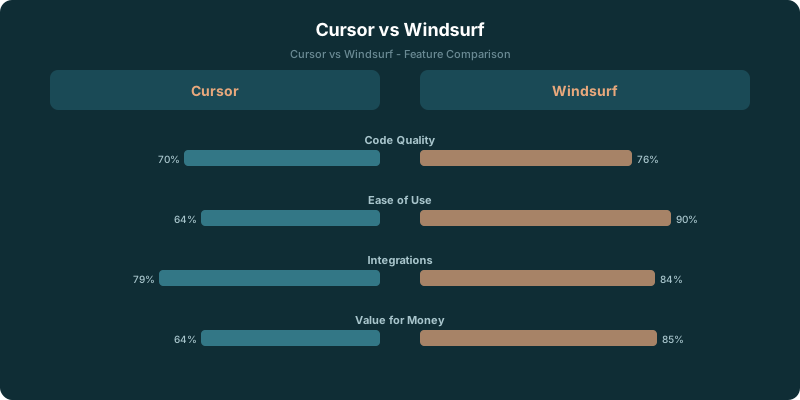
Choose Cursor if: You want the most mature AI code editor with proven multi-file editing, deep codebase indexing, and access to both Claude and GPT-4.1. Cursor has a larger user base and more battle-tested features.
Choose Windsurf if: You want a newer alternative with competitive pricing, strong AI flows, and a fresh take on agentic coding. Windsurf's Cascade feature handles complex multi-step tasks well.
Windsurf vs Cursor comes down to how you want an AI editor to behave while you work. Cursor Pro is listed at $20 per month, while Windsurf Pro is listed at $15 per month. That makes the lower priced plan a sensible place to start if you want to test an AI first editor without paying for flexibility you may never use.
Cursor is the stronger pick for developers who want a mature editor, multi file editing, codebase indexing, and access to different models. Windsurf is the better fit when Cascade and guided multi step work match how you build software.
Both can write code, explain unfamiliar files, and handle the tedious parts of a change. The useful distinction is what happens after the first prompt. Do you want to direct the work closely inside a familiar editor, or do you want a more opinionated workflow that can carry a task through several steps?
TLDR
Choose Cursor if model choice, codebase context, and mature editing controls shape your day. Choose Windsurf if Cascade fits your workflow and the $15 monthly plan feels like the better trial. Track credit use before treating either subscription as a fixed cost.
Key Takeaways
- Cursor Pro is listed at $20 per month, while Windsurf Pro is listed at $15 per month.
- Both editors moved to credit based pricing in early 2026.
- Cursor suits developers who want model flexibility and detailed control over multi file changes.
- Windsurf suits developers who want Cascade to carry more of a task through its working flow.
- A trial should reveal your credit usage before price becomes the deciding factor.
Windsurf vs Cursor Quick Verdict
Cursor is for the developer who wants an AI layer inside a serious code editor. You can work across a codebase, make multi file edits, inspect suggestions, and choose the model that fits the job. That flexibility matters when a small fix, a risky refactor, and a hard debugging session all need different levels of reasoning and oversight.
Windsurf takes a more guided approach. Cascade is the center of that experience. It is built for multi step tasks where the editor needs to keep moving through context, changes, and follow up work instead of waiting for you to turn every action into a new prompt.
Price gives Windsurf an immediate advantage for a first test. Windsurf Pro is listed at $15 per month, while Cursor Pro is listed at $20 per month, according to this PE Collective comparison of $15 and $20 monthly plans. The $15 monthly plan is 25% cheaper than the $20 monthly plan, which makes Windsurf the lower cost experiment.
That does not settle the decision. A lower monthly price loses its appeal if your work repeatedly pushes you toward an editor workflow that feels constrained. The editor you open all day has to fit the way you investigate bugs, inspect diffs, and decide whether an AI suggestion belongs in the branch.
Cursor wins for breadth. Windsurf wins for a tighter workflow and a lower listed entry price. Pick based on where you want control to sit.
Editor Workflow and Model Choice
Cursor has earned its position by feeling familiar to developers who already expect an editor to be the command center. The value is not that it can generate a function from a prompt. Plenty of tools can do that. Cursor is useful when a change crosses files, relies on codebase context, and still needs someone to inspect the reasoning before accepting the result.
Multi file editing is part of that appeal. A developer can ask for a change that reaches across components, configuration, tests, and documentation, then review the resulting work in the same environment. The editor remains the place where you compare alternatives and decide what ships.
Codebase indexing matters for the same reason. AI suggestions improve when the editor has enough context to understand naming, internal patterns, and the shape of the project. You still need to verify the output. But an editor that starts with more relevant context asks less of you to restate what the repository already knows.
Model choice is Cursor's other practical advantage. The Cursor plan comparison cites GPT-4.1 as a premium model request, according to the PE Collective comparison covering GPT-4.1. That framing matters because model access changes how developers think about difficult tasks. Some work needs speed. Some work needs a stronger attempt at understanding a complicated dependency chain. Some work should never be delegated beyond a narrow, reviewable change.
Windsurf makes a different bet. Cascade gives the editor a workflow for moving through a task with more continuity. That can be appealing when you are trying to get from a rough request to a working implementation without repeatedly rebuilding context. Rather than treating every interaction as a fresh instruction, the flow can feel closer to working through a ticket with an assistant that remembers what it was doing.
That design can be productive for contained work. It can also be a poor match for developers who want to stop often, switch models, inspect each decision, or redirect the work at a granular level. The answer depends on how often your projects reward momentum over intervention.
Consider the type of work you do before comparing feature lists. If your day is mostly planned implementation with a clear definition of done, Windsurf's guided flow may fit naturally. If your day involves unfamiliar systems, ambiguous bugs, competing approaches, and a lot of judgment calls, Cursor's mature editor experience gives you more room to steer.
Neither editor removes the need for review. AI code can look plausible while missing a local convention, a security constraint, or a quiet edge case. The better editor is the one that keeps review close to the work instead of turning your diff into a cleanup job.
Pricing and Credit Model
The old habit of treating an AI editor subscription as one flat monthly cost no longer holds up. Both editors moved to credit based pricing in early 2026, according to the PE Collective comparison on early 2026 credit based pricing. That means the headline subscription price is only part of the buying decision.
Cursor Pro is listed at $20 per month. Windsurf Pro is listed at $15 per month. The difference is straightforward at the start, and the $15 monthly plan is 25% cheaper than the $20 monthly plan, according to the PE Collective comparison of the 25% price gap.
Credits complicate the simple comparison because they tie cost to how you use the editor. A developer who asks for occasional completions and small edits may have a very different experience from someone who runs long coding sessions through premium models and multi step agent flows. Two people can buy the same plan and get very different value from it.
Do not treat credits as a technical footnote. They are part of the product. They shape whether you can use an editor freely during a hard week, whether you hesitate before asking for another attempt, and whether the listed plan price stays close to your actual cost.
The most useful comparison is not a generic feature checklist. It is a picture of your own work.
| Work style | Cursor | Windsurf | What to watch |
|---|---|---|---|
| Newer developer | Mature editor controls can make review easier | Guided Cascade flow can help maintain task context | Whether suggestions teach or merely produce output |
| Product engineer | Model choice and multi file editing suit varied work | Cascade suits planned changes with clear scope | Credit use across routine feature work |
| Senior engineer | Strong fit for directing and reviewing complex changes | Useful when a bounded task can run through a flow | Whether the editor saves review time |
| Team lead | Familiar editor workflow can fit established standards | Lower listed monthly price can make trials easier | Whether generated changes meet team conventions |
The table is deliberately about work patterns, not a winner by seniority. A newer developer may prefer Cursor because it leaves more visible checkpoints. A senior engineer may prefer Windsurf because a familiar class of task can move faster through Cascade. Titles are a poor proxy for workflow.
Use pricing pages alongside a trial. Cursor Pro is listed at $20 per month, and the Cursor pricing page gives you a place to compare that figure against the current plan details. Windsurf Pro is listed at $15 per month, and the Windsurf pricing page is the equivalent reference before you commit.
The credit model also changes what a fair trial looks like. Do not spend the trial making one flashy prompt and declaring victory. Use each editor on the work you would normally do: tracing a bug, changing a feature across files, writing tests, reading an unfamiliar module, and cleaning up a change that the AI got only partly right.
Watch the moments when you stop trusting the output. Did the editor provide enough context? Could you redirect it without friction? Did you spend more time specifying the task than you would have spent writing the code? Those answers are more useful than a demo project ever will be.
Which Editor Fits Your Work
Choose Cursor when you want the editor to stay flexible around your process. Its mature editor positioning, multi file editing, codebase indexing, and model access are useful when the work is messy or when you need to choose how much autonomy to give the AI.
That makes Cursor a strong option for developers who move between maintenance work, product changes, debugging, and unfamiliar repositories. The work changes shape often. You need the editor to change with it.
Cursor also fits developers who care about premium model access for selected requests. The Cursor plan comparison cites GPT-4.1 as a premium model request, according to the PE Collective comparison that lists GPT-4.1. If model choice affects how you handle difficult work, that capability may matter more than the monthly gap.
Choose Windsurf when you want a more directed AI workflow and find Cascade useful for carrying a task across its steps. The product's appeal is more than that it costs less. It is that the workflow can reduce the constant act of reexplaining what you want the editor to do next.
Windsurf is especially worth trying if much of your work has a clean path from request to implementation. You know the files involved. You know the expected behavior. You want help moving through the work while staying available to review the result. In that setting, Cascade can feel less like a chat box and more like a useful working partner.
The price difference makes that trial easier to justify. The $15 monthly plan is 25% cheaper than the $20 monthly plan, according to the PE Collective comparison of the $15 and $20 plans. But do not confuse cheaper with cheaper for your work. An editor that burns credits quickly or creates more review overhead can cost more in the time that matters.
There is also a third option: use the comparison to clarify what you need, then compare both against the wider market. Cursor Pro is listed at $20 per month and Windsurf Pro is listed at $15 per month; this guide to best AI code editors can help put those plans beside other tools before you settle on an editor.
The choice is straightforward once you stop looking for a universal winner. Cursor is the mature, flexible choice for developers who want model options and close control over codebase work. Windsurf is the lower priced choice for developers who want Cascade to help push a defined task forward.
Give each editor real work. Track credits. Review the diffs. The one that leaves you with fewer awkward handoffs wins the subscription.