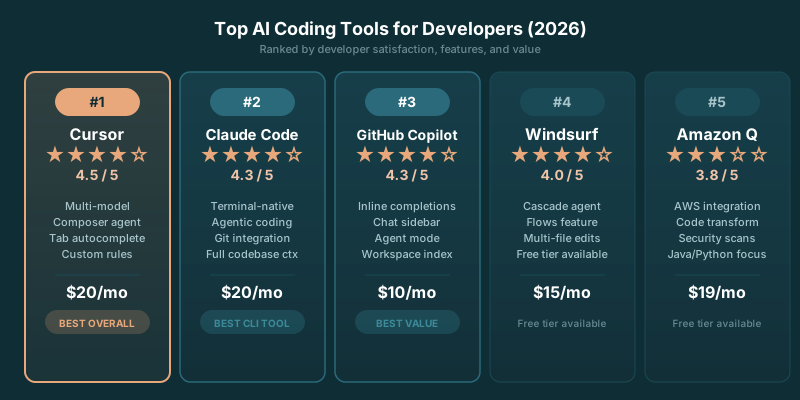
The best ai tools for developers 2026 have settled into a more useful shape. Coding assistants are now part editor, part agent, and part model router. The useful distinction is no longer whether a tool can write a function. It’s whether it fits how you ship: inside an existing repository, across a team, or through an API you control.
A lot of products can generate plausible code. Far fewer help you trace a failure through a real codebase, preserve context across a change, or keep costs legible when a hard problem takes several attempts. That’s where the stack starts separating.
This guide keeps the categories that matter: coding assistants for day-to-day work, frameworks for building AI applications, and vector databases for retrieval. Each tool gets the same treatment: what it does well, where it falls short, and what it costs when the published pricing supports a decision.
TLDR
Cursor, Windsurf, and GitHub Copilot are the core coding-assistant choices. Pick the editor that suits your working style, then keep API-first work separate when control and unit economics matter. Open-source tools give developers a useful escape hatch from bundled model credits.
What Changed in AI Developer Tools in 2026
The subscription pitch got more complicated. Cursor and Windsurf both moved toward credit-based usage for premium model access, which makes the sticker price only part of the decision. You’re choosing an editor, an agent workflow, and a budget for difficult requests.
Cursor Pro costs $20 per month and includes a $20/mo credit pool for premium model requests. Related analysis
Windsurf Pro costs $15 per month and includes 500 credits per month. Related analysis
That shift favors developers who pay attention to where the work happens. Routine autocomplete, narrow edits, and code navigation have different economics from asking an agent to investigate a sprawling regression. A product can feel cheap for a week and expensive the moment a difficult migration turns into a long conversation with a premium model.
The other change is architectural. Developers have stopped treating the coding editor as the whole AI stack. The editor handles implementation. An application framework handles prompts, tools, retrieval, and evaluation. A vector database handles the data layer behind search and retrieval. Keeping those jobs distinct produces a stack you can replace piece by piece when a vendor changes terms or a better model arrives.
Model choice has become more visible too. Claude Sonnet 4.6, the model behind many of these tools, costs $3 / $15 per 1M input / output tokens via API. Related analysis
That API price matters most when you’re building a product rather than asking an editor for help. You can control prompts, caching, context, fallbacks, and model routing. You also own the tradeoffs when a cheaper model handles the easy work and a stronger model handles the ugly cases.
Coding Assistant Pricing at a Glance
Pricing pages change faster than most comparison posts. These are the published terms worth using when you compare the core editor-based assistants.
| Tool | Plan | Price | Free tier |
|---|---|---|---|
| Cursor | Pro | $20 per month | n/a |
| Windsurf | Pro | $15 per month | 25 credits per month |
| GitHub Copilot | Pro | $10/mo | n/a |
| GitHub Copilot | Business | $19 per user | n/a |
Windsurf's free plan includes 25 credits per month. Related analysis
GitHub Copilot Pro costs $10/mo with 300/mo premium requests, and Business runs $19 per user. Related analysis
The table is a starting point, not a winner’s podium. Cursor is often the better fit for developers who want the editor to act like a repository-aware workspace. Windsurf appeals when you want a similar environment with its own agent workflow and credit model. Copilot earns its place when GitHub is already central to how your team works and a familiar editor extension creates less friction than a new coding environment.
If price is your first filter, compare it against the work you expect the tool to do. A low monthly plan can be a good deal for frequent small requests. A more expensive plan may be cheaper if it consistently helps you finish the difficult work without switching tools, rebuilding context, or manually checking every edit.
For plan details as they change, keep the direct references handy: Cursor pricing, Windsurf pricing, and GitHub Copilot pricing.
AI Coding Assistants
These tools sit in your editor and help you write code faster. The category has matured significantly. The question isn't whether to use one. It's which one fits your workflow.
Cursor
Cursor is an AI-first code editor built on top of VS Code. It's not a plugin. It's a full editor that reimagines how AI integrates into your coding workflow.
What it does well: Cursor's standout feature is its ability to understand your entire codebase, rather than just the file you're editing. You can ask it questions about your project, and it pulls context from relevant files automatically. The "Composer" feature lets you describe changes in natural language and it edits multiple files at once. For refactoring tasks, this saves hours.
Where it falls short: It can be sluggish on very large codebases (100K+ lines). The subscription cost adds up if you're using it across a team. And if you're deeply invested in a different editor's plugin ecosystem, the switch has friction.
Pricing: Cursor Pro costs $20 per month and includes a $20/mo credit pool for premium model requests. Related analysis
GitHub Copilot
The original AI coding assistant. Copilot is a plugin that works inside VS Code, JetBrains, Neovim, and other editors.
What it does well: Autocomplete is still top for line-by-line and function-level suggestions. The integration is mature and stable. Copilot Chat lets you ask questions about your code inline. The new Copilot Workspace feature (for planning and executing multi-file changes) has improved a lot since its early preview.
Where it falls short: Context awareness lags behind Cursor. Copilot primarily looks at the current file and open tabs, not your full codebase. For complex refactoring or architectural questions, this matters. Test generation quality is inconsistent.
Pricing: GitHub Copilot Pro costs $10/mo with 300/mo premium requests, and Business runs $19 per user. Related analysis
Windsurf
Windsurf (formerly Codeium) is positioning itself as the Cursor alternative with a different philosophy: AI that flows alongside your coding rather than taking over.
What it does well: The "Cascade" feature creates an AI workflow that watches what you're doing and proactively suggests next steps. It's primarily about the AI anticipating what you need. The autocomplete is fast and the context understanding is solid. Pricing undercuts competitors significantly.
Where it falls short: Smaller community and ecosystem than Cursor or Copilot. Some users report that proactive suggestions can be distracting until you tune the settings. Multi-file editing isn't as polished as Cursor's Composer.
Pricing: Windsurf Pro costs $15 per month and includes 500 credits per month. Related analysis Windsurf's free plan includes 25 credits per month. Related analysis
Claude Code
Anthropic's command-line AI coding agent. Unlike the editors above, Claude Code runs in your terminal and operates on your codebase through the command line.
What it does well: Exceptional at complex, multi-step coding tasks. It reads your codebase, plans changes, edits files, runs tests, and iterates based on results. For tasks like "add authentication to this API" or "refactor this module to use the repository pattern," it can handle the full workflow autonomously. The agentic approach means it catches and fixes its own errors.
Where it falls short: The terminal-based interface isn't for everyone. There's no inline autocomplete since that's not the use case. Cost can spike on large tasks since it uses Claude API credits. Best suited for substantial tasks rather than quick completions.
Pricing: Requires a Claude API subscription. Costs vary by usage but expect $50-200/month for active development use.
Which coding assistant should you use?
Choose Cursor if: You want the deepest AI integration and don't mind switching editors. Best for full-stack developers working on medium-sized codebases.
Choose GitHub Copilot if: You want solid autocomplete without changing your editor setup. Best for developers who want AI assistance without disruption.
Choose Windsurf if: You want a proactive AI companion at a lower price point. Best for developers who like the flow-state approach.
Choose Claude Code if: You tackle large, complex tasks and prefer autonomous execution over autocomplete. Best for senior developers and complex refactoring.
For a deeper side-by-side review of editor choices, see best AI coding tools tested.
AI Frameworks for Building Applications
If you're building an application that uses LLMs, you'll probably use a framework. These handle the plumbing: prompt management, chain orchestration, retrieval, memory, and tool use.
LangChain
The most popular AI framework by GitHub stars and npm downloads. LangChain provides the building blocks for LLM-powered applications.
What it does well: Massive ecosystem. There's a LangChain integration for basically everything: every vector database, every LLM provider, every document loader you can think of. LangGraph (the agent framework built on top) is powerful for complex workflows. LangSmith provides production monitoring and eval tools.
Where it falls short: The abstraction layers can feel excessive for simple use cases. If you just need to call an API and process the response, LangChain adds complexity you don't need. The API has changed significantly across versions, making tutorials from 6 months ago unreliable. Debug messages can be cryptic.
Pricing: Open source (MIT license). LangSmith cloud starts free, paid tiers from $39/month for teams.
LlamaIndex
LlamaIndex started as a RAG-focused framework and has expanded into a general-purpose LLM application toolkit. It's the best choice if retrieval is your primary use case.
What it does well: RAG is where LlamaIndex shines brightest. The document loading, chunking, indexing, and retrieval pipeline is more intuitive than LangChain's. Built-in support for advanced retrieval strategies like hybrid search, re-ranking, and recursive retrieval. The managed service (LlamaCloud) handles document parsing and indexing at scale.
Where it falls short: Less mature for non-RAG use cases. The agent framework is functional but not as developed as LangGraph. Smaller community means fewer tutorials and examples. Some advanced features require the paid cloud service.
Pricing: Open source (MIT license). LlamaCloud starts free, paid tiers from $35/month.
CrewAI
CrewAI takes a different approach: instead of building chains, you build teams of AI agents that collaborate on tasks.
What it does well: The multi-agent model is intuitive for complex workflows. You define agents with specific roles (researcher, writer, reviewer), give them tools, and let them coordinate. For tasks that naturally decompose into specialized sub-tasks, this pattern is more readable than a chain of prompts. Getting started is fast.
Where it falls short: Token costs can spiral because agents exchange messages that all consume context. Fine-grained control over agent behavior requires diving into the underlying code. For simple, linear workflows, the multi-agent model is overkill.
Pricing: Open source (MIT license). Enterprise cloud platform with additional features has custom pricing.
DSPy
DSPy is the contrarian pick. While other frameworks focus on prompt templates, DSPy treats prompts as optimizable programs. You define the logic, and DSPy automatically optimizes the prompts through compilation.
What it does well: When it works, it produces better prompts than you'd write manually. The programming model (signatures, modules, optimizers) is clean and composable. Evaluation-driven development is built into the workflow. For teams with strong ML backgrounds, the approach clicks fast.
Where it falls short: Steep learning curve. The mental model is different enough from traditional prompt engineering that it takes real time to internalize. Documentation is improving but still has gaps. The compilation step adds complexity to the development loop.
Pricing: Open source (MIT license).
Which framework should you use?
LangChain: Best default choice. Huge ecosystem, most tutorials, works for almost everything. Start here unless you have a specific reason not to.
LlamaIndex: Best for RAG-heavy applications. If search and retrieval is your core feature, LlamaIndex will save you time.
CrewAI: Best for multi-agent workflows. If your task naturally decomposes into specialized sub-tasks, the agent team model is elegant.
DSPy: Best for optimization-minded teams. If you want the framework to improve your prompts automatically and you're comfortable with a steeper learning curve, DSPy is uniquely powerful.
Vector Databases
If you're building anything with RAG or semantic search, you need a vector database. These store embeddings and let you find similar content quickly.
Pinecone
Best for: Teams that want a managed service with zero infrastructure work. Pinecone handles scaling, replication, and performance tuning automatically.
Strengths: Fast query performance at scale. Excellent documentation. Hybrid search (combining vector similarity with keyword filtering) works well. The serverless tier makes it affordable to start.
Weaknesses: Vendor lock-in. No self-hosted option. Costs can surprise you at scale because pricing is based on pod hours and storage, rather than just queries.
Pricing: Free tier with 100K vectors. Serverless starts at $0.33 per million read units.
Weaviate
Best for: Teams that want flexibility. Weaviate runs in the cloud (managed) or on your own infrastructure (self-hosted).
Strengths: Built-in vectorization (it can generate embeddings for you, rather than just store them). GraphQL API is powerful for complex queries. Multi-tenancy support is excellent for SaaS applications. Active open-source community.
Weaknesses: Self-hosting requires more DevOps knowledge than you might expect. Resource consumption is higher than some alternatives for small datasets. The GraphQL API has a learning curve if you're not familiar with it.
Pricing: Open source (self-hosted is free). Managed cloud starts at $25/month for the sandbox tier.
Chroma
Best for: Developers who want the simplest possible setup. Chroma can run in-memory with no external dependencies.
Strengths: Dead simple to get started. Install with pip, three lines of code to create a collection and add documents. Perfect for prototyping and small applications. The API is clean and Pythonic.
Weaknesses: Not designed for large-scale production workloads (yet). Limited query filtering compared to Pinecone or Weaviate. The hosted cloud service is newer and less battle-tested.
Pricing: Open source (Apache 2.0). Hosted cloud in beta.
pgvector
Best for: Teams already using PostgreSQL who don't want another database to manage.
Strengths: It's just a Postgres extension. If you know SQL, you know how to use it. No new infrastructure, no new query language, no new operational burden. Transactional consistency with your other data. Works with every Postgres hosting provider.
Weaknesses: Query performance falls behind purpose-built vector databases at scale (millions of vectors). No built-in features like automatic embedding generation or hybrid search. You're doing more plumbing yourself.
Pricing: Free (open-source extension). You pay for your Postgres hosting as usual.
Other Tools Worth Knowing About
Prompt management and observability
- LangSmith: Traces LLM calls, runs evals, tracks prompt versions. Best if you're already using LangChain
- Weights & Biases Prompts: Prompt versioning and evaluation for ML teams
- Humanloop: Prompt management with human feedback loops. Good for teams iterating on AI products with user feedback
Local model tools
- Ollama: Run open-source models locally with one command. Essential for development and testing without API costs
- vLLM: High-performance model serving. If you're deploying open-source models in production, vLLM gives you the best throughput
Open Source and Bring-Your-Own-Key Options
Bundled credits are convenient. They also make model choice and usage accounting someone else’s system. Open-source and bring-your-own-key setups give you a different deal: more setup work, more control over where requests go, and a clearer view of what each application call costs.
A bring-your-own-key workflow is especially useful for API-first teams. You can choose the model per task, record usage alongside product events, and replace a provider without retraining your entire team on a new editor. That flexibility is valuable when the application itself depends on model calls.
For low-cost API tasks, GPT-4.1 Nano at $0.10 per million input tokens is one of the cheapest capable models. Related analysis
That price makes small classification, extraction, routing, and transformation tasks easier to justify. Keep the expensive reasoning work separate from the routine work. Your users do not care which model handled a simple parsing step. They care whether the product is fast, accurate, and priced like someone was paying attention.
Local and open-source options also help during evaluation. You can test workflows without anchoring every experiment to a vendor dashboard. Developers who care about privacy, offline work, or custom deployment have more reason to keep this route available, even if a hosted editor remains their daily tool.
The catch is operational responsibility. You own model access, secrets, prompt logging, retries, fallback behavior, and the ugly edge cases that a bundled product hides. That is a fair trade when the AI layer is part of your product. It is needless work when you only want better autocomplete.
How to Choose Your Stack
Don't adopt tools for the sake of it. Start with the minimum viable stack and add complexity only when you hit real limitations.
For a simple chatbot or content tool: An LLM API (OpenAI, Anthropic, or Google) plus a coding assistant. No framework needed until you outgrow raw API calls.
For a RAG application: LlamaIndex or LangChain for the pipeline, plus a vector database. Chroma for prototyping, Pinecone or pgvector for production.
For a multi-agent system: CrewAI or LangGraph for orchestration, plus whatever retrieval and tools your agents need.
The best stack is the one you actually ship with. Don't spend weeks evaluating tools when you could be building. Pick something reasonable, start building, and switch later if you hit real limitations. Most of these tools are modular enough that switching costs are manageable.
Browse our full tools directory for detailed reviews with pros, cons, and pricing for each tool mentioned here.
Which Stack to Pick by Workflow
Solo developer
A solo developer should favor the tool that reduces context switching. Cursor or Windsurf makes sense when you spend most of the day inside a repository and want help navigating, editing, and investigating code without turning every task into a separate chat session.
Pick based on the editor workflow you enjoy using. Pricing should influence the choice, but a cheaper tool that interrupts your thinking loses its advantage quickly. Keep a direct API option available for experiments that need repeatability or access to a model outside the editor’s defaults.
Team shipping a product
Teams should start with consistency and reviewability. GitHub Copilot is appealing when GitHub already sits at the center of access, identity, and development workflow. Cursor or Windsurf can still be excellent choices for developers doing deeper repository work, but the team needs a shared policy for handling proprietary code, credentials, generated changes, and code review.
The winner is the stack that leaves a readable trail. AI-generated code still needs tests, review, and ownership. The tool should make your engineers faster without creating a pile of changes that nobody can explain later.
API-first product team
An API-first team should separate developer assistance from product architecture. Use a coding assistant for implementation, then build the customer-facing AI workflow with direct model calls and explicit observability.
Claude Sonnet 4.6, the model behind many of these tools, costs $3 / $15 per 1M input / output tokens via API. Related analysis
That kind of direct pricing lets you compare quality against cost at the request level. You can route simpler work to a cheaper model, reserve stronger models for difficult reasoning, and measure whether a product feature earns its token bill. The editor can help build that system. It should not quietly become the system.
The Stack That Holds Up
The best AI developer stack is usually smaller than the list of tools people bookmark. Pick one coding assistant that matches your workflow. Add a framework only when your application needs model orchestration or retrieval. Add a vector database only when semantic search has proven useful against real source material.
You do not need every new product that arrives with a demo and a dramatic name. You need tools that make the next release easier to ship, easier to inspect, and harder to break.
The question is whether your stack helps you own the code and the economics, or whether it leaves both inside someone else’s credit meter.
Key Takeaways
- Cursor, Windsurf, and GitHub Copilot solve overlapping problems with different editor and pricing models.
- Credit-based plans make usage behavior part of the buying decision.
- API-first teams benefit from direct control over model routing and request costs.
- Retrieval frameworks and vector databases should follow a real product need, not precede one.
- Open-source and bring-your-own-key routes keep your stack flexible when vendor terms move.
Sources
- PE Collective Cursor pricing: $20 per month
- PE Collective Windsurf pricing: $15 per month and 500 credits per month
- PE Collective GitHub Copilot pricing: $10/mo and 300/mo premium requests
- PE Collective Anthropic API pricing: $3 / $15 per 1M input / output tokens
- PE Collective OpenAI API pricing: $0.10 per million input tokens